THE SHORT VERSION
- GoHighLevel stamps no version number on an installed snapshot, so 'which build is this account on' has no answer the platform can give you. Keeping accounts synced is an operating choice you make, not a setting you switch on.
- A snapshot push adds and overwrites by asset, it does not reconcile. It will replace a workflow the client spent a month tuning, and it will not remove anything you deleted from the master.
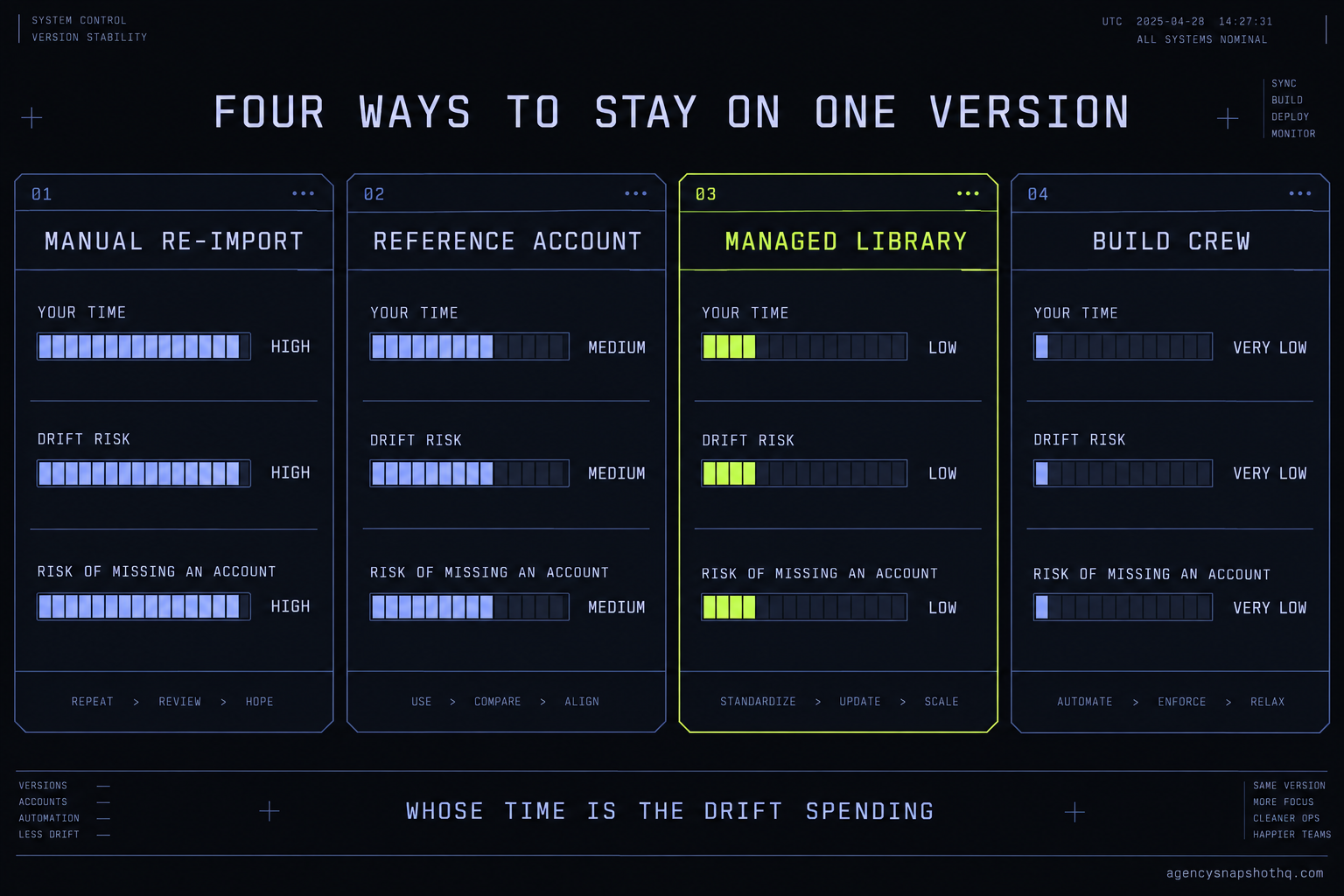
- The four realistic models are manual re-import, a reference sub-account you copy from, a managed library on a scheduled refresh, and a build crew on retainer. The right one is set by your account count and whose time the drift is costing.
- Manual re-import is free of any fee and fine at three accounts. Past roughly ten it stops being a method and becomes the reason nobody can say which account is current.
- Whatever model you pick, the one non-negotiable is a written record of which account went live on which build. Without it, every model drifts back to chaos inside two quarters.
The ticket came in on a Tuesday. One of your HVAC clients said the booking confirmation text had stopped going out after someone books. You open their account, trace the workflow, and find the bug in about four minutes: a step that references a custom value the client renamed last month. You fix it, test it, confirm the text fires. Good.
Then you sit back and the real problem arrives. You run the same HVAC build in eleven other sub-accounts. This exact workflow is in all of them. You just fixed it in one. The other eleven are still sending nothing after a booking, and not one of them has a ticket open, because their owners have not noticed yet. You fixed the client who complained. You did not fix the build.
So you open the master snapshot in your agency account to see which version these clients are on, and that is when it lands. There is no version. GoHighLevel never stamped one. The snapshot you installed in January, the one you tweaked in March, and the one you are looking at now are three different things wearing the same name, and the platform cannot tell you which account got which. You are not debugging a workflow any more. You are trying to find out what you actually shipped, to whom, and when, with no record to read.
This is the version problem, and every agency past a handful of accounts hits it. This briefing is about the four honest ways out of it, and the cost of each.
Why a snapshot has no version number
Before you can keep snapshots synced, you have to be clear about what a snapshot is, because the platform’s own model is the thing that trips agencies up.
A snapshot is a point-in-time copy. When you create one, GoHighLevel reads the assets you selected out of a source account, the workflows, pipelines, funnels, the website, the campaigns, the custom values and fields and forms, and freezes them into a package. That package carries no clock and no counter. It is not a live link back to the account it came from, and it is not a live link forward to the accounts you install it into. It is a photograph, and like a photograph it is already out of date the moment it exists.
That matters because of what happens at install. When you load a snapshot into a destination sub-account, GoHighLevel copies those frozen assets in and then walks away. The installed account and the master are now two separate things that happen to look alike. Edit the master afterwards and the installed account does not feel it. Edit the installed account and the master does not feel it either. There is no sync, no merge, no notification that they have diverged. The platform does not consider them related at all once the copy finishes.
A push adds and overwrites, it does not reconcile
The one tool GoHighLevel gives you to move a change is a re-push: load the snapshot into an account that already has an earlier version. People assume this behaves like an update. It does not. A push works asset by asset. For each thing in the snapshot it either creates it, if the account does not have it, or overwrites it, if the account does. It never removes. Delete a broken workflow from your master, push the snapshot, and the broken workflow is still sitting in every account you pushed to, because a push has nothing to say about things that are not in the package.
Overwrite is the dangerous half. When the push replaces an asset, it replaces the whole asset, including any change the client or your own team made in that account. The calendar the client reconnected to their own Google account, the workflow a VA spent an afternoon tuning for that one client’s offer, the funnel copy someone rewrote: a full re-push can flatten all of it back to the master’s version without asking. So the tool that looks like your sync button is also the tool most likely to start a Monday with an angry call.
The three things that drift
Once you see the install as a photograph, drift stops being mysterious. It comes from three directions, and they move independently.
The build drifts because you improve it. You find the booking bug, you add a better nurture sequence, you rewrite a funnel that was not converting. Every improvement widens the gap between your current master and the accounts already in the field.
The accounts drift because the clients and your team touch them. Someone renames a custom value. A client edits their own business hours. A VA adds a one-off automation for a promotion. None of that is in your master, and all of it is real work living only in that one account.
And the platform drifts underneath all of it. GoHighLevel ships changes to how A2P registration works, how calendars connect, how a trigger behaves. Those changes land in every account regardless of which snapshot version it holds, and no re-push carries them, because they are not snapshot assets at all. A good starting point on the mechanics of that first kind of drift is the companion briefing on snapshot version drift, which traces how a fleet loses track of itself in the first place. This piece picks up where that one ends: once you can see the drift, what do you actually do about it.
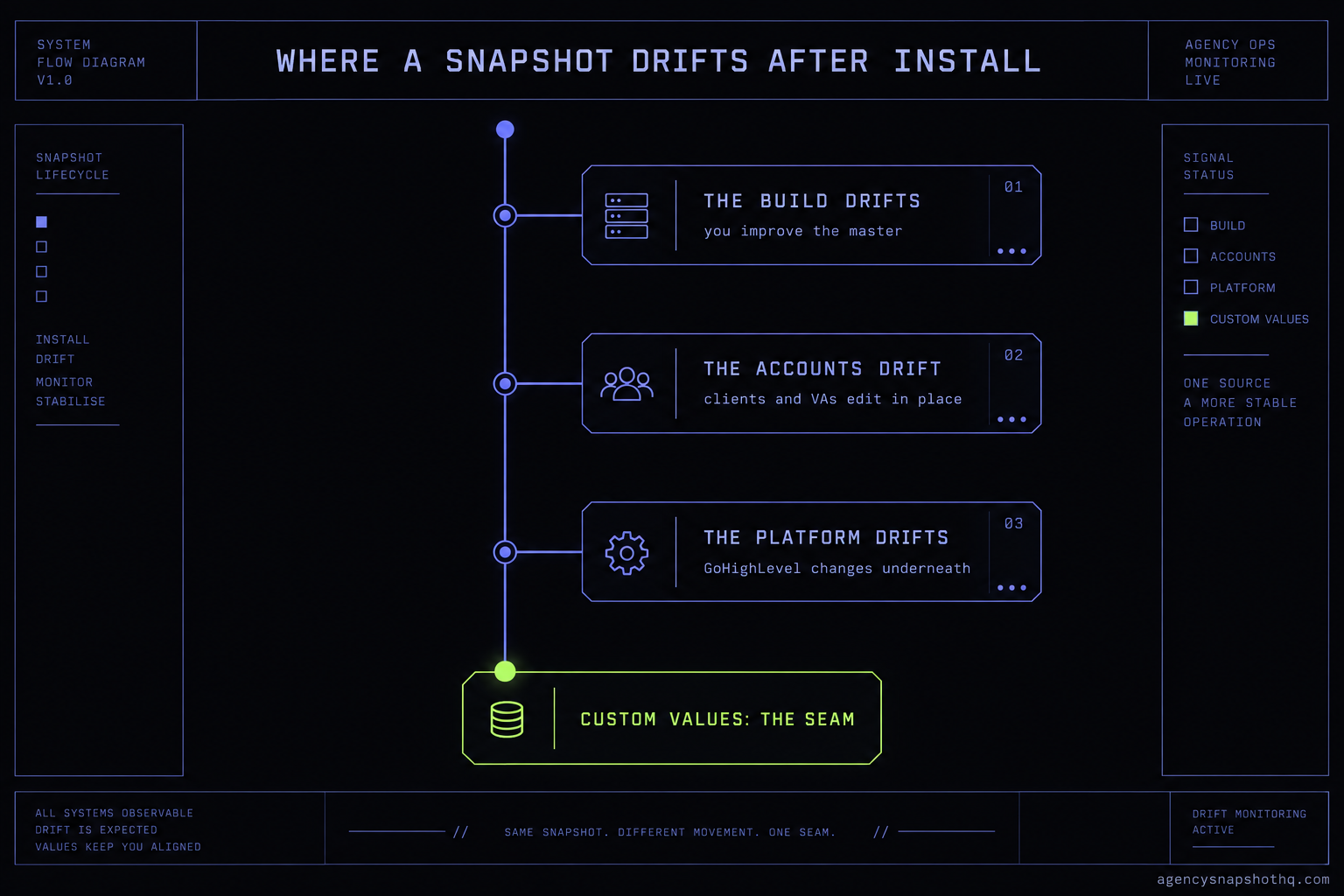
The seam that decides how painful all of this is turns out to be a single design choice in the snapshot itself: whether the client-specific strings live in custom values or are baked into the assets. When they live in custom values, a re-push can replace a workflow without touching the one screen that holds the client’s name, booking link and hours, so the blast radius of an update is small. When they are baked in, every push is a renovation. That is why a snapshot built for reuse, like the ones in our library, survives version work that a snapshot built once for one client never will.
The four ways to keep every account on one version
There are exactly four honest answers to the sync problem. Everything else is a blend of these. Here they are judged on the eight things that decide which one fits you.
| Criterion | Manual re-import | Reference account | Managed library | Build crew on retainer |
|---|---|---|---|---|
| Who does the work | You, per account | You, per account, from one source | Your library provider, on a schedule | A crew, on your behalf |
| Time per update cycle | High, scales with accounts | Medium, still per account | Low for you, near zero | None of yours |
| Scales past ~10 accounts | Poorly | Moderately | Yes | Yes |
| Risk of overwriting client work | High on a full push | Medium, you control scope | Low, change is scoped | Low, crew scopes it |
| Version record | Whatever you keep by hand | Manual, but one source of truth | Kept for you, with notes | Kept for you |
| Handles platform changes (A2P, calendars) | No, you do those separately | No, separate | Partly, flagged to you | Yes, inside the engagement |
| Fee model | None | None | Annual library, per-update service | Monthly retainer |
| Who owns the fix when it breaks | You, at 11pm | You | Shared | The crew |
Read the table as a progression in whose time the drift is spending. The further right you go, the less of the work is yours and the more of it is a published number you can plan around. Now the detail.
Manual re-import
You keep a master snapshot in your agency account, and when you change it you re-import it into each client account by hand. This is where almost everyone starts, and for good reason: it has no fee, it needs no tooling, and at three accounts it is genuinely fine. You make the fix, you push to three accounts, you test three times, you are done before lunch.
The trouble is purely arithmetic. The work scales with the account count, and so does the chance of missing one. At four accounts you remember them all. At twelve you do not, and the account you forget is the one that pages you a month later. Manual re-import does not fail loudly. It fails by quietly leaving one account behind each cycle until, a year in, no two accounts are quite the same and the phrase “the HVAC build” no longer refers to anything specific.
Reference account
A step up in discipline. You nominate one sub-account as the reference, the single account that is always correct, and you make every change there first. When you push to the others you push from the reference, not from a master you have not looked at in weeks. The gain is a single source of truth: there is always one account you can point to and say, that is current.
It still costs you a push per account, so the time does not drop much. What drops is confusion. You stop debugging against a master that no longer matches anything live, and you give yourself a place to test a change in a real account before it touches a client. Agencies running five to ten accounts often live here for a long time, and it works, as long as the reference account is disciplined and nobody edits the others out of band.
Managed library on a scheduled refresh
Here the master is not yours to maintain at all. You license a snapshot library that is kept current by the people who built it, and updates arrive on a schedule rather than whenever you find a bug at 11pm. Our HQ All-Access plan is this model: the whole library, refreshed quarterly, so the build you deploy next quarter already carries the fixes you would otherwise have chased yourself. When a specific account needs a change moved in carefully rather than re-imported wholesale, the snapshot update service does it per account with a version note, so the record survives the work.
The thing this model actually buys is that the build stops being your liability. You are no longer the single point of failure for a bug in a workflow that runs in twelve accounts. The limit is that it covers the library’s assets. A platform change like a new A2P registration flow is flagged to you but still lands in your lap, because it is not a snapshot thing. You are buying a current build and a kept record, not a crew.
Build crew on retainer
The furthest right. A crew holds the version problem for you, across your accounts, every cycle. When the build changes they move it. When the platform changes they handle it inside the engagement. Our managed retainer on the pricing page is this: a standing arrangement where the sync work, and the platform work around it, is simply not yours any more.
This is the most expensive model and the one that scales furthest, and the honest read is that it only makes sense once the drift is costing you more in your own hours, and in your own risk, than the retainer costs in dollars. For an agency running fifteen accounts and adding more, that crossover comes quickly. For an agency running four, it does not, and you should not buy it yet.
Where each model breaks
Picking a model does not end the problem. Each one fails in its own way, and knowing the failure in advance is most of avoiding it.
The re-push flattens the client’s own work
This is the most common and the most expensive. You fix a workflow in the master, re-import the whole snapshot to move the fix, and in doing so you overwrite the calendar the client reconnected, the custom value a VA renamed, and the funnel copy the client rewrote last month. The symptom is a flurry of tickets the morning after a push, all of them about things that were working yesterday. What is actually wrong is that a full re-import is not a surgical tool, and you used it like one. The fix is to never move a single change by re-importing the entire package. Isolate the change, carry it in deliberately, and keep the re-import for a genuine from-scratch rebuild. If the client-specific strings live in custom values, the blast radius shrinks to almost nothing, which is the whole argument for building snapshots that way in the first place.
The reference account quietly stops being the reference
You nominate one account as the source of truth, and for a month it is. Then a VA makes a quick fix directly in a client account because the client was on the phone and it was faster. Then someone else does it again. Nothing is written down. Three months later the reference account and the field have diverged, and the account you have been treating as correct is simply one more variant. The symptom is that a push from the reference breaks accounts that were fine, because the reference was never updated with the out-of-band fixes everyone made. What is wrong is process, not tooling. The fix is a rule with teeth: every change goes into the reference first, no exceptions, and a change made anywhere else is not finished until it is also in the reference and in the record.
Nobody records which account got which update
This is the failure that version control exists to prevent, and it comes back under every model if you let it. You push a fix to some accounts on Monday, get interrupted, and finish the rest on Thursday, except you lose track of which were which. Two of them never got the fix. There is no screen in GoHighLevel that will tell you, because the platform does not track it. The symptom is the ticket you opened this briefing with: a bug you know you fixed, still live somewhere, with no way to list where. The fix is embarrassingly low-tech. A spreadsheet, or a field in your own CRM, with one row per account and a column for the build date and version label you assign by hand. The record does not have to be clever. It has to exist, and it has to be updated every single time you touch an account.
A platform change lands that no snapshot can carry
GoHighLevel changes how A2P 10DLC registration works, or how calendars authenticate, and suddenly accounts that were sending fine are not. You reach for your snapshot to push a fix and realise there is nothing to push, because registration and calendar connections are not snapshot assets. They live in the account, account by account, and a snapshot has never carried them. The symptom is a fleet-wide failure that correlates with no change you made. The fix is to treat platform work as its own track, separate from version work, and to budget for it separately. A managed library will flag these; only a crew engagement actually does them for you. If the change is a one-off integration or API rework, that is scoped separately through agency systems integration, and it is never inside the free install support, by design.
The partial update that half-lands
You update a workflow in the master so it reads a new custom value, push it, and in half your accounts the new custom value does not exist, because it was only ever created in the reference account. The workflow runs and sends a text with an empty field where the value should be, or fails silently. The symptom is a message that goes out looking broken to the client’s customers, which is worse than a message that does not go out at all. What is wrong is that a workflow and the custom value it depends on are two assets, and you moved one without the other. The fix is to move dependencies together and to test the pushed account by firing the actual workflow, not by eyeballing that it imported. Import is not go-live. A fired test is.
The arithmetic: what each model costs to keep current
Put real numbers on it, with the assumptions visible so you can substitute your own.
Start with the platform floor, because sync only matters if you have enough accounts to sync. To run unlimited sub-accounts at all you are on HighLevel’s Unlimited plan at $297 a month, or Agency Pro at $497 a month for SaaS mode, per GoHighLevel’s own pricing; the $97 Starter plan caps you at three sub-accounts, which is exactly the account count where manual re-import still works and version control is not yet a problem. So the agencies for whom this briefing matters are, by definition, paying at least $297 a month before a single snapshot is in play. Those figures were confirmed by search this run against the published pricing page rather than fetched directly.
Now the time. Manual re-import has no fee, so its cost is entirely your hours. Say a clean re-import and test takes you 40 minutes per account when nothing goes wrong. At eleven accounts that is a little over seven hours per update cycle, and if your loaded cost on your own time is $90 an hour, each cycle costs you about $660 in time you could have billed. Run four update cycles a year and manual re-import is costing roughly $2,640 a year in your own hours, before you count the cost of the account you forget. That number is the honest comparison point, because the fee-based models are not competing with zero. They are competing with your Saturday.
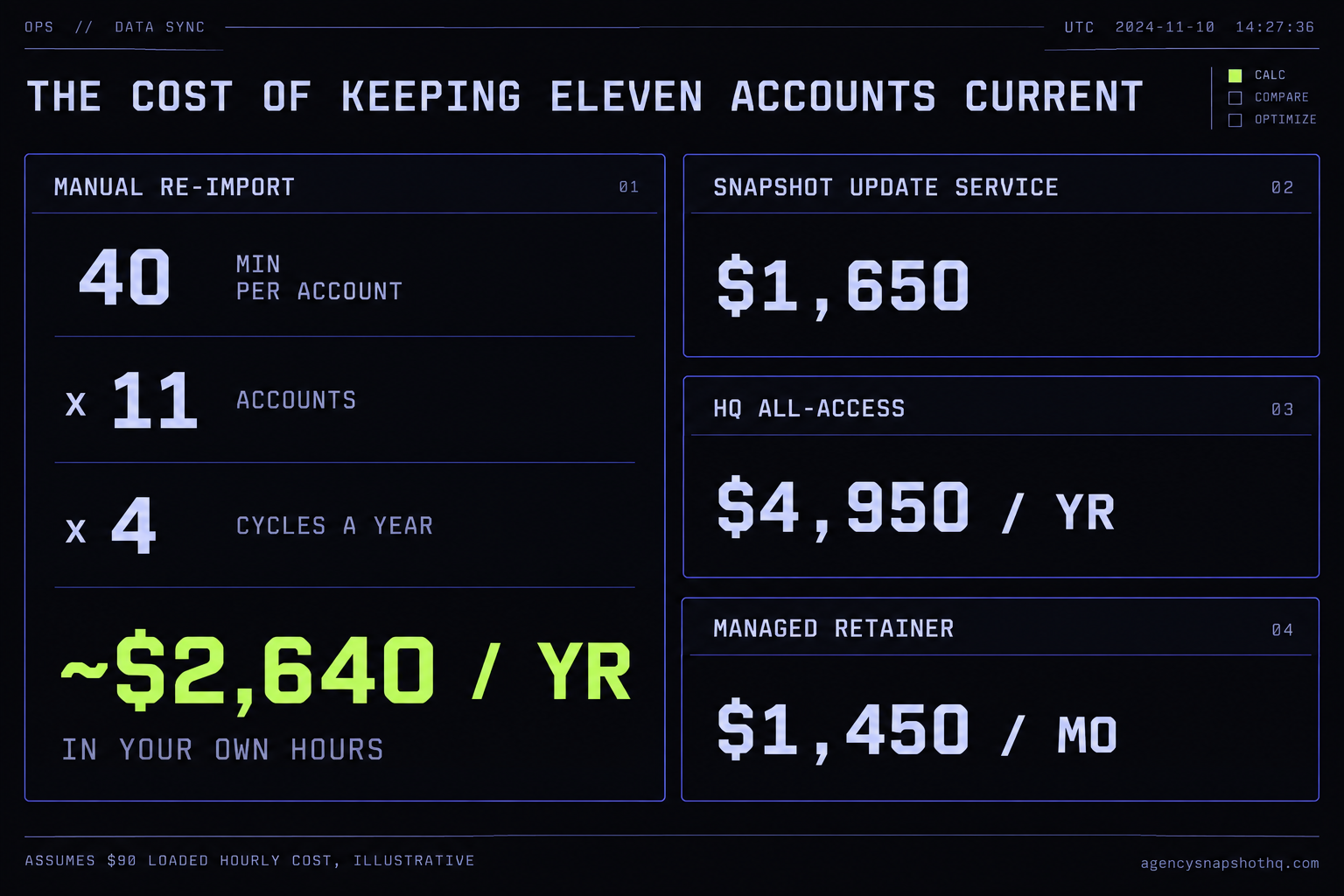
Against that, our snapshot update service is a published $1,650, and HQ All-Access is $4,950 a year for the whole library kept current, both prices read live from our own catalogue rather than quoted from memory. The managed retainer runs $1,450 a month. Whether any of those beats $2,640 a year of your own time depends entirely on your account count and what your hour is worth, which is why the arithmetic above shows its working instead of handing you a verdict.
The competitor shape is worth naming, because it is checkable. Growthable bundles update support into a monthly subscription: their Agency AI plan is $197 a month and their white-label support tiers run $549 and $649 a month, per Growthable’s pricing, confirmed by search this run. Extendly and HL Pro Tools, two of the better known done-for-you shops, publish no price for this at all; every buyer goes to a sales call, which you can confirm yourself on the Extendly and HL Pro Tools pages. We publish the number. That is not a small thing when you are trying to do the arithmetic above and half the market will not give you a figure to put in the column.
The case against each option, including ours
An objection you dodge is one the reader raises on their own and trusts less for your silence. So here are the strongest ones.
The first is that you do not have a version problem, you have a build problem, and no amount of sync tooling fixes a snapshot that was badly built. This is true, and it is the best objection. If your client-specific data is baked into assets instead of living in custom values, every model above hurts more, because every push is a renovation. The answer is not to buy a sync model on top of a bad build. It is to move to a build designed for reuse first, which is most of what separates a snapshot that costs $890 for a childcare centre from one assembled once for one client and sold on. Fix the build, then pick the sync model. In that order.
The second is that a managed library or a retainer makes you dependent on us, and dependence is a risk. Also fair. The honest answer is that you are already dependent on something: on your own memory, on a spreadsheet nobody updates, or on a VA who might leave. Moving the dependency to a published service with a written record and a version note is not removing the dependency, it is making it legible and transferable. You can leave a managed library and keep every account you have, because the accounts are yours. That is a very different kind of dependence from one that lives only in one person’s head.
The third is cost: that $4,950 a year, or $1,450 a month, is a lot against a manual process that is free. It is, and for a small agency it is the wrong purchase. The whole point of showing the arithmetic rather than asserting a verdict is that the answer flips on account count. At four accounts, stay manual and keep a real record. At fifteen and climbing, the manual process is not free at all; it is costing you the hours you should be spending selling, plus the risk of the account you forget. Buy the model that matches where you are, not where a sales page wants you to be. If you are weighing the build itself rather than how to keep it current, the deployment options briefing covers the choice that comes before this one, and a single-niche build like the HVAC contractor snapshot or the dental practice snapshot is where that decision usually starts.
Whichever model you land on, the record is the part you cannot skip. Pick the model that fits your count, write down which account is on which build, and update the record every time you touch an account. Do that and every model works. Skip it and every model, ours included, drifts back to the Tuesday ticket you started with.