THE SHORT VERSION
- A GoHighLevel snapshot carries no version number, so once it is installed nothing in the account records which build it came from. Drift is invisible by default.
- Every install forks. The moment a snapshot loads into a sub-account, your later edits, the client's edits and your next push all run on separate timelines that no push fully reconciles.
- Drift becomes a client-facing bug in four predictable places: a fix that reached only some accounts, a push about to flatten a client edit, one snapshot that is silently several versions, and a handover where nobody knows the baseline.
- You cannot make GoHighLevel show the version, so you stamp it yourself: a custom value on every install, a register kept outside the platform, and a quarterly check against reality.
- The cheapest time to fix drift is before a client notices. A stamped install costs seconds; hunting a mystery version across a dozen live accounts costs an afternoon a quarter.
It is the second week of an onboarding and the client is on the call, screen shared, reading their intake automation back to you. “It sends one reminder,” they say, “then it goes quiet.” You built that snapshot. You know this one chases harder than that and then hands off to a nurture. Except you built it a while ago, and this account was set up in the spring, and the version sitting in front of you is not the version in your head. Someone asks the only question that matters: which version is this account actually on. Nobody on the call can answer it.
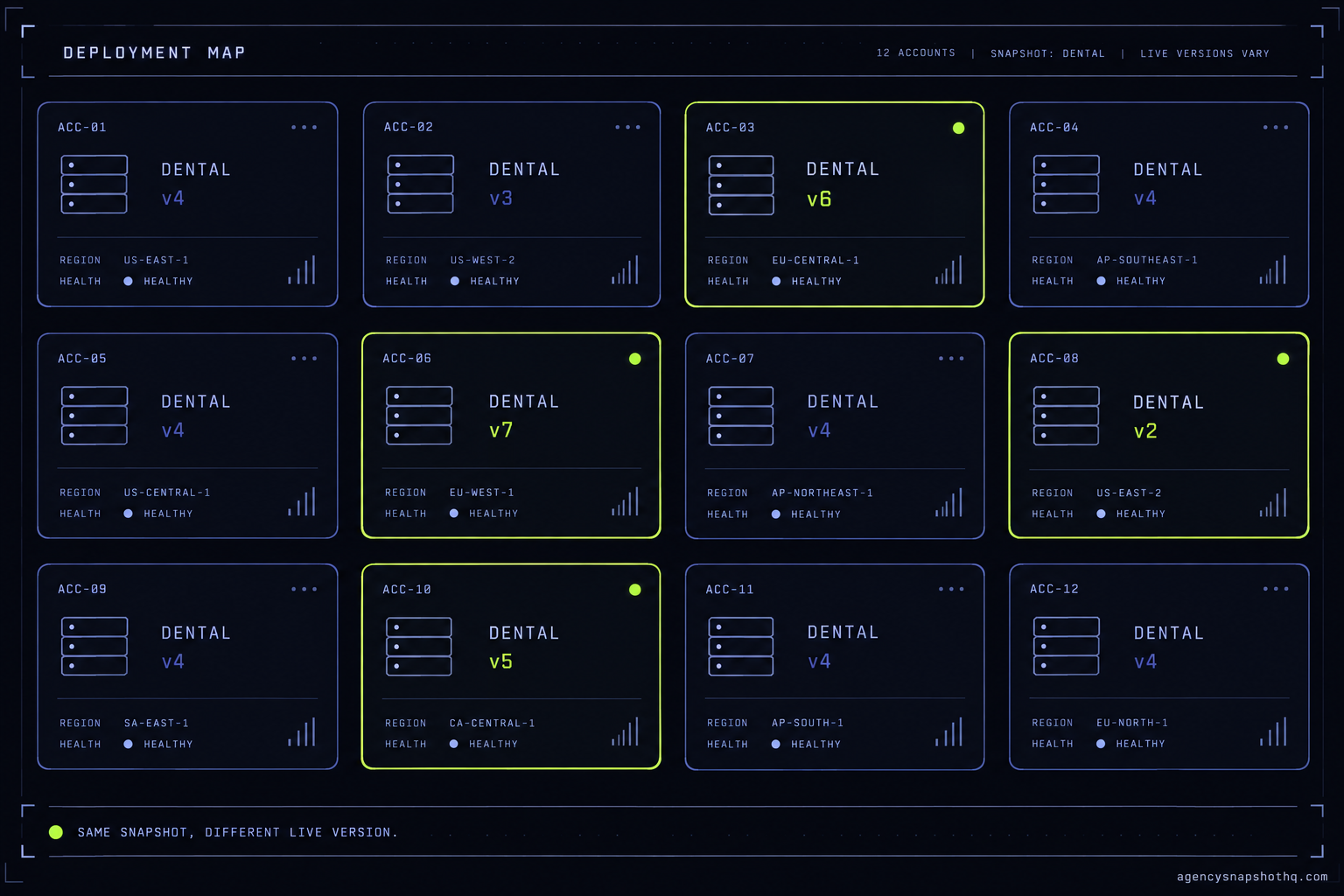
That is the moment most agencies meet snapshot drift, and they usually meet it in front of a client. You run a handful of trades off a handful of snapshots. Account seven is a dental practice, account nine is a law firm, and both came off snapshots you have edited several times since. One got June’s fix. One did not. A third has a change the client’s own VA made on a Tuesday that you have never seen. From the outside they are all “the dental snapshot.” Underneath, they are different accounts wearing the same name.
This is a briefing about that gap: why GoHighLevel keeps it hidden, where it turns into a bug the client finds first, and how to make the live version something you can read before anyone reads it back to you.
A snapshot carries no version number, and that is the whole problem
Start with what a snapshot is, because the drift falls straight out of it. A snapshot is a point-in-time copy of the assets in a sub-account: the workflows, funnels, pipelines, emails, custom values and fields, forms and surveys. HighLevel’s own overview describes it as a way to copy account assets fast. The word to hold onto is copy. When you install a snapshot into an account, you are not subscribing that account to a live master. You are stamping a duplicate of a moment and walking away from it.
Nothing in that duplicate records the moment. There is no build number, no date, no label on the account that says “this came from the June dental build.” The snapshot has a name, the name is all you get, and the name does not change when the contents do. You can rebuild the snapshot from its source and push it out, and the account still just reports that it loaded “Dental Practice.” The help docs are careful about the mechanics of loading a snapshot into an existing account and pushing updates to accounts that already have it, but neither hands you a version stamp, because the platform was built to move assets, not to track which assets landed where.
So be clear about this first: it is not a bug you can file. It is the shape of the tool. A snapshot is a copy with a name and no version, and every account you install it into inherits the same blank space where a version number should be. The moment you own more than one account off the same snapshot, and the moment you edit that snapshot even once, you have created a difference the platform cannot show you.
Agencies survive this at two or three accounts because they can hold the state in their heads. The dental account got the fix, the other one did not, you remember which is which. At eight accounts across three trades, with a teammate pushing and a client editing, memory stops being a system. The state is real. It is just nowhere you can look. And a state you cannot look at is a state you will get wrong on a call.
What actually forks when you install
Install one snapshot into two accounts and you now have three things, not one. You have the snapshot in your agency, and you have two independent accounts, each holding a copy that started identical and will not stay that way. Understanding drift is mostly understanding those three timelines and where they stop agreeing.
The first divergence is the one you cause. You improve the snapshot. You fix a broken trigger, rewrite a reminder, add a pipeline stage, and you rebuild the snapshot from its source so it carries the change. That rebuild does not touch anything already installed. To reach a live account you have to push, and a push goes only to the accounts you select, only inside your own agency. Push to five of your eight and three are now a version behind, with nothing marking them as behind.
The second divergence is the one the client causes, or their VA, or a teammate covering for you. GoHighLevel lets an account edit its own assets freely. Someone renames a stage, pauses a workflow, rewrites the copy in an email because a promotion changed. That edit lives only in that account. Your snapshot has no idea it happened, and your next push has no idea either. The loading flow warns you about conflicts and lets you override during a load, and it is explicit that an override cannot be undone, but a warning at push time is not a record you can read at rest. “Cannot be undone” is a bad thing to learn from a dialog box while a client waits.
The third divergence is time. Accounts built months apart were built from whatever the snapshot was on that day. The account you set up in spring started from spring’s build. The one from last week started from last week’s. They were never the same to begin with, and no later push makes them agree unless you push the same change to both and nothing local is standing in the way.
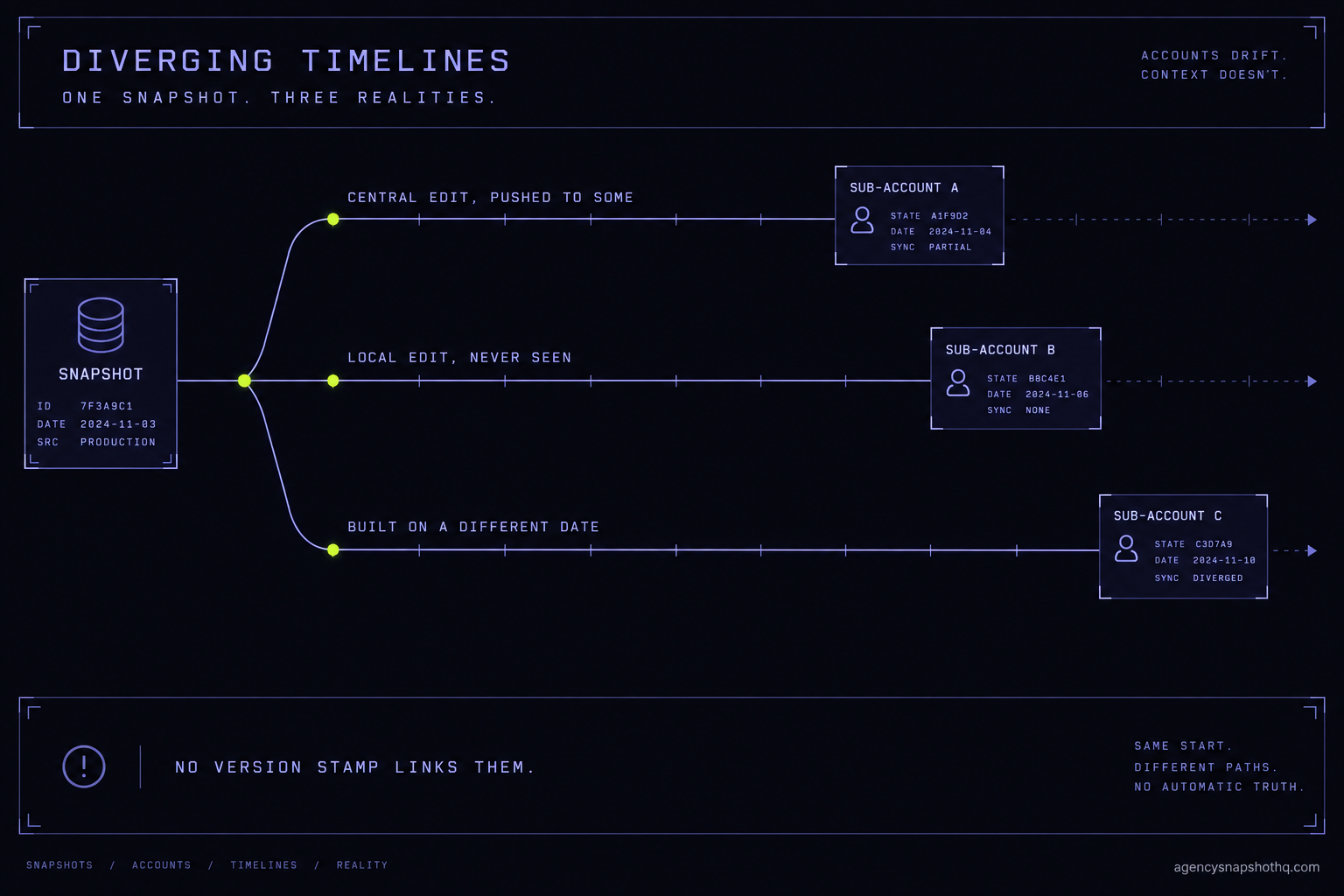
Three timelines, drifting at three different rates, none of them stamped. That is the machine. Everything that goes wrong next is one of these three catching up with you at the worst moment.
The four places drift turns into a client-facing bug
Drift is harmless right up until it is not, and it always cashes out in one of four ways. Each has a tell, an underlying cause, and a fix. The fix is rarely hard. Seeing it in time is the hard part.
The fix that reached only some accounts
What you see: a bug you know you fixed, live in front of a client. The missed-call reply fires once and stops where it should keep chasing. The booking confirmation points at an old calendar. You fixed this. You remember fixing it.
What is wrong: you fixed the snapshot and pushed it to some accounts, not all of them, and this is one of the nots. Maybe the push failed quietly here. Maybe this account was created after the push and never got it. Maybe you pushed to “the dental accounts” and this one is filed under something else. The change is real and correct in your snapshot. It simply never arrived at this account.
The fix: push it now, to this account, deliberately. Then answer the question that let it happen, which is which other accounts are also behind. Without a register you are back to memory. With one, it is a filter. This failure makes the case for tracking on its own, because the cost is not the two-minute push, it is that you had no way to know the push was needed until a client found the gap.
The push that is about to flatten a client edit
What you see: nothing yet. This is the dangerous one, because the tell arrives after you have already caused the damage. You push an update to bring an account current, the client calls a week later, and the custom offer they had running is gone.
What is wrong: a push adds and updates assets, and it does not merge. Where your central version and the local version both changed the same asset, the push overwrites, and the local change is the one that loses. The platform is explicit that an override during a load cannot be undone. You did not see the conflict because you pushed without checking what this account had changed locally, and GoHighLevel will not stop you from pushing over a customisation it has no way to value.
The fix: before pushing to any account that has been live for a while, treat it as drifted until proven clean. Look at what was edited locally. If the client changed an asset your update also touches, decide the merge by hand before you push, not after. The operational rule experienced agencies settle on is stricter and better: clients do not edit snapshot assets, they get a custom value or an asset that lives outside the snapshot’s prefix, so a push never has a local change to flatten. That discipline is far easier to set on a clean install than to retrofit, which is one reason a free, guided snapshot install is worth taking on a new account rather than importing a share link and hoping.
The one snapshot that is silently several versions
What you see: two accounts in the same trade behave differently and both look correct. The HVAC account in one city runs a seasonal campaign the other does not. A pipeline has an extra stage in one place. Neither is broken. They are just not the same, and you cannot say why.
What is wrong: they were built from different builds of the snapshot and patched by different pushes, so “the HVAC snapshot” is really several accounts that share a name and a lineage but not a state. This is drift at rest, the kind that does not announce itself with a bug, the kind you discover the day you try to make a change “everywhere” and find there is no everywhere to make it in.
The fix: pick a canonical build and reconcile toward it on a schedule, not in a panic. You cannot flatten every account overnight without risking the failure above, so you bring accounts current in stages, checking local edits as you go, and you stamp each one as you finish so the ground truth stops moving under you. This is the point where the rollout method that keeps accounts identical from the start pays off, and its absence is what you are now paying for.
The handover where nobody knows the baseline
What you see: an onboarding call, or a hand-off to a new teammate, and the question “what is this account running” has no answer. You reconstruct it live, clicking through workflows while the client watches, guessing at which version this is.
What is wrong: the knowledge was never written down. It lived in the head of whoever built the account, and that person is on holiday or has moved on. The account works. Nobody can describe it. For an agency that sells reliability, “we are not sure what your account is doing” is the most expensive sentence you can say on a call, and drift is what puts it in your mouth.
The fix: this one is pure record-keeping, and it is the through-line of all four. If every account carries a stamped version and sits in a register, the baseline is a lookup. The handover is boring, which is exactly what a handover should be.
Making the live version something you can see
GoHighLevel will not show you the version, so you add the version yourself, in two places, and you keep them honest with a cadence. None of this is heavy. It is the difference between a state you carry in your head and a state you can read off a screen.
First, stamp the account. On every install, set a custom value, something like snapshot_version, to the build you are installing: dental-2026-06, for instance, dated and named. Custom values travel in the snapshot and live in the account, so the stamp sits right next to the thing it describes. When you push an update, update the stamp in the same motion. Now any account can answer “what am I” from inside itself, and a teammate who has never seen the account can read its version off one field. This costs a few seconds per install and it is the single most useful habit in this whole briefing.
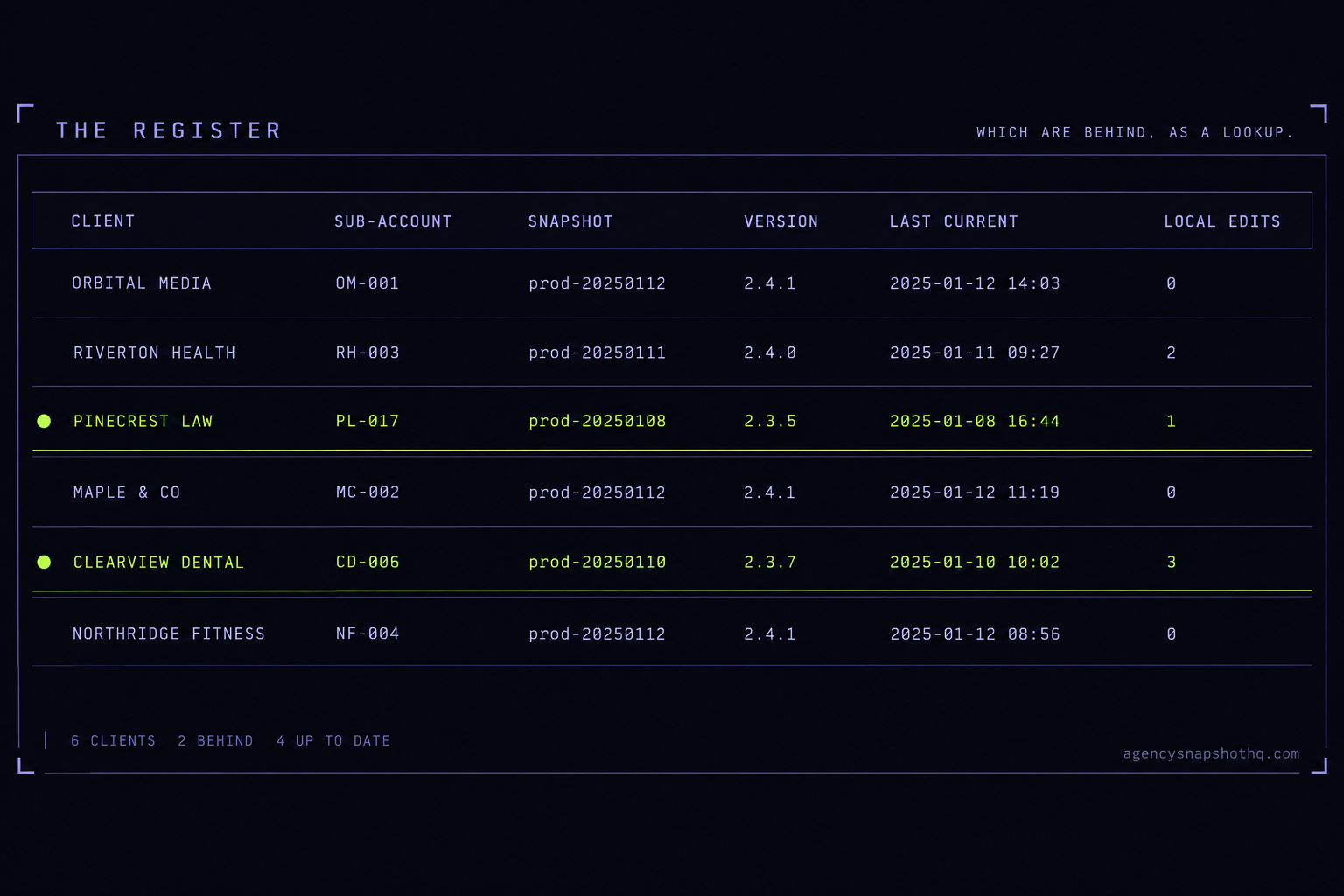
Second, keep a register outside the platform. A sheet is fine. One row per account: the client, the sub-account, the snapshot, the stamped version, the date it was last brought current, and a note for any local edit you have accepted and chosen to keep. This is the thing GoHighLevel cannot give you, because it spans accounts and it records intent, and intent is exactly what a push throws away. The register is where “which accounts are behind” becomes a filter instead of an afternoon.
Third, put a cadence on it. Drift is not a one-time cleanup, it is a slow leak, so you check on a schedule rather than when something breaks. Once a quarter, walk the register against reality: does the stamp match what is installed, has anything been edited locally since, is any account more than one version behind. Fold it into a review you already run so it never becomes its own project. A snapshot library that gets refreshed on a quarterly cadence gives you a natural moment to reconcile the accounts it feeds, so borrow that rhythm even if you maintain your own builds.
The pattern underneath all three steps is the same. You are replacing memory with a marker, and a marker with a schedule. GoHighLevel is very good at moving assets and indifferent to tracking them, so the tracking is yours to build, and it is cheap to build if you build it on the way in rather than after a client has found the gap. The agencies that never seem to have this problem do not have better memories. They wrote it down.
What drift costs before anyone calls it a problem
Put money on it, because the case for stamping an account looks like overhead until you price the alternative. The numbers here are illustrative and the assumptions are on the table, so substitute your own.
Start with the platform, because that cost is real and sourced. To run one snapshot across several client sub-accounts you are on HighLevel Unlimited at $297 a month, with SMS, email and call usage billed on top; the SaaS-mode tier, Agency Pro, is $497 a month, and every plan carries a 14-day free trial. That is the meter running under every account whether or not you can say what version it is on. Drift does not add to that bill directly. It adds to the labour on top of it, and labour is where agencies quietly lose the margin the platform leaves them.
Say a mystery-version investigation costs you thirty minutes: clicking through an account, comparing it to the snapshot, working out what is different and why. That is a conservative half hour. Across a dozen live accounts, if you are reconstructing state on even half of them over a quarter, that is roughly three hours a quarter of pure archaeology, a dozen hours a year, none of it billable and all of it avoidable. Stamping an account on install costs seconds and turns that thirty-minute investigation into a ten-second lookup. The stamp pays for itself the first time you would have gone hunting.
Now price the version that reaches a client. The second failure above, a push flattening a customisation, is not thirty minutes. It is the rebuild, plus the apology, plus the dent in a relationship you are billing five hundred to twenty-five hundred dollars a month to keep. One of those a year outweighs every stamp you will ever set.
Against that, the cost of doing it right on the way in is close to nothing. A snapshot install here is free, with 12 hours of dedicated installation support to use within 10 days of purchase, which is time you can spend getting the first account stamped and the register started rather than getting the install to work at all. The snapshots themselves are one-time buys, priced by trade from $890 up to $2,490, and the whole library on HQ All-Access is $4,950 a year. Those are the fixed numbers. The variable number, the one that grows with every account you cannot describe, is the labour drift adds, and that is the one you control by writing down what you shipped.
The arithmetic is not close. Seconds per install against hours per quarter, and one prevented client-facing overwrite against a year of stamps. Track it.
The objections worth taking seriously
Three push back on all of this, and the strongest is the one that argues against buying anything from us.
“A good snapshot should not need this.” A good snapshot needs it more, not less, because a good snapshot gets installed more often and edited more often, and both are what generate drift. Quality decides whether an account works on day one. It does nothing about whether account seven and account nine still agree in month six, because that gap is a function of installs, edits and pushes over time, not of how well the thing was built. The best snapshot in the world, installed into a dozen accounts and improved several times, drifts exactly like a mediocre one. Drift is a portfolio problem, and no single snapshot, however good, is a portfolio.
“This is what your install service is for, so why am I learning it?” Fair, and here is the honest limit. A guided install gets an account onto a clean, stamped baseline, and our own install support is bounded on purpose: 12 hours, to be used within 10 days of purchase, and when those hours are spent or the window closes, further help is quoted as paid work. That boundary is exactly why the objection cuts the other way. We can hand you a clean baseline and start the register with you. We cannot follow every account for the rest of its life for free, and you would not want to depend on a vendor who claimed they could. The tracking has to be yours because the edits are yours, the clients are yours, and the account outlives the install. Buy the clean start. Own the upkeep.
“I run fifteen accounts, I do not have time to check eight things on each one.” Then do not. The system in this briefing is built so the expensive part happens once, on the way in, when it costs seconds, and the recurring part is a filter and a quarterly glance, not a per-account audit. You are not checking fifteen accounts by hand every week. You are stamping each account as it is born and reading a register when you need an answer. The time cost of tracking is front-loaded and small. The time cost of not tracking is back-loaded and unbounded, and it arrives on a client call. If you genuinely have no minutes for the stamp, that is the signal to hand the deployment and the tracking to a crew that will set it up as a system, not the signal to keep flying blind.
None of these three says drift is not real. They say the fix should be cheap, honest and yours. It is all three, as long as you start it before the accounts pile up. If you are weighing the platform-native update path against a managed one, the mechanics of pushing an update after it is live are worth reading next to this, because the merge behaviour is where drift does its real damage.
Where to start
Do the small thing first, today, before the reading fades. Open your busiest trade, the one with the most accounts behind it, and add a snapshot_version custom value to one account. Name it for the build and the month. That single stamp is the whole system in miniature, and it will feel obvious the moment it is there.
Then make the register exist, even badly. One sheet, one row for that account, the columns from earlier: client, sub-account, snapshot, version, last brought current, local edits kept. A register with one honest row beats a perfect register you never start.
From there it is repetition and a calendar. Stamp on every install, update the stamp on every push, add the row, and once a quarter walk the list against reality. If your account count is already past where memory works, and the thought of back-filling all of it is the reason you keep not starting, that is the case for handing the rollout and the tracking to a crew. Either way, the version stops being a mystery. That is the whole win.