THE SHORT VERSION
- The free install covers the snapshot landing in the account. Onboarding is the work after that: rebrand, A2P registration, calendar and domain reconnection, the first live test. That block of work is where the real cost sits, and it is your time, not a line on an invoice.
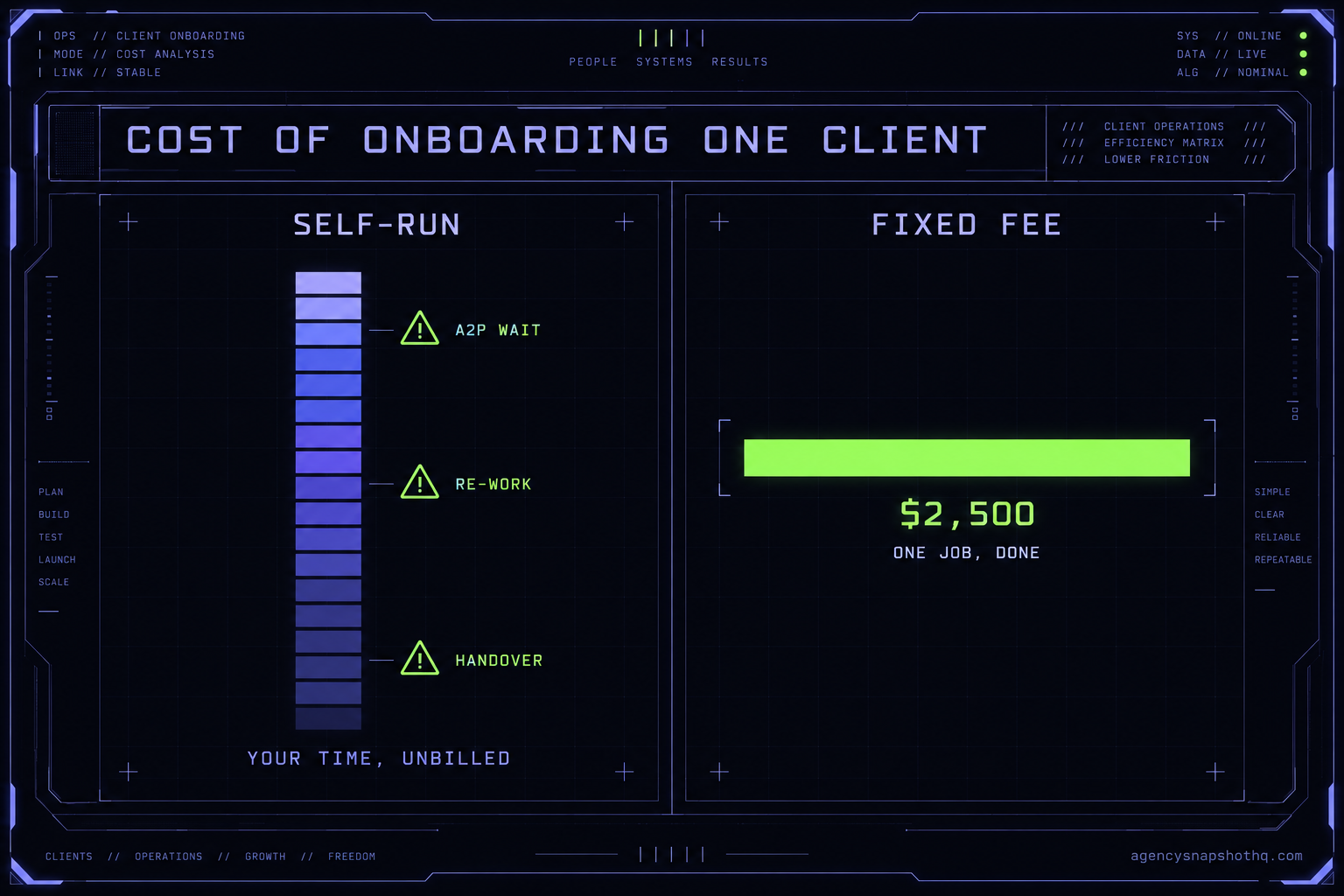
- Self-run onboarding is not free. Price your own hour at what you bill a client and a single full onboarding costs you a few hundred to a couple of thousand dollars in time you did not invoice, before you count the re-work when a step is missed.
- The fixed fee wins on the two things your own hours cannot buy back: the A2P approval that has to start on day one, and a client whose first week works instead of limping.
- The honest cut: onboard one client a quarter and learn to do it well yourself. Onboard one a week, or bill your hour above roughly $120, and paying the desk is the cheaper number once your time is counted.
- The platform underneath is the recurring cost nobody folds into the onboarding quote. The client sits on a HighLevel account whether you onboard them in an afternoon or over a fortnight.
You closed the client on Tuesday. Retainer signed, first month paid, and now there is a sub-account sitting empty in your HighLevel console with their name on it and a snapshot ready to load. The client thinks they are live. In their head the machine is already running: calls getting answered, reviews coming in, the number you quoted on the sales call already doing its work.
It is not running. It is an empty account and a share link. Between those two things and a client whose first week actually works is a block of labour nobody put a price on when the deal closed, because the snapshot was free to install and onboarding felt like the easy part. This briefing is that price, counted in the only currency it is actually paid in, which is your own time, and set against the fixed fee for handing the whole thing to someone else.
Install is not onboarding, and the gap between them is the job
Here is the distinction that decides the whole cost, because the two words get used as if they mean the same thing and they do not.
The install is the snapshot landing in the sub-account. On this site that install is free, and it comes with a fixed block of support: twelve hours of dedicated installation support, to be used within ten days of purchase. Those hours cover loading the snapshot, rebranding the website to the client, A2P and 10DLC registration, email domain setup in GoHighLevel, and a few extra automations where the account needs them. That is the install, and for a lot of agencies it is genuinely most of the way there.
Onboarding is everything that turns a loaded account into a client-ready one. It is the work of making the demo account into their account, then proving it works before the client ever logs in. Walk it as it actually happens and the shape of the cost becomes obvious.
First the account itself gets configured to the client. Business name, address, service area, time zone, the contact routes, the users. None of it is hard and all of it is a field you have to find and fill, and GoHighLevel spreads those fields across Settings, Business Profile and the individual sub-account the way a filing cabinet spreads one client across six drawers.
Then the snapshot loads, and it brings the whole working system with it: the funnels, the pipelines, the workflows, the appointment reminders and no-show recovery, the AI Studio website, the nurture campaign, review automation, seasonal automation, custom values, custom fields, the forms and surveys, one AI Receptionist and one AI Chatbot. That is a complete operating system for a local business arriving in one import. It also arrives wired to a set of placeholders that were true in the demo account and are false in this one.
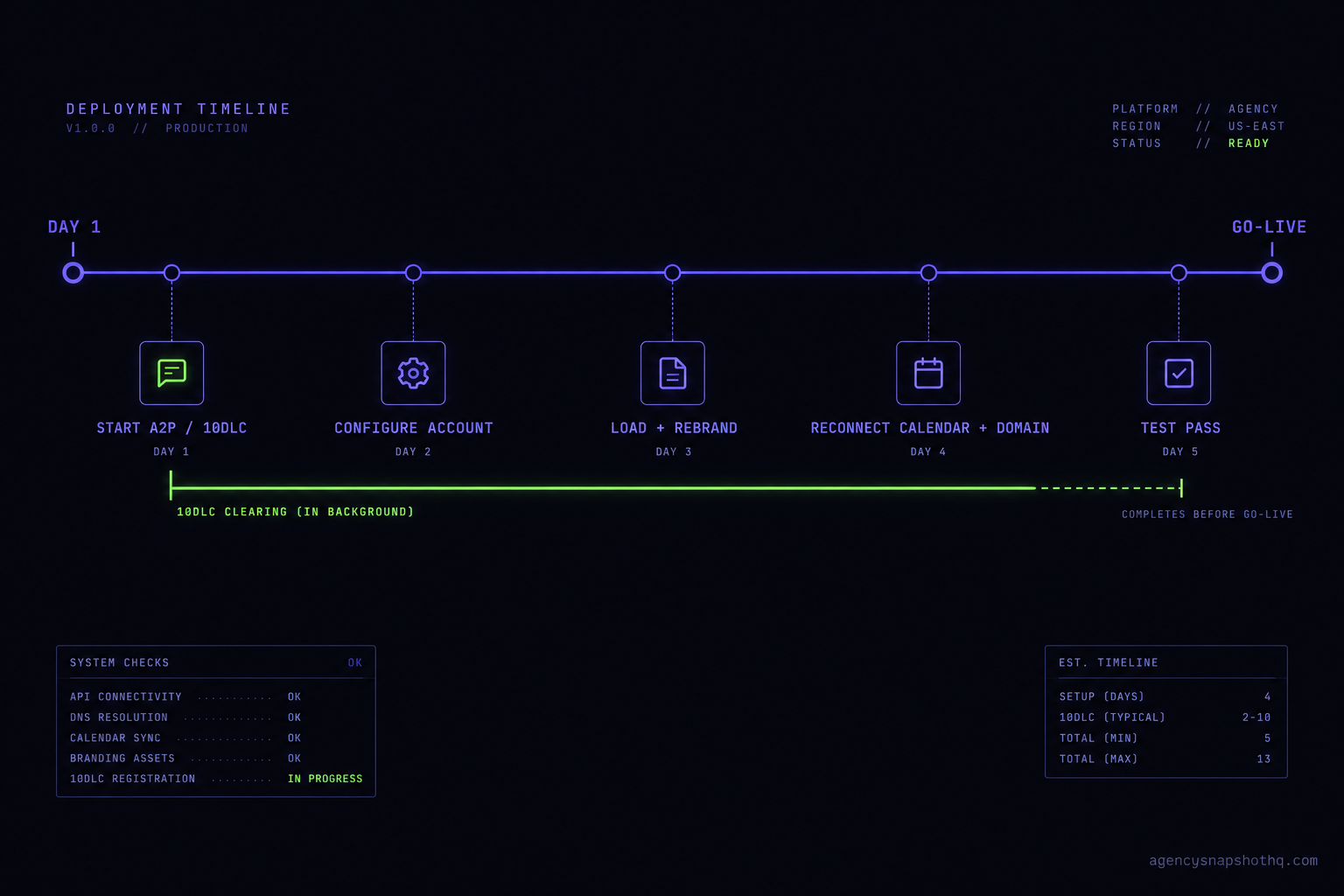
Now the real onboarding starts. The custom values that the whole snapshot reads from, the business name the texts sign off with, the booking link the reminders point to, the review URLs the review automation sends, have to be created and filled for this client. The calendar has to be connected to the client’s actual Google or Outlook account, not the one the snapshot was built on. The sending domain has to be authenticated so email leaves the account and lands in an inbox. The phone number has to be provisioned, and the A2P and 10DLC registration that lets it send SMS at all has to be started, because until that clears the texting half of the system is dead.
And then, the step most self-run onboardings skip and every good one keeps: you test it. You book a fake appointment and watch the confirmation fire, the reminders queue and the no-show recovery arm. You submit the contact form and watch the lead land in the pipeline and the AI Receptionist pick it up. You trigger a review request and read what the customer would read. You do this because the client is going to do it by accident in week one with a real customer, and you would rather find the broken step than have them find it.
That whole second half, the configuration, the reconnection, the registration, the test pass, is onboarding. It is the gap between a free install and a working client, and it is a block of focused hours whether you run it yourself at a kitchen table on Sunday or hand it to a desk. The question is only who spends those hours, and what they cost when they do.
Where self-run onboarding quietly costs more than the hours
The hours are the visible cost. The money leaks out of the parts of onboarding that do not look like work until they go wrong. Here are the four that cost agencies the most, in the order they tend to bite.
The A2P wait you did not schedule around
The single most expensive mistake in self-run onboarding is treating A2P and 10DLC registration as a task for the end, right before go-live. It is not a task. It is a queue. You register a brand and a campaign, and then you wait for approval that is out of your hands, and carriers filter SMS from unregistered numbers in the meantime, which is the whole reason the registration exists. Leave it to day six of a one-week onboarding and the client’s reminders and missed-call text-backs simply do not send on launch day, and now you are explaining a dead feature to someone who just paid you. The fix is free and costs nothing but sequence: start the registration on day one, before the fun configuration work, and let it clear in the background while you do everything else. Self-run onboardings miss this constantly because the registration is boring and the funnels are interesting.
The calendar still pointed at the builder’s account
A snapshot is built in somebody’s demo account, and calendars do not travel cleanly. Import a snapshot and the booking calendar will often still reference the integration it was built with, which means the first appointment a real customer books lands in the wrong Google calendar, or nowhere, and the confirmation goes out with a meeting link to an account the client cannot see. The reader-facing symptom is a client emailing you in week one asking why they got a booking notification for a meeting that is not on their calendar. What is actually wrong is that the calendar’s connection and its linked user were never re-pointed during onboarding. The fix is a reconnection and a test booking, five minutes of work that only happens if onboarding includes a test pass.
Custom values nobody created
The snapshot reads from custom values the way a mail merge reads from a spreadsheet. If the value is empty, the text still sends, just with a blank where the business name should be, or the literal placeholder token, or last client’s booking link. Nothing errors. Nothing warns you. The workflow runs green and the message goes out wrong, and you find out when the client forwards you a screenshot of a text that says “Thanks for booking with {{business_name}}.” This is the failure that makes a brand-new client lose confidence fastest, because it looks sloppy in a way they can see without understanding anything technical. The fix is a pass through every custom value the snapshot defines before the account goes live, which again is onboarding, not install.
The ninety-percent-done that eats a second week
The pattern that wrecks the self-run budget is not a disaster, it is a slow one. You get the account eighty or ninety percent configured in an afternoon, feel good, and move on to billable client work. The last ten percent, the domain that will not authenticate, the one workflow that references a pipeline stage you renamed, the review link that 404s, sits there. It surfaces a week later as a client complaint, and now you are context-switching back into an account you have half-forgotten, at a worse hourly value than if you had finished it in one sitting. The cost is not the ten percent. It is the re-entry, the re-learning, and the client’s eroded trust while it sat broken. Finishing in one focused block is cheaper than finishing in three interrupted ones, every time.
The handover that was just a password
The account works, and then the whole thing gets handed over as a login and a cheerful “you are all set.” A week later the client cannot find where a lead goes, cannot read the pipeline, and does not know the review requests they are getting credit for are automatic. What you see is a client who goes quiet, or worse, one who starts editing workflows they do not understand and breaks the thing you just built. What is actually wrong is that onboarding ended at “it works” instead of “they can use it,” which are not the same finish line. The fix is a short, deliberate handover: a walkthrough of where leads land, what fires on its own, and the two or three things never to touch. It is twenty minutes of work that closes the support thread which otherwise runs quietly for the life of the account, and it is the step a rushed self-run onboarding drops first because the account looks done.
The arithmetic, with the assumptions on the table
Now the numbers, and the honest way to read them is to substitute your own. Every figure below is either a published price or an illustrative scenario with its assumptions shown, never a measured result.
Start with your own time, because that is the cost self-run onboarding hides. A full client onboarding, done properly with a test pass, is a few hours of focused work spread across a week. Call it eight to twelve hours once you count the configuration, the reconnections, the registration you start and track, and the testing. The number that matters is what one of your hours is worth. On the open market, a freelance GoHighLevel specialist runs roughly $25 to $75 an hour, and top US specialists bill $75 to $150. Your own hour is worth at least what you would pay to replace it, and realistically what you bill a client for it.
Run that out. At a conservative $75 an hour and ten hours, a single self-run onboarding costs you $750 of time you did not invoice. At $120 an hour, which is a modest agency rate, the same onboarding costs you $1,200. And that is the clean version, with no re-work, no second week, no client-trust repair. Add one missed A2P sequence and a context-switch back into the account and the real number climbs past the headline.
Set that against the published alternatives:
| Path | Published price | What it buys | Where the cost hides |
|---|---|---|---|
| Self-run onboarding | Free install + your hours | The snapshot in the account, rebranded, and whatever you finish | Your unbilled time, plus re-work when a step is missed |
| Snapshot installation | $650 | The snapshot loaded and configured by the desk, per sub-account | Still yours to onboard the client around it |
| Agency account setup | $1,200 | The agency-level account built and configured once | A per-agency job, not a per-client one |
| White-glove onboarding | $2,500 | The whole client-ready build, registrations started, tested, handed over | Nothing hidden; the scope is fixed and so is the fee |
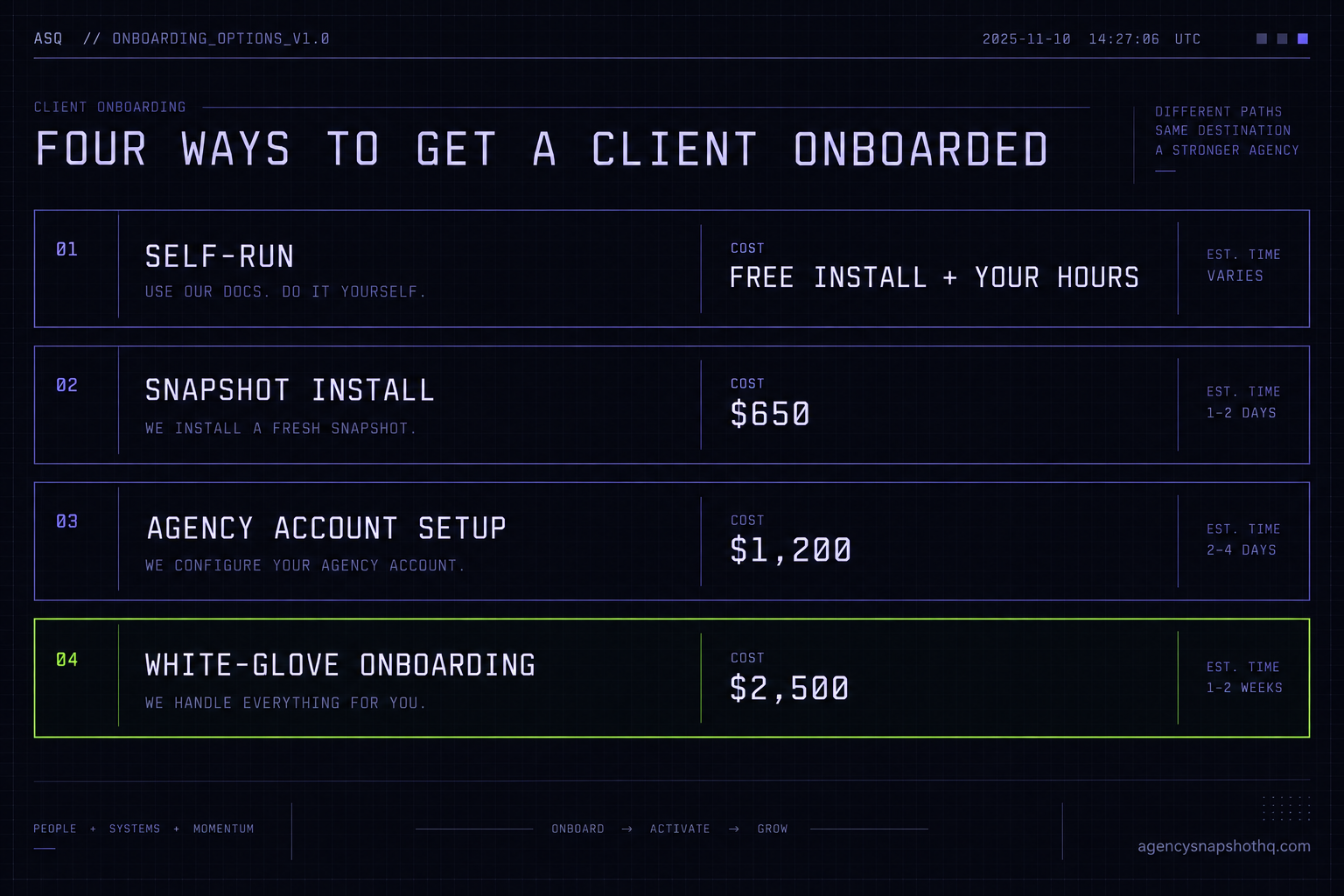
The comparison that decides it is the last row against your own time. White-glove onboarding is $2,500 for the complete job, done once, with the A2P started on day one and the account tested before the client sees it. Self-run is “free” plus eight to twelve of your hours plus the risk. The break-even is not a mystery: at roughly $120 an hour and ten clean hours you are already at $1,200 of time for one client, and a second interrupted week or a botched launch closes the rest of the gap fast. Below that rate, or for an agency that onboards occasionally and enjoys the control, self-run is genuinely cheaper and you should do it.
Two more numbers belong in the frame. The first is the platform, which is the recurring cost that sits under every client no matter who onboards them. The client’s account runs on HighLevel, and the agency plan that lets you run unlimited sub-accounts is $297 a month, with SMS, email and call usage billed on top, and a 14-day free trial on every plan. Onboarding speed does not change that number. The second is the market for help: if you would rather rent ongoing support than run onboarding yourself, platforms like Growthable price white-label human support from $549 a month with a one-time setup session from $299, which is a recurring relationship rather than a one-client fixed fee. Different shape, worth knowing when you compare.
The objections, including the one against paying us
“I can do it in a weekend, so the fee is pure margin for you.” You can, and for your third or fourth client you probably should, because by then you have a written process and the judgement calls are fast. The fee is not margin on the easy case. It is for the case where a weekend becomes two because A2P did not clear, or where the client’s launch limps because nobody ran a test pass. You are not paying for the hours. You are paying for the hours to be the right ones, started in the right order, by someone who has done it enough times that the A2P queue is muscle memory. If that case does not scare you, do it yourself.
“The onboarding fee is more than a month of the platform.” It is, and that comparison is the wrong one, because the platform is a recurring cost and the onboarding is a one-time one. A client you keep for a year is $297 a month of platform and one $2,500 onboarding, which is a small fraction of what that client pays you over the same year. The onboarding is a capital cost on a client relationship, not an operating one, and it is cheapest the first time rather than after a bad launch has already cost you the client’s confidence.
“Why not hire a cheap VA and keep the whole thing in-house?” Because onboarding a first client is not yet repeatable work, and a VA is at their best on repeatable work. A GoHighLevel VA at a low hourly rate is excellent value once you have written down exactly which custom values to create, how to wire the calendar and what to test. Until that process exists, the judgement is the job, and a cheap rate does not lower the total cost if the training, the QA and the re-work all land back on you. The right sequence is to run onboarding well a few times, write down what you did, and then hand the repeatable version to a GoHighLevel VA at $1,150 a month. Buying cheap labour to do judgement work is the most expensive order to do it in.
“If I buy the fee, I never learn my own stack.” This is the real one, and it is the argument against paying us. An agency that outsources every onboarding does stay dependent, and dependency is a cost even when the invoice is reasonable. So here is the straight answer: if you onboard one client a quarter, learn it. Do it yourself, break things on your own account, and own the knowledge. If you onboard one a week, or you are rolling one snapshot across a stack of sub-accounts and the per-client labour is eating the hours you should be selling with, buy the fixed number and keep your time for the work only you can do. The decision is not about capability. It is about where your hour is worth the most, and for a growing agency that is almost never inside a settings panel re-pointing a calendar.
If you want the number taken off your plate entirely, white-glove onboarding is the fixed-fee version of this whole briefing, and agency account setup is the one-time agency-level build that sits underneath it. If you would rather do it yourself, the snapshots in the library arrive built for exactly this, with a free install and a written guide, and the law firm and digital marketing agency builds are good examples of how complete the account is before onboarding even starts. The full rate card is on the pricing page, and the FAQ answers the questions this briefing raised but did not have room to finish.