THE SHORT VERSION
- A pipeline is configuration and your opportunities are data. A snapshot carries the pipeline, its stages and the automations that write to it, and it cannot carry a single opportunity, because those are live records that belong to the account they were created in.
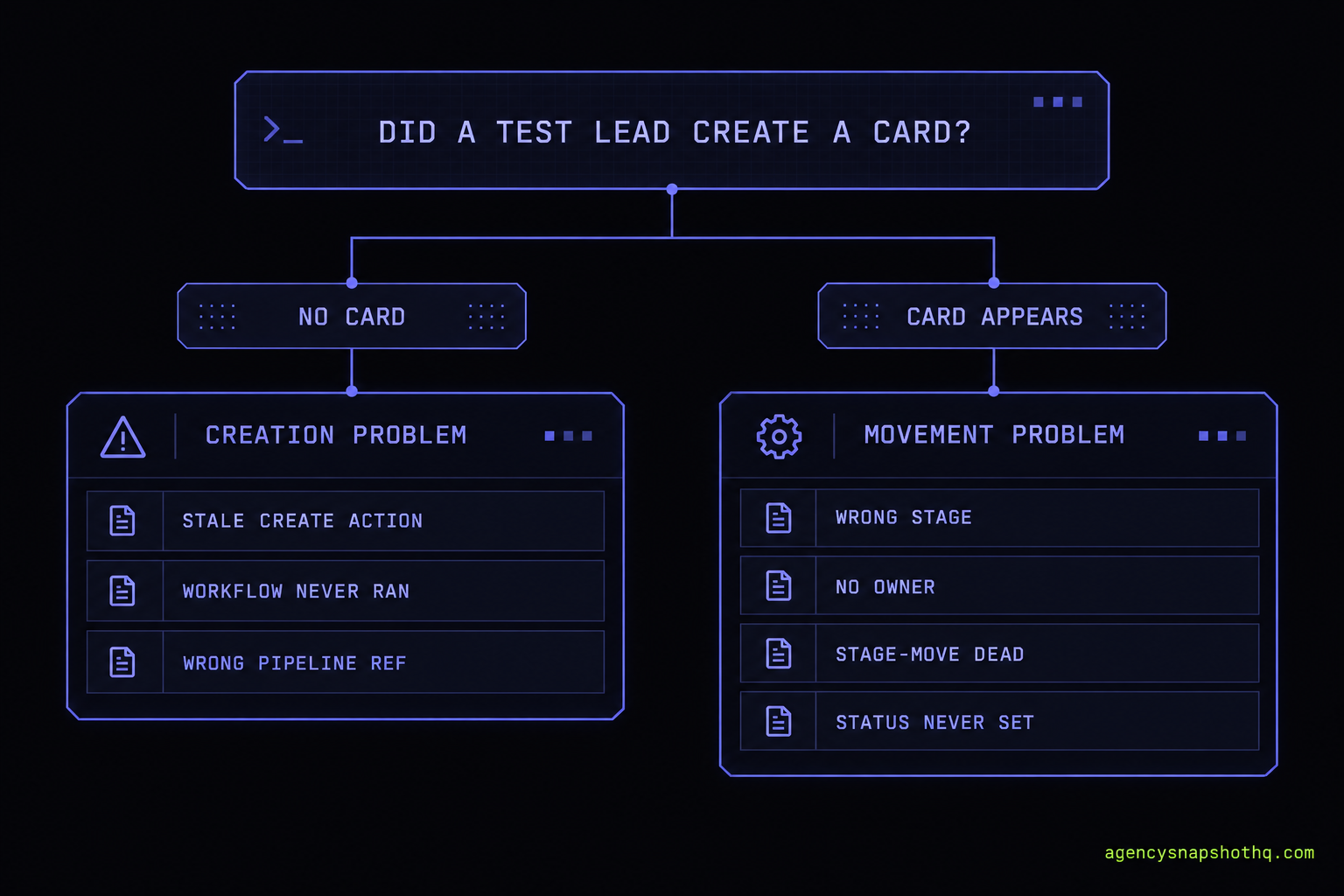
- The one check that tells you where to look is the board itself. An empty board means opportunities are not being created, so the problem is upstream, in the action that should create them. A full board that never advances means they are created and then stall, so the problem is the stage logic or the people meant to work it.
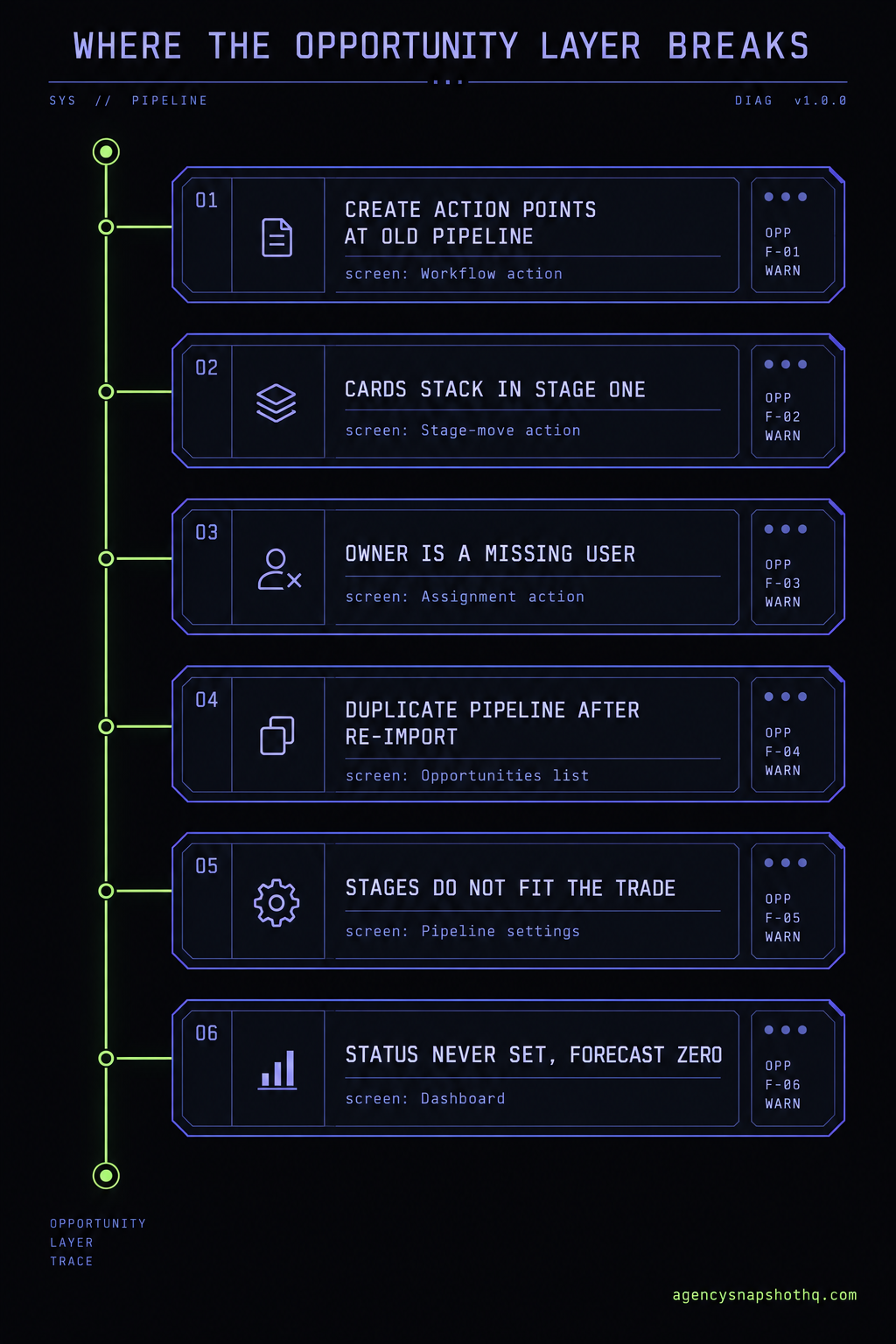
- The opportunity layer fails in a short, predictable list: the create-opportunity action still points at the source account's pipeline, new leads land in the wrong stage or none, the owner is a user who does not exist in this account, a re-import leaves two pipelines, or the stages never matched the client's real sales process so the team stopped dragging cards.
- The dashboard forecast reads off this layer. If opportunities never get a status of Won, Lost or Abandoned, the pie chart and the revenue forecast are fiction, and the client notices the fiction before you do.
- Buying the snapshot here includes a free install with 12 hours of support to use within 10 days, which covers rewiring the opportunity actions and proving a real lead lands on the right stage with an owner before a client ever asks why the board is empty.
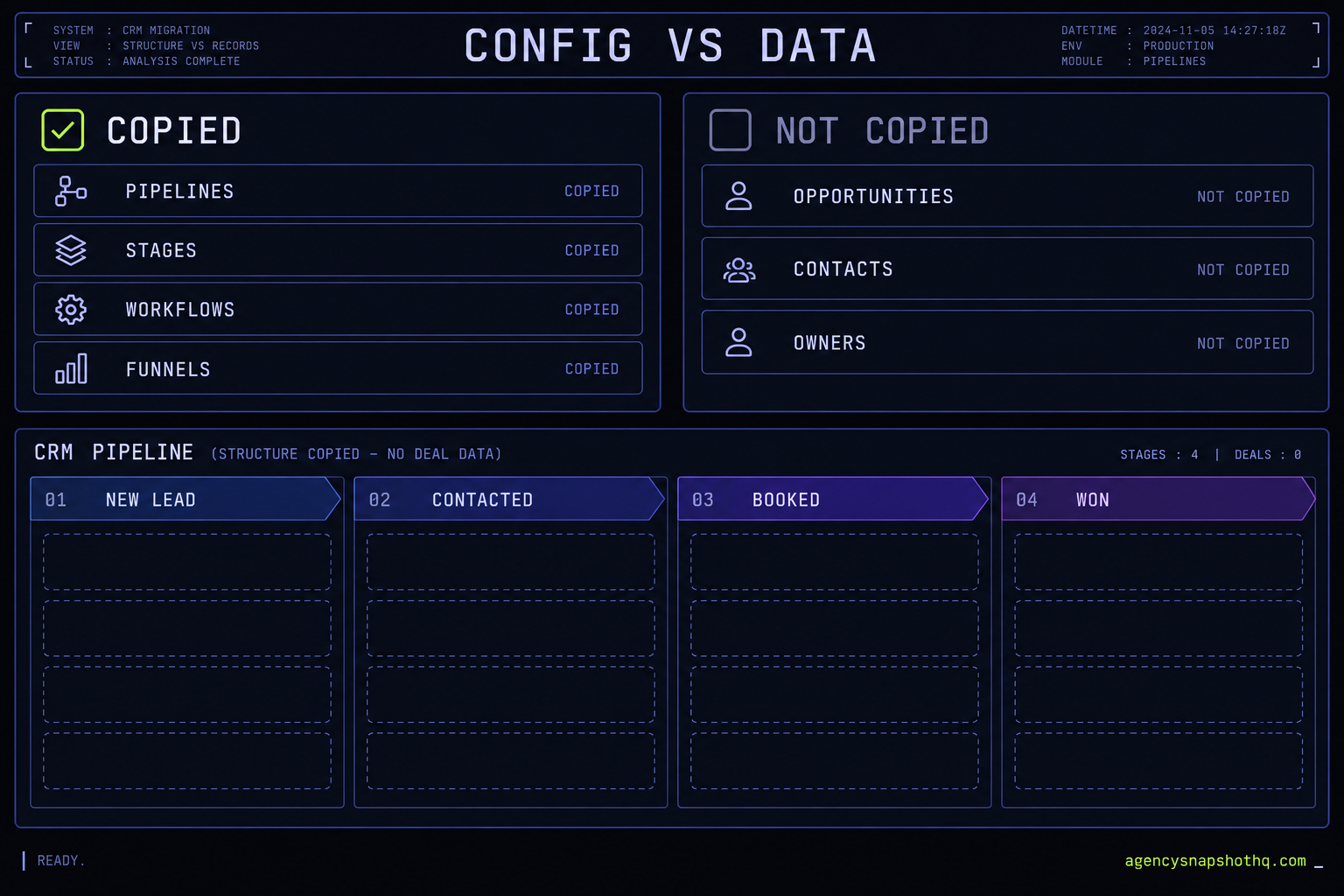
Three weeks into the rollout, the roofing client called on a Tuesday afternoon with a question that sounds simple and is not. “The sales board you set up says we’ve closed nothing this month. That can’t be right, we signed four jobs last week. Is the thing working?” You open their roofing sub-account and go straight to Opportunities. The pipeline is there, every stage you built, New Lead through to Won, exactly the way it looked on the account you created the snapshot from. And it has not moved. Forty-odd cards sit stacked in the first column. None has advanced. About half show no owner. The dashboard pie chart, the one the client is staring at, reads zero Won for the month, because not a single card has been marked anything but open.
Nothing is broken in the way the client means. The snapshot imported clean. The pipeline is right there. But the board is a photograph of a sales process, not a working one, and the four signed jobs the client is thinking of never touched it. A pipeline is one of the few parts of a snapshot that looks completely finished the moment it lands and does almost nothing until you wire the layer underneath it. This piece traces that layer from the pipeline down to the opportunity and the person meant to work it, and marks every place a snapshot leaves it frozen, in the order you should check them.
A pipeline is configuration; your opportunities are data
Before you can fix a board that will not move, you have to be exact about what a snapshot actually moved. GoHighLevel draws a hard line through the opportunity area, and the snapshot respects that line whether or not you meant it to.
On one side of the line is configuration. A pipeline is a structure: a named flow, split into ordered stages, that describes how a deal is supposed to progress. The pipeline, its stages, their order and their dashboard visibility are all configuration, and a snapshot carries them faithfully. So do the automations that read and write to the board: the workflow action that creates an opportunity, the one that moves it a stage along, the one that assigns an owner. The shapes all travel.
On the other side is data. An opportunity is a record of one potential deal, a specific contact associated with a specific pipeline at a specific stage, carrying a value, an owner and a status. Opportunities are live account data, the same category as contacts, conversations and call logs, and a snapshot carries none of them. This is not a setting you can flip. It is the definition of what a snapshot is: a template of how an account is configured, not a copy of what has happened inside it.
That single division explains the empty board, and it is worth sitting with, because the reflex is to treat an empty pipeline as a failed import. It is the opposite. The pipeline imported perfectly. The absence of opportunities is the correct, expected result of moving configuration without data. The board is supposed to arrive empty and fill from zero as the new account does business.
How an opportunity is actually born, and moved
If opportunities do not come across, something in the new account has to create each one, and there are only a few things that can. A person can add one by hand from the Opportunities screen, linking a contact and choosing the pipeline and stage. An import or an API call can create them in bulk. Or, and this is the one that matters for an agency, a workflow action creates them automatically: a lead submits a form, a workflow enrols them, and a Create Opportunity action drops a card onto the board at a chosen stage. That automated path is the entire point of the snapshot. It is what turns a raw lead into a tracked deal without anyone watching the inbox.
Movement works the same way. A card does not advance because time passed. It advances because something moved it: a person dragging it, or far more often a workflow action that updates the opportunity to the next stage when an event happens, a call booked, a quote sent, an invoice paid. Stage-based automation is how a healthy board appears to run itself, and every one of those actions holds a reference to a specific pipeline and a specific stage.
Why the references are the whole problem
Here is the hinge the rest of the piece turns on. When GoHighLevel rebuilds your pipeline in the new sub-account, it creates a new pipeline and new stages with new identities. The automations that write to the board still carry the identities from the account you built the snapshot in. On that source account the references were live, so your testing worked and the board moved. In the client account the Create Opportunity action is still trying to drop cards into a pipeline that, as far as this account is concerned, does not exist by that identity. The action does not error in a way the client sees. It just fails to produce the card, or produces it somewhere you did not intend. The structure is perfect and the plumbing underneath points at the wrong building. We traced the reading side of this, the triggers that let a lead into a workflow at all, in why a snapshot’s workflows fire nothing after import. The opportunity layer is the writing side of the same fault.
The one check that tells you where to look
Before you touch a single automation, read the board and answer one question: are opportunities being created at all? Everything downstream depends on the answer, and the board tells you plainly.
Push one real lead through the live form the way a customer would, then open Opportunities. If no new card appears anywhere in the pipeline, opportunities are not being created, and the problem is upstream in the Create Opportunity action or the workflow that should run it. That is a creation problem. If a card does appear but it lands in the wrong stage, or carries no owner, or simply never moves again after it is created, then creation is fine and the problem is the stage logic, the assignment, or the people meant to work the board. That is a movement problem.
That split, no card versus a card that sits, decides where the next ten minutes go. It is the difference between fixing an action that writes to the board and fixing the logic that advances it, and they are not the same job. Most people skip this and start dragging cards around by hand to make the client happy, which hides the failure for exactly as long as it takes the next lead to arrive and stack up behind the ones they moved.
Where the opportunity layer breaks
With the creation-versus-movement split in hand, the specific failures fall into a short list. Work them in this order. The early ones are the most common and the cheapest to rule out.
The create-opportunity action still points at the source account’s pipeline
What you see: a real lead comes in, the workflow appears to run, and no card ever lands on the board. What is actually wrong: the Create Opportunity action inside that workflow holds a reference to the pipeline and stage from the account you built the snapshot in. Those were rebuilt with new identities on import, so the action is writing to a pipeline this account does not recognise. Depending on how the import resolved it, the card goes nowhere or silently drops into a default. The fix: open every workflow that contains a Create Opportunity or Update Opportunity action, clear the stale pipeline and stage selection, and re-pick this account’s real pipeline and stage from its own list. Then run a genuine lead through and confirm the card appears where you chose. This is the single most common reason a board stays empty while leads are clearly arriving, and it is invisible from the pipeline view because the pipeline itself is flawless.
Cards land, but they all pile into the first stage
What you see: opportunities are being created, which is progress, but every one of them sits in New Lead and nothing advances. What is actually wrong: the automations that should move a card along, the ones that fire when an appointment is booked or a quote is sent, each reference a destination stage that was rebuilt on import. The move action no longer matches a real stage, so the card is created and then never touched again. A board where creation works and movement does not fills up fast and looks, to a client, exactly like a board nobody is working. The fix: open each stage-move automation and re-point its destination stage at this account’s stage. Map them against the real pipeline in order, booked moves to Booked, quote-sent moves to Quoted, and test one card all the way through so you watch it travel, rather than trusting that each action resolved on its own.
Every opportunity arrives with no owner
What you see: cards are on the board, maybe even in the right stages, and the owner column is blank on all of them. What is actually wrong: the owner is set by an assignment action, and that action references a specific user by identity. A snapshot does not carry users; your team is created fresh in each sub-account. So the action is trying to assign the lead to someone who does not exist here, and the result is no owner at all. Round-robin distribution breaks for the same reason, because it is a list of users that did not come across. Worse, any notification wired to go to the assigned user, the text that tells a rep a hot lead just landed, has no one to reach, so the lead sits unseen. The fix: after you add the account’s real users, open the assignment action and re-select them, or rebuild the round-robin list from this account’s team. Confirm a test lead not only lands on the board but pings the person who is supposed to call it.
A re-import or a second snapshot left two pipelines
What you see: the Opportunities screen now shows the same pipeline twice, or a near-duplicate with a slightly different name, and cards are scattered across both. What is actually wrong: pipeline names have to be unique within a sub-account, so loading a snapshot again, or layering a second snapshot that carries its own version of the pipeline, creates a parallel pipeline rather than merging into the one you have. Automations split across the two, some writing to the original and some to the copy, and the board fractures. The fix: decide which pipeline is the live one, re-point every create and move action at that one, migrate any real cards off the duplicate, and delete the duplicate. Then treat re-imports with care, because a snapshot is additive and will keep making copies if you let it.
The stages never matched the client’s real sales process
What you see: the board is wired correctly, cards are created, owners are set, and the team still is not using it. Cards go stale where a rep left them. What is actually wrong: this is not a plumbing fault, it is a fit fault. The snapshot ships a sensible default pipeline, but a roofing company’s path from inspection to signed job is not a real estate agent’s path from showing to close, and neither is an insurance agency’s renewal cycle. If the stages do not describe how this client actually sells, the team quietly abandons the board and keeps the real pipeline in their heads, and no automation can rescue a board nobody opens. The fix belongs at go-live, not after: adapt the stage names and order to the trade before the first lead, so the board the team sees on day one is already theirs. A default is a starting point to shape, never a finished sales process to impose.
Opportunities never get a status, so the forecast is fiction
What you see: the pipeline fills and even moves, but the dashboard revenue number and the win-rate chart make no sense, and the client is the one who points it out. What is actually wrong: a card advancing through stages is not the same as a card being closed. An opportunity carries a status, Open, Won, Lost or Abandoned, and the reporting reads off that status. If nothing ever marks a deal Won or Lost, every card stays Open forever, the won-revenue number stays at zero no matter how many jobs the client signs, and the pie chart counts a graveyard as a live pipeline. The fix: wire the close. The automation or the human step that ends a deal has to set the status, not just park the card in a final stage, and the team needs the one-click habit of marking Lost and Abandoned too, because a forecast that only ever grows is a forecast nobody trusts.
What a stalled pipeline actually costs
The reason to care about any of this is that the board is where the client decides whether you are worth the money. A pipeline that does not move is not a cosmetic defect. It is the one screen the client checks to answer the only question they really have, which is whether the leads they are paying for are turning into work.
Start with what runs whether the board works or not. HighLevel’s Unlimited plan is $297 a month, as checked on 11 October 2026 and confirmed through search snippets of the pricing page rather than an independent fetch. That fee buys the sub-accounts the pipelines live in, and it is spent in full whether a single opportunity ever advances or every card rots in the first column. The snapshot exists to make that fee pay for itself by tracking leads into deals without a person minding the board. A frozen pipeline turns a running cost into money spent to produce a screen that makes the client nervous.
Now the part that actually hurts, with the assumptions printed so you can substitute your own. Say you bill this client a management retainer of $1,000 a month, which sits in the middle of the range an agency charges. Say the stalled board, three weeks in, convinces them that nothing is happening and they decline to renew after month three rather than running the year out. That is nine months of retainer you will not bill, $9,000, walked out the door over a layer that was an afternoon to wire. Put your own retainer and your own churn point in and the shape holds at any inputs: the loss is not the price of the snapshot, it is the lifetime of the client, and the board is what spends it. The snapshot itself was a four-figure sum once. One avoidable churn dwarfs it.
There is a quieter cost in the forecast. If opportunities never get a status, the client’s own revenue number is wrong, and you taught them to distrust the system that produces it. The two performance figures this system is built around, a target of recovering around 70% of no-shows and a typical 5 to 10 reviews a month, are both targets rather than measured results, and both assume a board that captures the deal in the first place. A target is worth nothing on a pipeline that never records an outcome.
The objections worth answering
If you run more than a couple of accounts, you have reasons to push back on all of this. The strongest ones deserve a straight answer.
“I will just create and move the opportunities by hand.” You can, and for one quiet account it might even hold. But the entire value of the snapshot is that the board runs without a person, and a pipeline you drag by hand is a pipeline that stops the day you get busy. Worse, manual movement masks the broken automation instead of fixing it, so the failure is still there, hidden behind your effort, waiting for the week you cannot keep up. The honest move is to wire the actions once so the board works when nobody is looking, which is the only condition that matters.
“This is exactly why I would never trust a snapshot. I will build my own pipelines in each account.” Build them if you prefer, but understand this is not a snapshot defect. It is a property of how GoHighLevel separates configuration from data, and it applies to anything you reuse, including your own snapshots the moment you install one into a second client. A pipeline you build by hand in a client account still needs its create and move actions wired to its stages and an owner attached, which is the same work. A home-grown approach does not escape the opportunity layer. It just means you rebuild the structure from scratch every time as well as wiring the plumbing, which is more work, not less.
“If the fix is a few dropdowns, why would I pay anyone to do it?” At one account, you should not, and this piece is written so you can do it yourself in an afternoon. Re-point the create action, re-point the move actions, attach the owner, run one real lead through and watch it travel. The free install we include earns its place only where the repetition is the expensive part, the same rewire and the same end-to-end test across a stack of client sub-accounts, each proven with a live lead before a client ever opens the board. If your situation is one account and four dropdowns, do the dropdowns. It is honest to say the service is for scale, not for a single board.
“My client’s sales process is too specific for any pre-built pipeline to help.” Partly true, and it is the best argument on this list. A generic pipeline will never match a specific business out of the box, and if that is all a snapshot gave you it would be close to useless. But a sane default you adapt is faster than a blank board you design from nothing, especially across many accounts where a known starting structure is the thing that keeps your fleet consistent. The snapshot is not claiming to know your client’s sales process. It is giving you a tested skeleton to reshape, and the reshaping is the five minutes that was always going to be yours.
Fix the board before the client reads it
The pattern underneath every one of these failures is the same. A snapshot carries the pipeline and the automations that write to it, and it cannot carry a single opportunity or a single user, so the opportunity layer is the part that always needs rewiring and testing after an import, in every account, every time. The board that looks most finished is the one that hides it best, because the stages are perfect and only the plumbing is wrong.
If you are standing up one account this week, the sequence is short. Confirm the create action points at this account’s pipeline and stage. Re-point every stage-move action at the right destination. Add the real users and attach the owner or round-robin. Check there is only one pipeline. Shape the stages to the client’s actual sales process. Wire the close so a deal gets a status. Then push one genuine lead through the live form and watch the card appear, land in the right stage, carry an owner, and move when you trigger the next step. That is the whole job, and it is an afternoon.
If you are rolling the same snapshot across a stack of client accounts, that rewire and that end-to-end test are the repeat work that makes a rollout an operation rather than a task, and it is exactly what the free install that comes with every snapshot is for: 12 hours of dedicated support to use within 10 days of purchase, spent reconnecting the opportunity actions and proving a real lead lands correctly in each account before a client ever asks why the board is empty. Buy the snapshot here and that is covered. Bought one elsewhere and want the boards made to move, the same work is a snapshot update service, connected and tested with a recorded walkthrough. Either way the test to insist on is identical: a real lead, through the real form, appearing on the real board, in the right stage, with the right owner, and advancing when it should. Everything above is just the list of reasons that test can fail, and the order to check them in. For the questions that come up most often, the FAQ collects the short answers.