THE SHORT VERSION
- A trigger is the only door into a workflow, and a snapshot carries the trigger's wiring, not the live objects it points at. A form, pipeline stage or tag that got a new identity on import leaves the trigger watching for an event that never arrives.
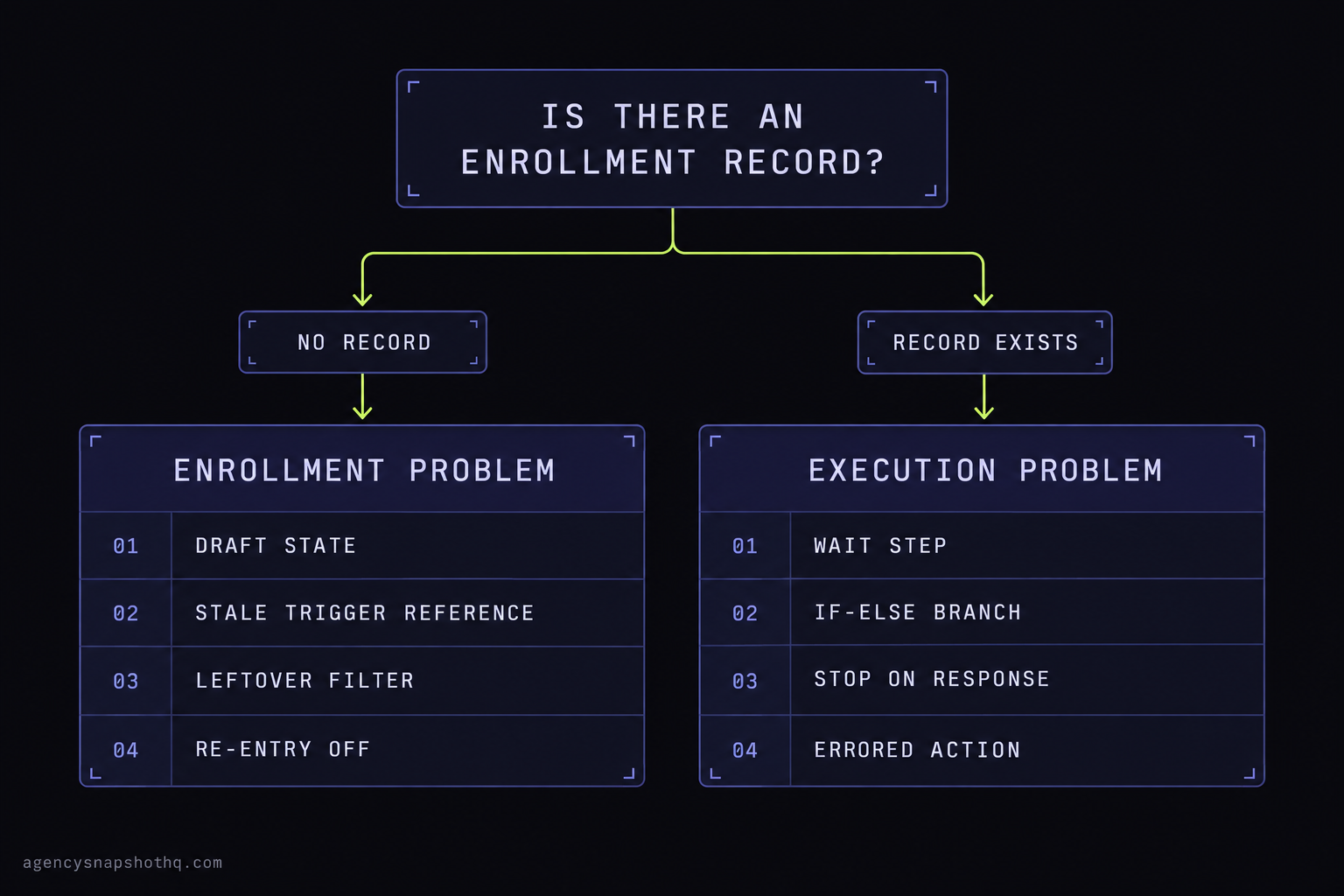
- The single diagnostic that tells you where to look is Enrollment History. No enrollment record means the contact never got in, so the problem is the trigger. A record that exists means the contact got in and stalled, so the problem is a step.
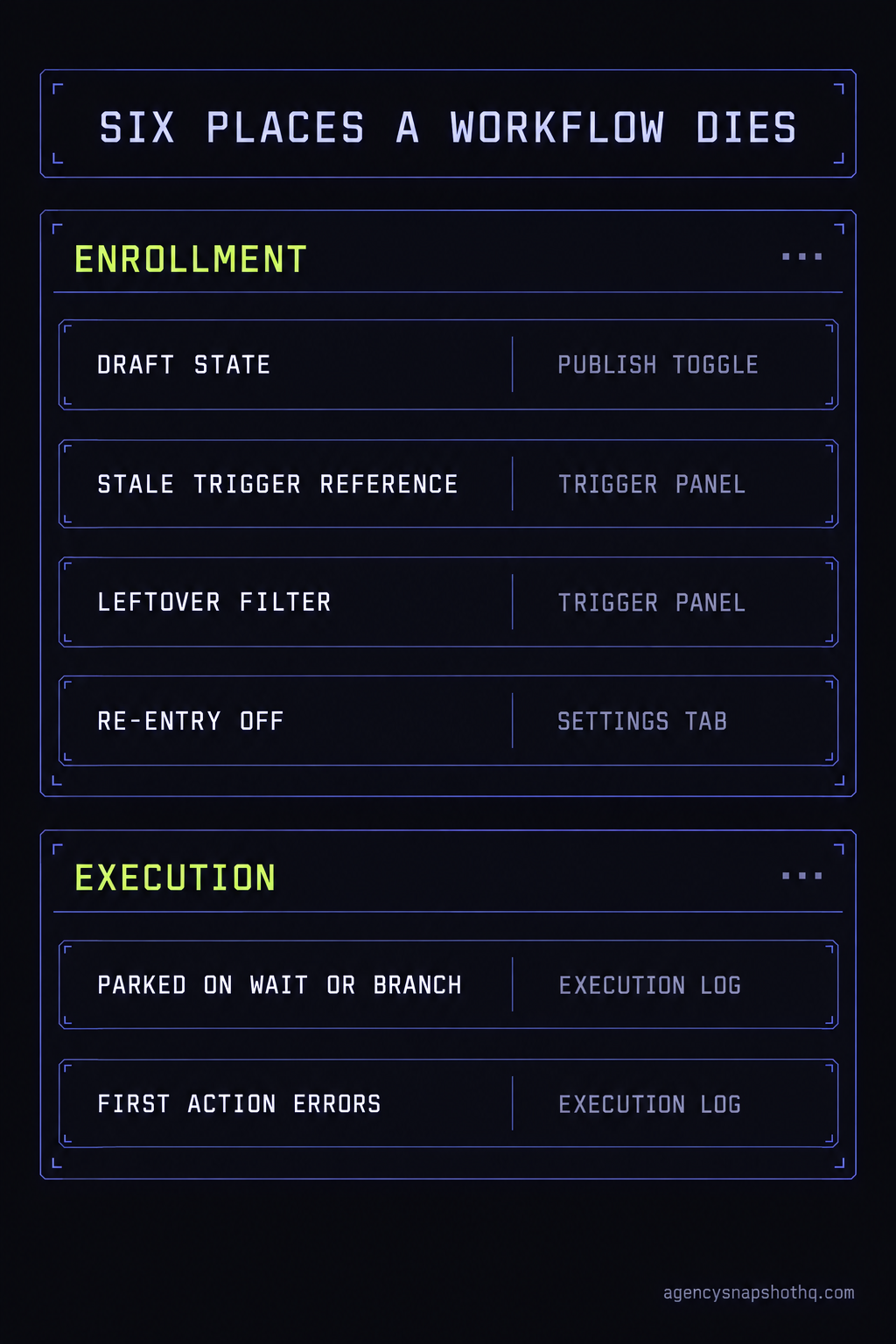
- Automations fail silently in a fixed set of places: the workflow is still in Draft, the trigger reference is stale, a leftover test filter excludes everyone, re-entry is off and your test contact already ran, or a Wait or If-Else step parks the contact forever. Check them in that order.
- Testing with yourself is the least reliable test you can run, because your own contact is usually already enrolled, already complete, and carries data a real lead will not have.
- Buying the snapshot here includes a free install with 12 hours of support to use within 10 days, which covers rewiring and testing the triggers against a real enrollment before a client ever submits the first form.
The lead came in at 9:12 on a Monday. You could see it happen: a new contact on the real estate sub-account you had stood up the week before, name and number filled in, the source tag sitting on the record, the opportunity already dropped into the first stage of the pipeline. Everything you built was there. By 11 the client had called, and the question was the one you never want on a Monday: “someone asked for a callback two hours ago and nobody’s reached out, is the system working?”
You open the contact. No text went out. No email. No task landed on anyone’s list. The speed-to-lead workflow, the whole reason the snapshot exists, shows zero runs against this person. It is published. You can see the trigger. You tested it on your own account on Friday and watched the text arrive on your phone. So either the workflow broke over the weekend, which it did not, or the thing you tested on Friday is not the thing that just failed for a real lead. It is the second one. It is almost always the second one.
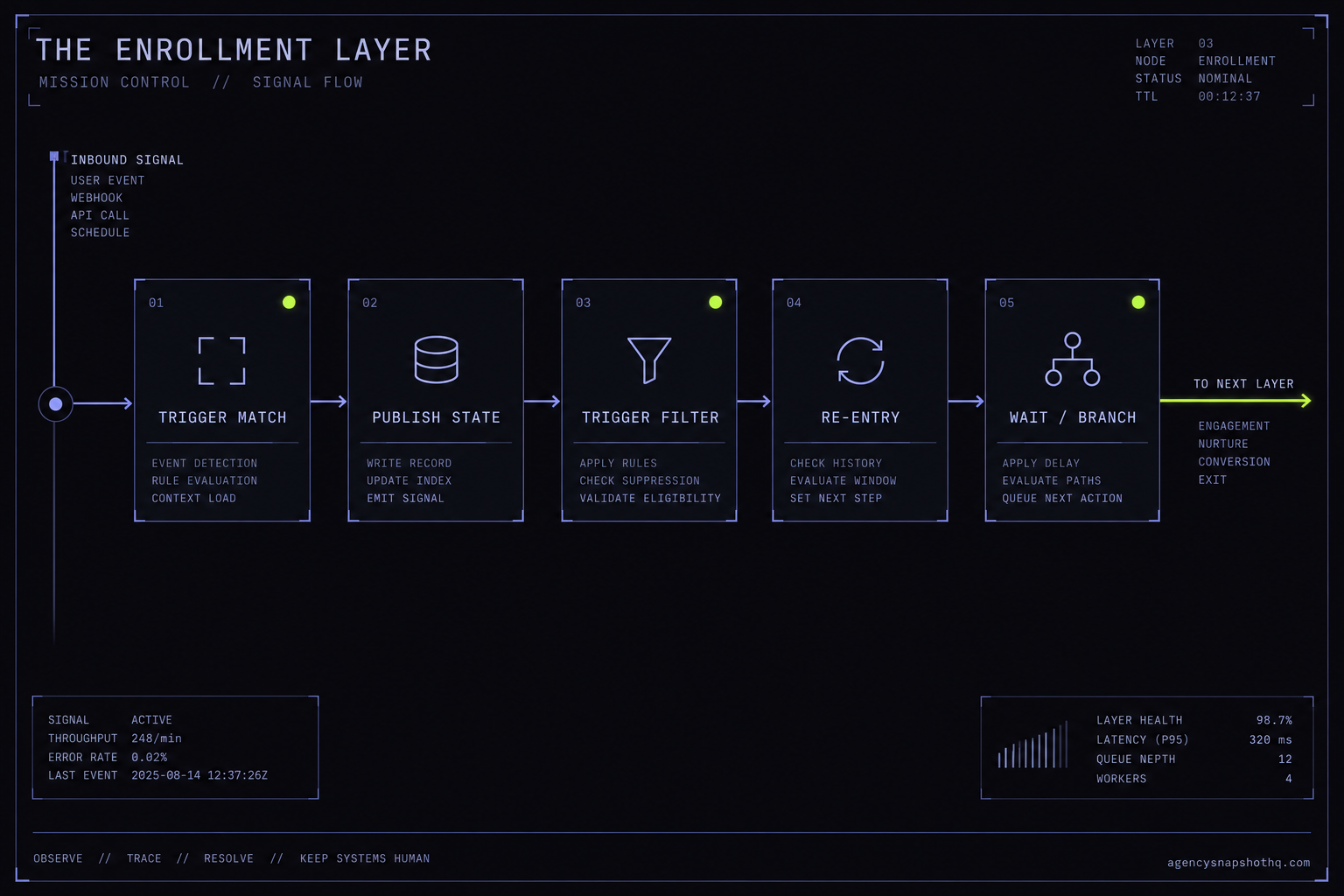
A workflow has exactly one way in: a trigger that matches an event. A snapshot carries the wiring of that trigger faithfully, and it cannot carry the live objects the trigger points at, because those objects are created fresh in the destination account with new identities. The workflow looks finished because the shape imported. It fires nothing because the door it is watching was rebuilt somewhere else. This piece traces the enrollment layer from the trigger down to the last step, and marks every place a workflow quietly refuses to run, in the order you should check them.
The trigger is the only door, and it carries a reference, not a copy
Before you can fix an automation that does nothing, you have to be precise about what a workflow actually is. It is two separate things stacked together, and the import treats them differently.
The top half is enrollment: the trigger, plus the settings that decide who is allowed in and how often. The bottom half is execution: the ordered steps that run once a contact is inside. When people say “the workflow isn’t working,” they almost always mean one of two very different failures, and the whole job is telling them apart. Either the contact never entered, which is an enrollment problem at the top, or the contact entered and got stuck, which is an execution problem further down. Fixing the wrong half is how an afternoon disappears.
A trigger watches for a specific event on a specific object
A trigger is not a general sensor. A “Form Submitted” trigger watches for a submission of one named form. A “Pipeline Stage Changed” trigger watches for a move into one named stage of one named pipeline. A “Tag Added” trigger watches for one named tag. The workflow builder stores each of those as a reference to the object, not as a description of it, and that distinction is the hinge the whole problem turns on.
When you export a snapshot, the trigger comes with its reference intact. When you import it into a new sub-account, GoHighLevel rebuilds the forms, the pipelines, the stages and often the tags as new records with new identities. The trigger still holds the old reference. On the demo account where you built it, the reference was live, so your Friday test matched and the text sent. In the client’s account the form the real lead submitted is a different record from the one the trigger is still watching for. The event happened. It simply did not match. No enrollment record is created, and from the dashboard the workflow looks idle and correct at the same time.
Draft and publish are a second gate, independent of everything else
Sitting above even the trigger is the publish state. A workflow can be fully built, saved, and still in Draft, in which case it will not act on real contacts at all. The builder auto-saves your canvas edits into the draft continuously, so the work looks preserved and complete, and nothing goes live until you explicitly publish. A snapshot can carry a workflow in either state, and a workflow you were mid-edit on when you built the snapshot can arrive in the new account unpublished. The toggle is in the top-right of the builder, and it is the first thing to read, because every other check below is moot if the workflow is simply switched off.
The settings tab decides who gets in, and how often
Once a trigger matches and the workflow is live, one more set of rules decides whether this particular contact is admitted. The workflow settings hold three controls that quietly block enrollment. Allow Re-Entry decides whether a contact who already finished, or is still inside, can enter again. Allow Multiple Opportunities decides whether a contact with more than one opportunity can enroll once per opportunity. Stop on Response ends the flow for anyone who replies to a message it sent. None of these is wrong. Each of them, left at a value that suited the builder’s testing, can turn a working trigger into a non-event for the exact contact you are watching.
The one question that tells you which half is broken
Here is the move that saves the afternoon. Before you touch a single setting, answer one question: did this contact ever enter the workflow? Everything downstream depends on the answer, and GoHighLevel will tell you plainly if you open the right screen.
Open the workflow and go to Enrollment History. It lists every contact who entered, when, the step they are on now, and the status that explains how they left if they are gone. You can filter it by date and by contact, so you find your 9:12 lead in seconds. If there is no record for that contact, the contact never got in. The trigger did not match, or a gate above it blocked them, and you have an enrollment problem. If there is a record, the contact got in, and any failure after that is an execution problem on a named step, which the execution log for that contact will show you row by row, down to the first action that errored or the step they are parked on.
That single split, no record versus a record, decides where you spend the next ten minutes. It is the difference between rewiring a trigger and reading an execution log, and they are not the same work. Most people skip this screen, start toggling settings at random, and end up changing three things that were never the problem.
The places a workflow silently dies
With the enrollment-versus-execution split in hand, the specific failures fall into a short, predictable list. Work them in this order, because each one is cheaper to rule out than the next and the early ones are the most common.
The workflow is still in Draft
What you see: a workflow that looks complete, with a trigger and steps, running against nobody. What is actually wrong: it was never published in this account, or it arrived unpublished from the snapshot. The fix: read the Draft/Publish toggle in the top-right and publish it. This sounds too obvious to be the answer, and it is the answer often enough that it goes first. A snapshot built from an account where the workflow was mid-edit will carry the draft state across, and a bulk import of many workflows makes it easy to miss one that never flipped to published. There is no bulk publish control, so each workflow is its own switch to check.
The trigger points at an object that no longer exists by that identity
What you see: the workflow is published, the event clearly happened, and Enrollment History has no record of the contact. What is actually wrong: the trigger holds a reference from the source account. The form the lead filled in is a new record in this account, so a “Form Submitted” trigger watching the old form never matches. A “Pipeline Stage Changed” trigger watching a stage that was rebuilt never matches. A “Tag Added” trigger watching a tag that came across under a slightly different name never matches. The fix: open the trigger, clear the stale object, and re-select the real form, stage or tag from this account’s own list. Then submit a genuine test through the real form rather than adding the tag by hand, so you are testing the same door the lead will use.
A leftover filter excludes the very contact you are testing
What you see: a record exists for some contacts but not for others, or not for your test lead. What is actually wrong: the trigger carries a filter from the builder’s own testing, and every configured filter has to be satisfied at once for the contact to enroll. A filter like “contact source contains Facebook” or “tag is client-test” made sense when the builder was isolating their own experiments, and it silently excludes every real lead who does not carry that exact attribute. The fix: read every filter on the trigger, not just the first. Remove the ones that belonged to the build phase, and keep only the ones the live business actually needs. A single stray filter is the most time-consuming of these to find precisely because the workflow is otherwise perfect.
Re-entry is off and your test contact already ran
What you see: the workflow fired once, during testing, and never again, including for the real lead if you reused a contact. What is actually wrong: Allow Re-Entry is off by default, so a contact who is already enrolled or has already completed is skipped when the trigger fires again. This is the failure that teaches people the workflow is broken when it is working exactly as configured. If you test with your own contact twice, the second run never happens, and you conclude the trigger died. The fix: for genuinely one-time flows, leave re-entry off and test with a fresh contact each time. For flows meant to repeat, such as a per-appointment reminder or a per-opportunity nurture, turn on Allow Re-Entry or Allow Multiple Opportunities as the flow requires. Appointment and invoice triggers re-enroll per event regardless, which is worth knowing before you go hunting for a bug that is not there.
The contact entered and is parked on a step
What you see: Enrollment History has a record, the contact is inside, and still nothing sent. What is actually wrong: the sequence stalled. A Wait step set to wait until an event that never happens holds the contact indefinitely. An If-Else step branching on a custom field that imported empty sends the contact down a path with no actions, or off the end of the workflow. Stop on Response ended the flow early because the contact replied. The fix: open the execution log for that contact and read down to the first row that is waiting or errored. That row names the step, and the step names the fix, whether it is a wait condition that can never clear, a branch reading a field that was never populated, or a stop rule firing as designed.
The first action errors because the account cannot perform it yet
What you see: a record exists, the contact enrolled, and the log shows an error on the first real action. What is actually wrong: the step depends on something the sub-account has not been set up to do. The most common case is a reminder or nurture workflow whose opening action is an SMS, in an account with no approved A2P registration, so the first send errors and the rest of the sequence never runs. A workflow that updates an opportunity can error if the pipeline it writes to did not import. The fix: resolve the dependency the step needs rather than the workflow itself. For SMS that means finishing A2P 10DLC registration before you blame the automation, because an unregistered send is blocked outright, not retried.
What a dead workflow actually costs
The reason to care about any of this is that the automation is the product. You are paying for an engine, and a silent enrollment failure means the engine is off while the meter runs.
Start with the platform. HighLevel’s Unlimited plan is $297 a month as checked on 8 October 2026, confirmed through search snippets of the pricing page rather than an independent fetch. That fee buys the account the workflows live in, and it is spent in full whether the speed-to-lead flow fires or sits idle. The snapshot you installed exists to make that fee pay for itself by answering leads without a person watching the inbox. A workflow that never enrolls anyone turns a running cost into pure waste for as long as nobody notices, and the thing about a silent failure is that nobody notices by definition.
Now the leads, with the assumptions printed so you can substitute your own. Say a single client sub-account takes 20 inbound leads a week through the form. Say the speed-to-lead workflow, working, would text each one inside a minute and book a meaningful share of them that a two-hour-later callback would lose. Put the value of a booked job at $500, a figure you should replace with your own average. If the dead workflow costs that client even two booked jobs a week that fast follow-up would have saved, that is $1,000 a week, roughly $4,000 a month, against a snapshot that cost a four-figure sum once. The arithmetic is deliberately coarse because the real numbers are yours, but the shape holds at any inputs: the loss compounds weekly and invisibly, and it dwarfs the price of the asset that was supposed to prevent it.
There is a second cost that is harder to price and worse to carry. The client sees the leads arrive and sees nothing happen to them, and the conclusion they draw is not “a trigger reference did not survive the import.” It is “the system you sold me does not work.” The system does work. A door was watching the wrong frame. But the trust is spent at the client’s end before you ever get to explain, which is why the fix is worth doing before the first real lead rather than after the first complaint.
One more figure belongs here, stated the way we are allowed to state it. The appointment reminder and no-show recovery flows carry a target of recovering around 70% of no-shows, and the review request flow targets a typical 5 to 10 reviews a month. Both are targets, not measured outcomes, and both are worth exactly nothing if the workflow behind them never enrolls the contact. A target assumes the engine runs. Confirming enrollment is what makes the target a possibility instead of a slide.
The objections worth answering
If you run more than a couple of accounts, you have reasons to push back on all of this. The strongest ones are worth stating in full.
“I will just rebuild the workflows from scratch in each account.” You can, and it will not remove the problem. A workflow you build directly in a client sub-account still has a trigger, and that trigger still has to point at that account’s form, pipeline and tags. If you build it against the wrong form, or leave a filter from your own testing, it fails for exactly the same reason an imported one does. Rebuilding also throws away the one advantage the snapshot gave you, which is that every account starts from the same known build. You trade a five-minute rewire for an hour of rebuilding and inherit a fleet of accounts that are now all subtly different. The fix for a stale reference is to fix the reference, not to burn the workflow down.
“This is the reason I would never buy a snapshot. I will build my own library.” Build your own library if the economics favor it, but understand that this particular failure is not a snapshot defect. It is a property of how GoHighLevel moves automations between accounts, and it applies to your own snapshots the instant you install one into a second client. The moment you reuse anything you built, triggers that reference account-specific objects have to be rewired in the destination. A home-grown library does not escape the enrollment layer. It just means the stale references are yours. The honest comparison is not snapshot versus no snapshot, it is a known build you rewire deliberately versus a blank account you build from nothing every time.
“If the fix is a toggle and a dropdown, why would I pay anyone to do it?” At one account, you should not. Reading the publish state, rewiring a trigger and running one real test is an afternoon of your own time, and this piece is meant to let you do it. The install and support we include exist for the case that does not scale by hand: the same rewire and the same end-to-end test across a stack of client sub-accounts, done once per account, verified against a genuine enrollment before a client ever submits a form. If your situation really is one account and one toggle, do the toggle. The service earns its place only when the repetition is the expensive part, and it is honest to say so.
“The workflow worked in testing, so the build is fine and this is a platform bug.” Testing with yourself is the least representative test available, and the fact that it passed is weak evidence. Your own contact is usually already enrolled from a previous run, so re-entry rules hide the failure. Your record carries data a real lead will not have, so an If-Else branch that will strand a real contact sails through for you. You added yourself in a way the real lead never will, by hand rather than through the live form, so you never exercised the actual trigger. A passing self-test and a real failure are perfectly consistent, and the way to tell them apart is a fresh contact through the real door, read in Enrollment History.
Fix it before the first real lead, not after the first complaint
The pattern underneath all six failures is the same. A snapshot carries the design of your automations and cannot carry the live objects they point at, so enrollment is the layer that always needs rewiring and testing after an import, in every account, every time. The workflows that look most finished are the ones that hide it best, because the shape is perfect and only the door is wrong.
If you are installing one account this week, the sequence is short: confirm every workflow is published, open each enrollment trigger and re-point it at this account’s real form, stage or tag, clear any filter that belonged to the build phase, then push one genuine lead through the live form and read Enrollment History to prove it entered and the first step ran. That is the whole job, and it is an afternoon.
If you are rolling the same snapshot across a stack of client accounts, the rewire and the end-to-end test are the repeat work that makes a rollout an operation rather than a task, and it is exactly what the free install we include with every snapshot is for: 12 hours of dedicated support to use within 10 days of purchase, spent reconnecting the triggers and proving a real enrollment in each account before a client ever sees a form. Buy the snapshot here and that work is covered. Bought one elsewhere and want it done cleanly, the same installation service covers it, connected and tested with a recorded walkthrough. Either way, the test to insist on is the same one: a real contact, through the real door, showing up in Enrollment History with the first step run. Everything in this piece is just the list of reasons that test can fail, and the order to check them in.
For the questions that come up most, the FAQ collects the short answers, and the mortgage broker and HVAC contractor snapshots are built with the same enrollment layer, rewired and tested the same way.