THE SHORT VERSION
- The deployment decision is about your hours, not the snapshot: the same snapshot lands four different ways depending on how much labour you keep.
- Self-install is free of any service fee, but A2P registration and email domain setup are where a DIY rollout quietly loses two weeks.
- A per-account install service is worth it the moment your loaded hourly cost times the hours a clean go-live takes you exceeds the flat install fee.
- A managed rollout buys calendar time and a single owner across accounts; a fully deployed account buys the whole build, not just the import.
- Mixing models across sub-accounts without a version record is how agencies lose track of which account is on which build.
It’s Friday afternoon and there are nine sub-accounts waiting on the same snapshot. You bought it last week. It imports clean, the workflows read the way you hoped, and now the only question left is the one you keep putting off: do you sit down and roll it out yourself over the weekend, or do you pay someone to do it while you go and sell the next three clients.
You have done one of these before. It took most of a day, and half of that day was not the snapshot at all. It was the A2P brand that sat in review, the email domain that would not authenticate, the calendar that kept pointing at your own Google account. The snapshot was the easy part. So the number you are actually weighing is not the price of the snapshot. It is the price of your Saturday, times nine, against a fixed fee you can read off a page.
That is the decision this briefing settles. The snapshot is chosen. What is left is how much of the deployment you keep and how much you hand over, and there are four honest answers.
What deploying a snapshot actually involves
Before you can price the models against each other, you have to be clear about the work, because the work does not change. Whoever does it, a snapshot goes live in the same order, and most of the steps have nothing to do with the snapshot itself.
The import comes first, and it is genuinely quick. You take the share link, open the destination sub-account, and load it. On a well built snapshot the pipelines, workflows, funnels, the AI Studio website, the nurture campaign and the forms all arrive together. If the snapshot was built to be reused, nothing collides and nothing points back at the account it came from.
Then the real work starts. Every client-specific string has to be set. On a snapshot built properly, those strings live in custom values, so setting the business name, the booking link, the review link and the office hours is a single screen rather than an edit to forty templates. If the snapshot was not built that way, this is where a weekend goes. Next is the calendar: it has to be reassigned to the client’s own connected calendar, or every booking lands in a stranger’s inbox. Then the phone: the number has to be provisioned and, before a single text sends, the account has to clear A2P 10DLC brand and campaign registration. This is the step that does not care how good your snapshot is. It runs on a carrier’s clock, not yours.
Email is the same shape of problem. The sending domain has to be added in GoHighLevel and authenticated with the right DNS records, or the nurture campaign you just imported quietly lands in spam. Then the website gets rebranded, the logo and colours swapped, the copy pointed at the client’s offer. And last, before you hand over the keys, someone has to actually test it: fire a form, watch the workflow run, confirm a text arrives with the business name in it and not a merge field.
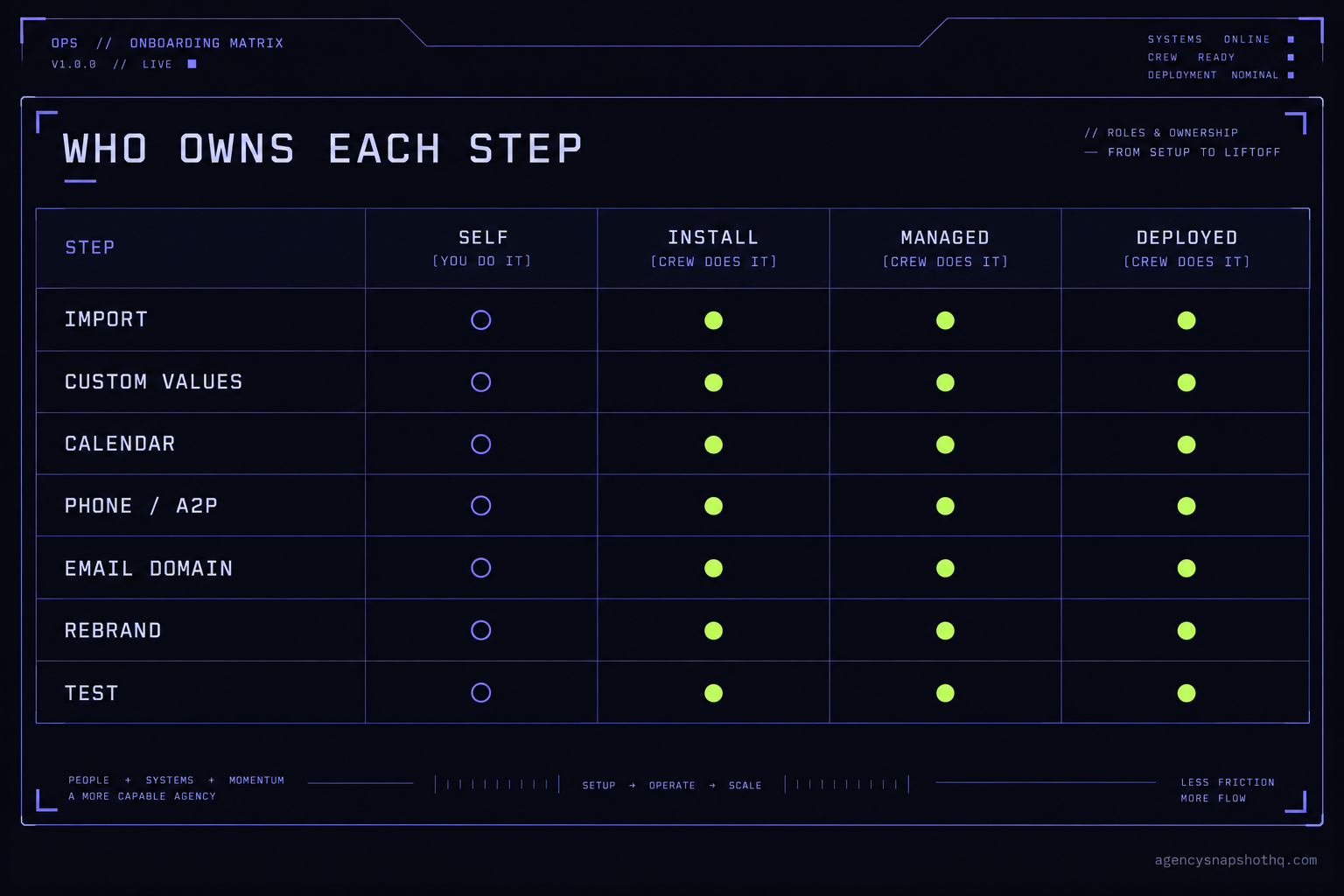
That is the whole job. Import, custom values, calendar, phone and A2P, email domain, rebrand, test. The snapshot handles the first stretch of it for you. The rest is setup that any account needs, and it is exactly the part the four deployment models divide up differently. Once you see the work as a list, the models stop being marketing tiers and become a straightforward question of which rows you keep.
If you want the mechanics of doing it across many accounts at once, the sub-account rollout runbook walks the order step by step. This briefing is the decision that comes before it: who runs that runbook.
The four models, and where each one draws the line
Self-install
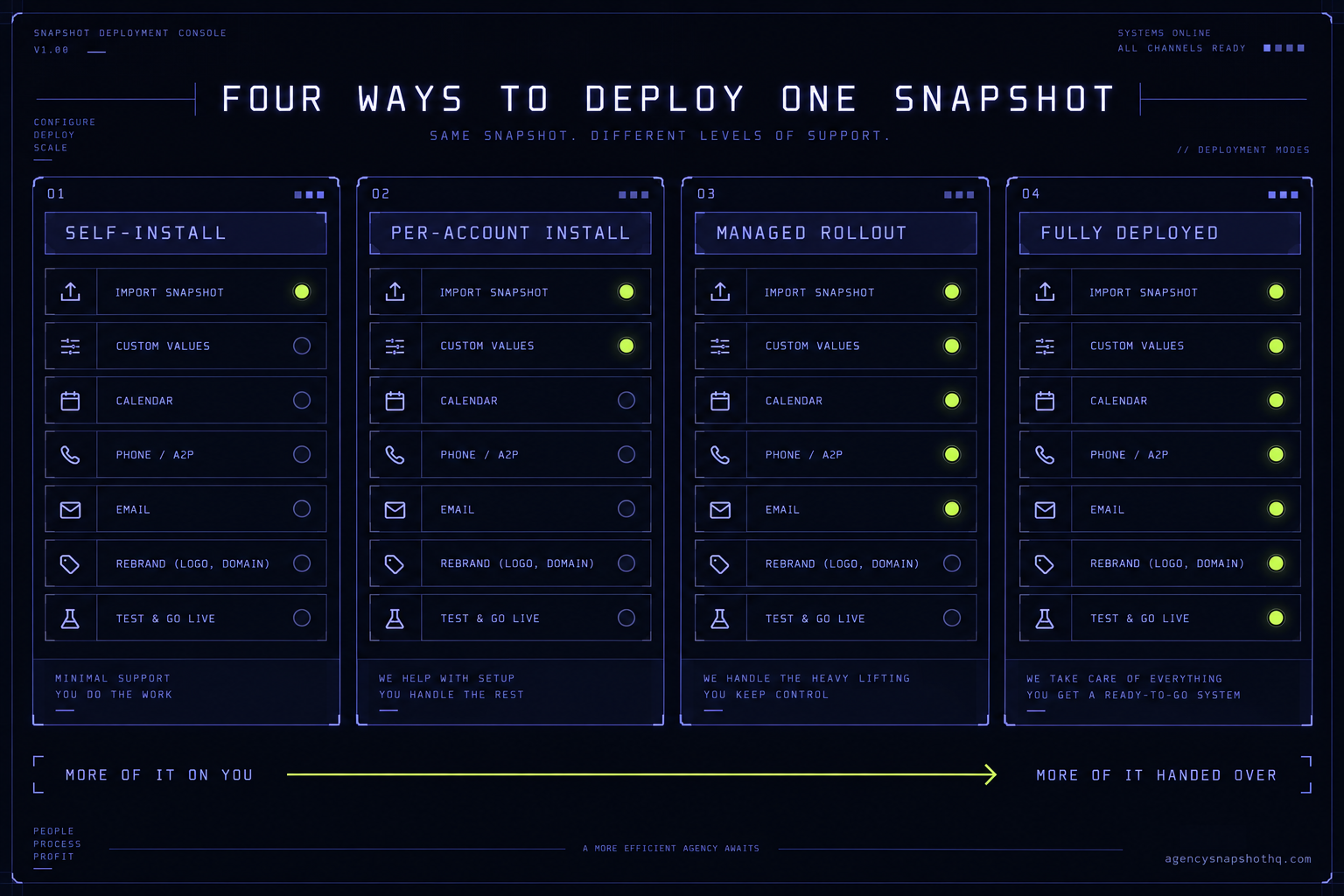
You import the snapshot and do every row on the list yourself. The install is free with the snapshot, and it comes with twelve hours of dedicated installation support to be used within ten days of purchase, so you are not alone the first time. Those hours cover installing the snapshot, rebranding the website, A2P and 10DLC registration and setup, email domain setup, and a few extra automations where you need them. When the hours are spent or the ten days close, further help is quoted.
Self-install costs you nothing beyond the snapshot licence and your own time. It is the right call when you have one or two accounts, when you want to learn the snapshot from the inside because you will be maintaining it, and when the calendar is not the constraint. Its weakness is that the slow rows, A2P and email authentication, still run on their own clocks whether you are watching or not.
Per-account install
You buy the snapshot installation service and hand one sub-account over. It is priced per sub-account and turns around inside seventy-two hours. The crew does the import, the custom values, the calendar, the phone and A2P, the email domain, the rebrand and the test, and gives you back a working account. Your hours on that account drop to near zero.
This is the model that scales cleanly by the account. Three accounts is three installs; ten is ten. It suits an agency that has standardised on a snapshot and is now onboarding clients faster than it wants to spend evenings in setup screens. Its limit is that it is an install, not an ongoing relationship with your process. It gets one account live and correct; it does not own how the next twenty stay in sync.
Managed rollout
You buy white-glove onboarding: a scoped engagement, a fixed fee, and a fixed window of fourteen business days. Instead of a single account handed back, you get a rollout run for you, with one owner across the accounts in scope, the setup done, and the whole thing tested before it goes live. This is the model to reach for when the constraint is calendar time and coordination, when several accounts have to go live together and you cannot afford them drifting apart during setup.
The thing to understand about a managed rollout is that it is an engagement, not a subscription. It covers the accounts in its scope. Accounts you add later are a new scope, or you run them yourself on the free install support. Agencies get burned when they treat one white-glove engagement as permanent cover for every future client.
Fully deployed account
You buy the Deployed plan. This is not an install of one snapshot; it is the whole agency account built and tested end to end, with all-access to the library included for the first year. You are not handing over a sub-account to be set up. You are handing over the console to be built. It suits the operator who wants to be running clients next month rather than building infrastructure this quarter, and who has a stable offer that a built account can be shaped around.
Its risk is the opposite of self-install’s. Self-install can cost you time you did not budget. A fully deployed account can cost you a build you did not need if your offer is still moving, because you pay for a finished thing and then change it. It is the right answer when what you are buying is time, and the wrong one when what you actually need is to keep experimenting.
The comparison, on eight criteria
Here is the same four models against the eight things that actually decide it. Prices are this site’s published prices, read live. Your hours are yours to fill in.
| Criterion | Self-install | Per-account install | Managed rollout | Fully deployed |
|---|---|---|---|---|
| Service fee | None (snapshot only) | Flat, per sub-account | Fixed engagement fee | Single plan fee |
| Your hours per account | High | Near zero | Near zero | Near zero |
| Calendar time to live | Your own pace | 72 hours | 14 business days | The full build window |
| Who owns A2P and email setup | You | The crew | The crew | The crew |
| Scales by | Your evenings | Cost per account | Scope of engagement | One account, built |
| Risk of a broken go-live | On you | Low | Low | Low |
| Best when | 1 to 2 accounts, you maintain it | Onboarding faster than you want to set up | Several accounts must go live together | You want to run clients, not build |
| Still on you afterward | Everything | Keeping accounts in sync | New accounts after scope | Running the offer |
Read the table by row, not by column. The row that decides it for most agencies is “your hours per account”, because that is the row you can price. Every other row is a consequence of that one. The moment your hours per account are worth more than the fee that removes them, the decision has already been made for you.
Where the deployment decision goes wrong
The four models are simple. Choosing the wrong one for your situation is where the money leaks, and it leaks in four predictable ways.
You chose self-install to save the fee, and lost two weeks to A2P
This is the most common one. The snapshot imports in an afternoon, the account looks finished, and you tell the client it is live. Then the first campaign sends nothing, because the A2P brand is still in registration and the number is not cleared to send. What you see is a working-looking account. What is actually wrong is that the slow rows, the ones on the carrier’s clock, were never started early enough. The fix is order: begin A2P and email authentication on day one of any self-install, before you touch the fun parts, because those are the steps that gate go-live and they do not speed up because you are in a hurry. If you cannot start them a fortnight before the client expects to be live, that alone is the argument for handing the account to a crew that starts them the same day.
You bought a per-account install and expected it to keep the fleet in sync
An install service installs. It gets one account live and correct, once. What it does not do is own the drift that sets in afterward, when you tweak the snapshot for one client and forget to carry the change to the other eight. What you see three months later is nine accounts that are supposed to be identical and are not. What is wrong is that you bought a component and expected a system. The fix is to keep a version record the moment you run more than one install, so you always know which account went live on which build. Our own snapshot version drift briefing is entirely about this failure, because it is the one agencies notice last and pay for longest.
You bought one white-glove engagement and treated it as permanent cover
A managed rollout is scoped. It covers the accounts in front of it, run by one owner, inside a window. Some agencies buy it once, love it, and then quietly assume every client they land for the next year is covered by it. What you see is a support request that comes back with a quote attached. What is wrong is a mental model, not a bill: you bought an engagement, not a subscription. The fix is to decide up front how the accounts after the engagement get deployed, whether that is a fresh scope, a per-account install each time, or your own hours on the free install support, and to price that into what you charge the client from the start.
You bought a fully deployed account before your offer was stable
The Deployed plan builds the whole account for you. That is exactly what you want when your offer is settled and what you regret when it is not. What you see is a beautifully built account that you then start pulling apart, changing the pipeline stages, rewriting the nurture, repointing the funnels, because the way you actually sell has moved since you ordered it. What is wrong is timing: you paid for a finished build and then kept designing. The fix is sequence. Get your offer stable on one or two self-installed accounts first, learn what your real pipeline looks like with clients in it, and buy the fully deployed account once there is a settled thing to deploy. Buying the build is buying time, and time is only worth paying for when you know what you want built.
The thread through all four is the same. The deployment model is a bet on where your constraint is. Self-install bets it is money. The install service bets it is your hours. The managed rollout bets it is calendar time. The fully deployed account bets it is the whole build. Pick the model that matches your actual constraint, not the one that matches your mood on a Friday.
The numbers, with the assumptions showing
The only number you need to run this decision is your own loaded cost per hour, and the only honest way to show the maths is to let you put your own in. So here it is with visible assumptions you can swap.
Say a clean self-install of a well built snapshot into one sub-account takes you eight hours end to end, once you count the setup screens, the A2P and email steps, the rebrand and a real test pass. That is a working figure, not a measured one; your number will be higher the first time and lower once you have a routine. Say your loaded cost per hour is $90, which is a placeholder, not a claim about your business. Then a self-install costs you about $720 of your own time per account, on top of the snapshot licence you already paid.
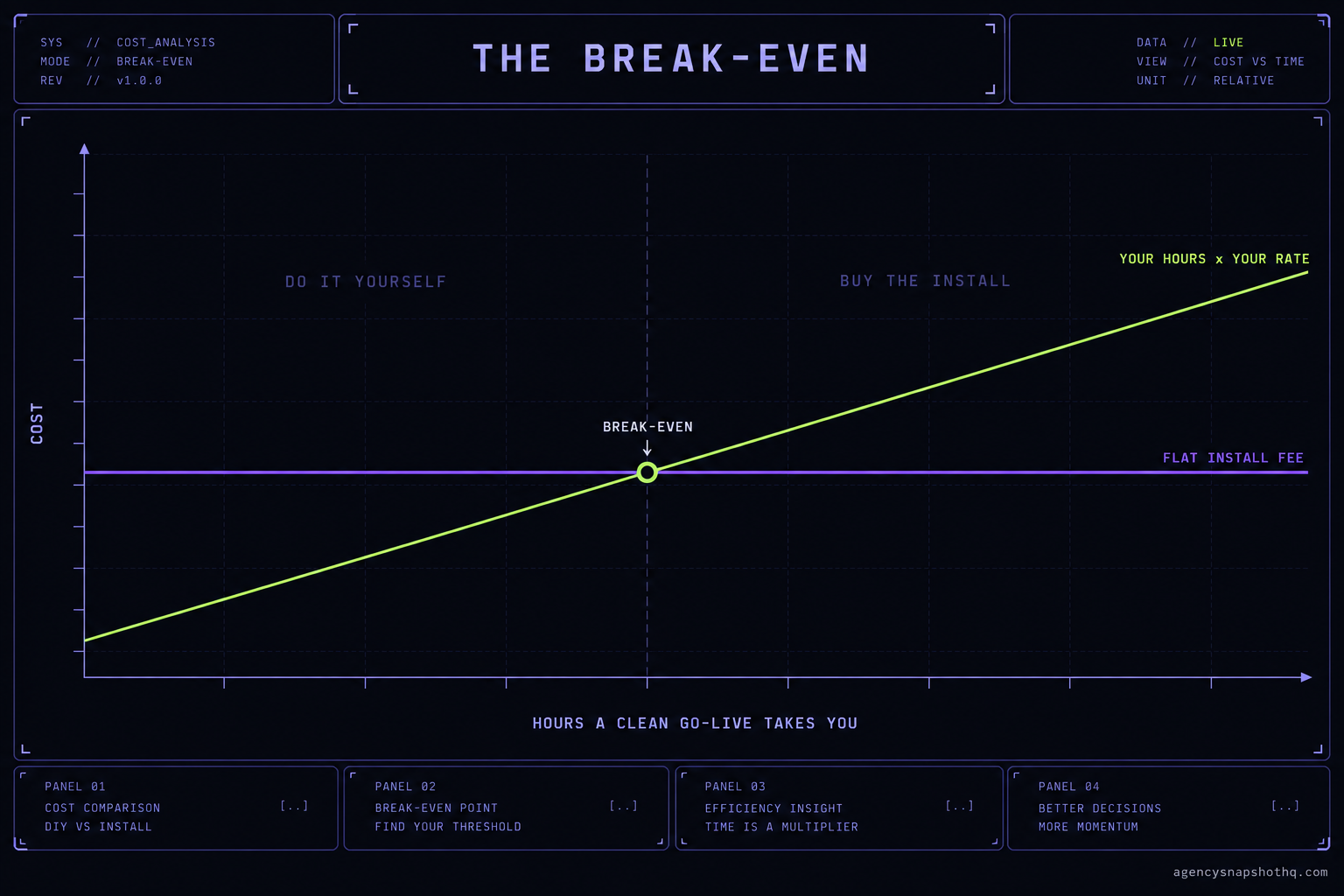
Against that, the per-account install is a flat $650 and turns around in seventy-two hours. On those assumptions the install service is already cheaper than your own time, and it frees the eight hours to do something that earns more than $90. Change the inputs and the answer changes with them. If a clean go-live takes you five hours at a $70 cost, that is $350 of your time, and self-install wins on cash. The break-even is simply your hours times your rate against the flat fee: below it, do it yourself; above it, buy the install. The point is not the specific figure. It is that you should run it on your real numbers rather than on the instinct that doing it yourself is free. It is not free. It costs whatever else those hours would have earned.
Now the recurring floor underneath all of this, because it is the number agencies forget. The snapshot and the deployment are one-time. The platform is not. HighLevel’s own plans run at $97 a month for Starter, $297 a month for Unlimited, and $497 a month for Agency Pro, per HighLevel’s pricing page (figures confirmed via search snippet this run, not independently fetched). The line that matters for a rollout is the sub-account cap: Starter is limited to three sub-accounts, while Unlimited and Agency Pro carry unlimited sub-accounts. If you are deploying a snapshot across more than three clients, you are on Unlimited or above already, and the deployment fee is small next to the platform subscription you are running anyway. Usage-based charges for SMS, calls and email sit on top of that and are billed separately by volume, which is one more reason the A2P and email steps are not optional detail. They are what makes the recurring spend actually send anything.
The objections worth answering
“I’ll just self-install everything and never pay a fee.” You can, and for one or two accounts you should. The honest limit is your calendar, not your ability. The free install support is twelve hours inside a ten-day window, which is generous for a first account and finite by design. When you are onboarding faster than you can spend evenings in setup screens, the fee you avoided becomes the client you did not sign because you were rebranding a website instead of on a sales call. Self-install stops being free the moment your time has somewhere better to be.
“Why not just clone my best account instead of paying for a deployment at all?” Because a cloned sub-account is not a snapshot. It carries assignments to people who do not exist in the new account, calendars owned by someone else, and absolute media links pointing back at the original. It works exactly once, on the account you cloned from, and falls apart on the second install. A redeployable snapshot with its client-specific strings in custom values is a different thing from a copy, and it is most of what you are paying for whichever deployment model you choose. Cloning saves the fee and costs you the reuse.
“The install service is cheaper than white-glove, so white-glove is overpriced.” They are not the same product, so the comparison does not hold. The install service gets one account live in seventy-two hours. A managed rollout runs several accounts to a coordinated go-live inside a fixed window, with one owner keeping them in step, which is a different job with a different failure mode. If you have one account to launch, the install is the right buy and white-glove would be paying for coordination you do not need. If you have five that must go live together for a launch, the install service run five times gives you five accounts and no coordinator, which is how they end up subtly different. Buy the model that matches the shape of the work.
“I’ll buy the fully deployed account so I never have to think about any of this.” Sometimes the right call, sometimes the expensive one. If your offer is stable and you want to be running clients next month, the Deployed plan buys you exactly that. If your offer is still moving, you will pay for a finished build and then rebuild it as you learn, which is the most expensive way to arrive at a snapshot you could have self-installed while you figured the offer out. The question to ask is not whether you can afford it. It is whether the thing you would deploy is settled enough to be worth deploying once.
Whichever way you go, the snapshot itself is the same on the other side. What you are choosing is how much of your own time to keep. Price that honestly, against your real hours and your real calendar, and the Friday-afternoon decision stops being a mood and starts being a number. Start from the snapshot library if you have not chosen yet, or the pricing page if the question is which plan the fleet should sit on.