THE SHORT VERSION
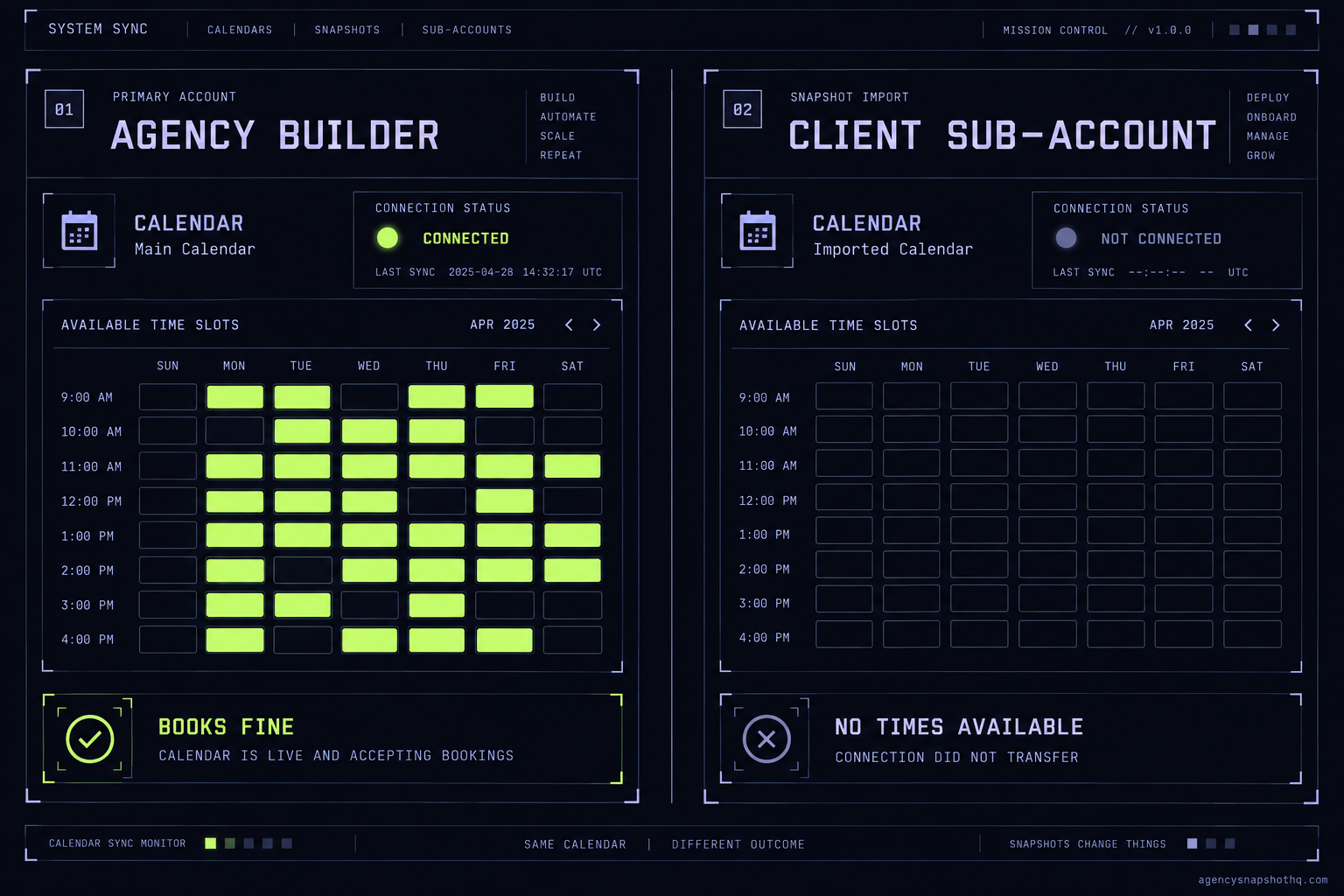
- A snapshot carries the shape of a calendar, not its connection. The link to a real Google or Outlook account does not travel, so availability and two-way sync are broken on arrival even though the calendar looks present.
- A booking that works in your agency builder almost never works in a fresh client sub-account, because you tested with your own calendar connected and the client's account has no connection yet.
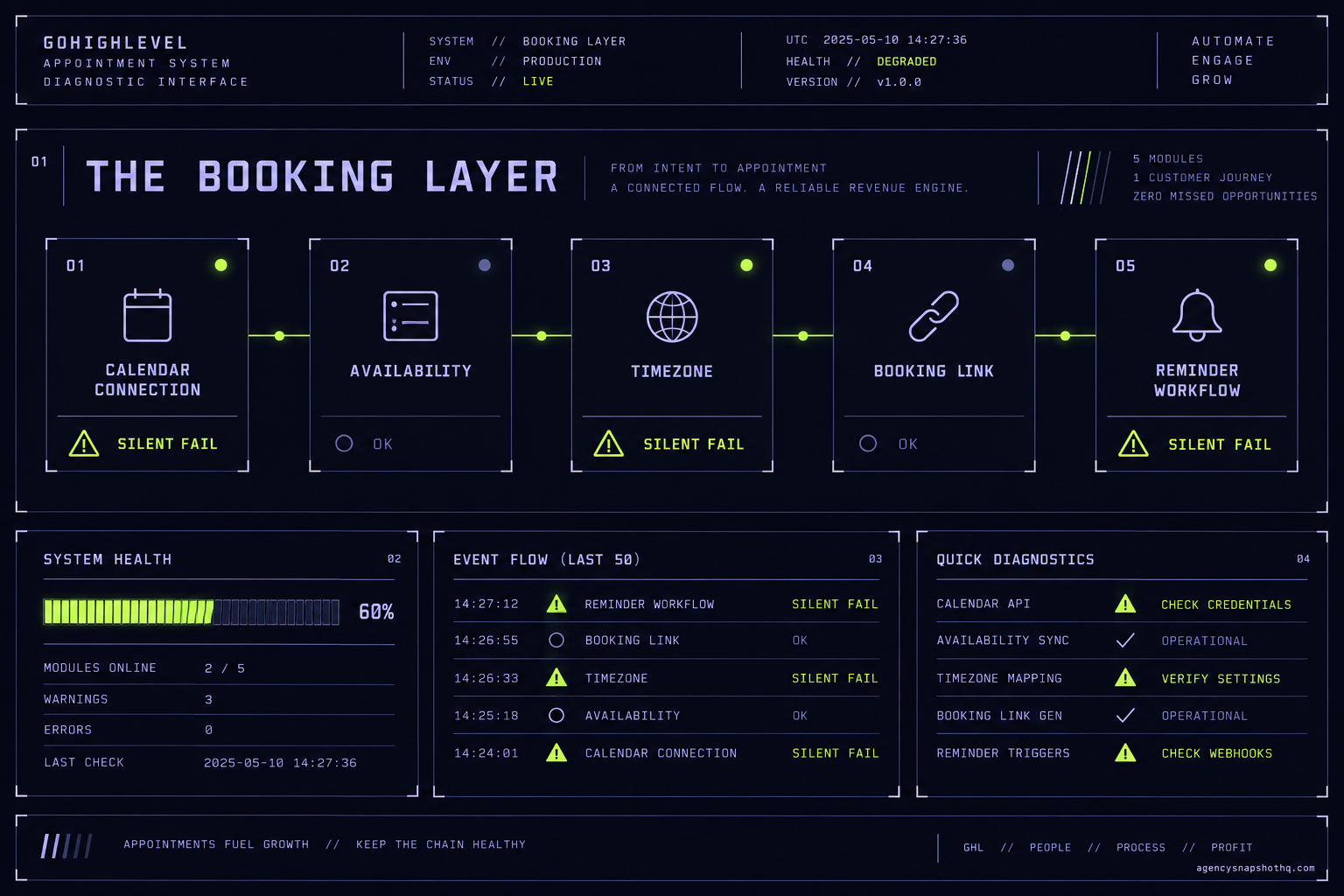
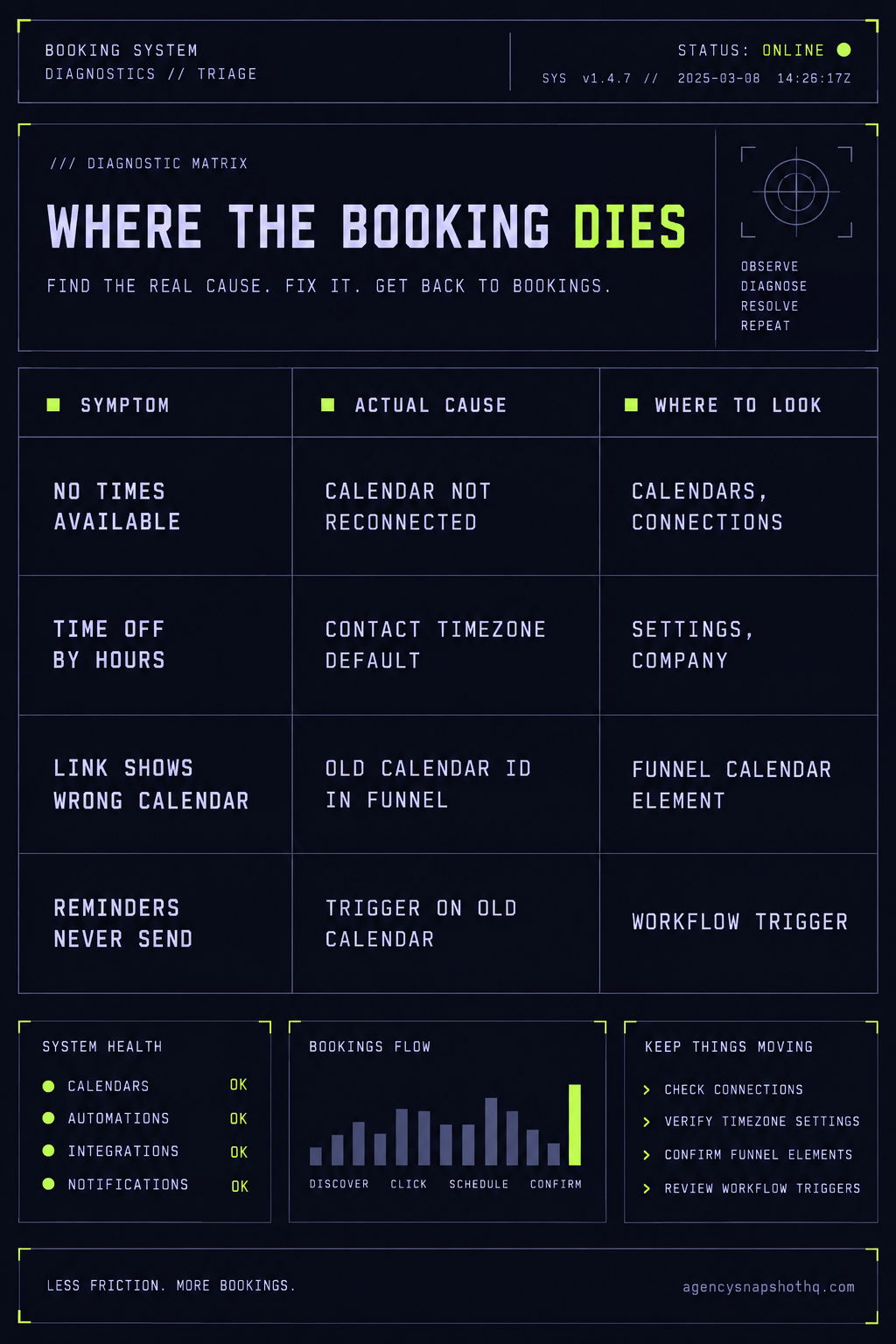
- The booking layer fails in a fixed set of places: the calendar connection, the availability schedule, the timezone, the workflow triggers that fire reminders, and the booking link's own calendar reference. Check them in that order.
- Appointment reminders and no-show recovery only pay off if the SMS actually sends, which depends on an A2P registration the snapshot cannot carry for you.
- Buying the snapshot here includes a free install with 12 hours of support to use within 10 days, which covers reconnecting the calendar and testing a booking end to end before a client ever sees the link.
The message came in on a Tuesday afternoon, forwarded from the client with a single line on top: “third person this week says your booking link doesn’t work.” The account was a dental practice you had stood up the Friday before, snapshot imported clean, every funnel loading, the calendar sitting there in the sub-account looking exactly like the one on the demo you had walked them through. You open the booking page the way a patient would, in a private window, and the slot grid is empty. Not broken, not erroring. Empty. “No times available,” in grey, under a calendar that has every appearance of being finished.
Here is the part that stings. It worked when you tested it. You booked a test appointment on Friday, watched it land, saw the confirmation. So either the calendar broke over the weekend, which it did not, or the thing you tested on Friday was not the thing the patient is looking at now. It is the second one, and it is almost always the second one.
A snapshot carries the shape of a calendar. It does not carry the one piece that makes a calendar actually book: the live connection to a real account that owns the hours. That connection cannot travel in a snapshot, so a freshly imported calendar is a dashboard wired to nothing until you reconnect it by hand. This piece traces the whole booking layer, top to bottom, and marks every place it quietly dies after an import, in the order you should check them.
How a snapshot actually carries a calendar
Before you can fix a booking that fails, you have to know what a snapshot moved and what it left behind. A GoHighLevel calendar is not one object. It is a small stack of settings that each have to be right, and a snapshot copies some of them faithfully and cannot copy others at all.
The connection that does not travel
The top of the stack is the connection: the authorisation that lets GoHighLevel read a real person’s free and busy times and write bookings back into their Google, Outlook or iCloud calendar. That authorisation is a token held between one specific account and the calendar provider. It is not a setting you can serialise and ship. When you export a snapshot, the calendar’s name, its duration, its buffers, its booking form and its workflows come along. The connection does not. HighLevel’s own integration works by granting it permission to read and create events in the external calendar, and that grant is scoped to the account that gave it, so it has to be granted again, by the client, inside the new sub-account.
This is why the calendar looks present and books nothing. The structure imported. The link to real hours did not. On the demo account the connection was yours, live, so the grid filled with your availability and your test appointment landed in your own calendar. In the client’s sub-account there is no connected account yet, so there are no hours to offer, and the grid is empty.
Availability, and where the hours come from
Underneath the connection sits availability. GoHighLevel reads bookable time from a schedule attached to the calendar and from the connected calendar’s existing events, which it treats as busy so it does not double-book. Schedules are now managed centrally and reused across calendars, which is a help when it comes across and a trap when it does not, because a calendar can import pointing at a schedule that is empty or that never made the trip. A calendar with no schedule and no connected account has two separate reasons to show no times, and fixing only one of them leaves the grid just as empty.
Two-way sync, and the write-back nobody checks
The connection, once it exists, can run one way or both. With linked calendars and write-back enabled, a booking in GoHighLevel is written into the external calendar, and a cancellation or reschedule updates it in both places. This is the setting that stops the client’s own diary and the booking page from drifting apart. A snapshot can carry the intent to sync, but the sync does nothing until the connection beneath it is live, so a reconnected calendar still needs its sync mode set and confirmed rather than assumed.
The timezone default that surprises everyone
The setting that catches the most careful operators is the timezone, because GoHighLevel’s default is not the one people expect. The platform offers slots in the contact’s own timezone by default, and separately lets a user view appointments in whatever timezone they choose without changing the booking logic. On top of that, the sub-account carries a timezone of its own, set under the company settings, and the connected calendar carries one too. When those three agree, nothing is wrong. When they disagree, a slot a patient books for nine in the morning records as two in the afternoon, the reminder fires against the recorded time, and everybody blames the automation.
The workflows that read the appointment
At the bottom of the stack are the automations that make a booking feel like service: the confirmation, the reminder sequence, the no-show recovery. These are workflows triggered by an appointment reaching a particular status on a particular calendar, and they read the time, the location and the contact off that appointment. The snapshot brings the workflows. Whether they fire against the new calendar is a separate question, and it is the one the next section opens with, because a workflow pointed at the wrong calendar is the failure that looks most like success.
Where the booking quietly dies
Five failure points, in the order a booking depends on them. Work them top to bottom and you find the one that is biting before you waste an afternoon on the four that are not.
The calendar points at a connection that is not there
This is the empty grid, and it is first because it is the most common and the most invisible. What you see is a booking page that loads perfectly and offers nothing. What is actually wrong is that the calendar has no connected account to read hours from, so there is no availability to display. The fix is to open the sub-account, go to the calendar settings, find the connections tab, and connect the client’s real calendar account, which the client has to authorise because it is their data. Then assign that connected user to the calendar as the person whose hours it books against. Until a real account is attached and a real person owns the slots, the grid stays grey no matter how clean the import looked.
Every slot is offered in the wrong timezone
Here the grid fills, the booking works, and the appointment still lands in the wrong hour. What you see is a client asking why a nine in the morning consult shows as an afternoon in the confirmation, or a reminder that arrives at a time that makes no sense. What is wrong is a disagreement between the three timezones in play: the sub-account’s own, the connected calendar’s, and the contact’s, which the booking page uses by default. The fix is to set the sub-account timezone correctly under the company settings first, confirm the connected calendar matches, and decide deliberately whether bookings should follow the contact’s timezone or be locked to the business’s. Then book a test as a contact in a different timezone and read the confirmation, because this is the one failure you cannot verify from inside your own account in your own timezone.
The widget says no times available even after you reconnect
Sometimes the connection is live, the timezones agree, and the grid is still empty. What is wrong now is availability itself: the calendar has no schedule with real working hours, or the connected account is so full of existing events that every slot reads as busy, or the booking window is set to open so far in the future that nothing shows for the dates a patient is looking at. The fix is to attach a schedule with the business’s actual hours, confirm the connected account is the right one and not a personal calendar stacked with all-day blocks, and check the minimum scheduling notice and the booking window are set to human numbers. An empty grid has more than one cause, which is exactly why you check them in order rather than assuming the first fix was the whole job.
The reminders and the no-show recovery never fire
The booking works end to end, the appointment lands at the right time, and then nothing happens. No confirmation text, no reminder the day before, no follow-up when the patient does not show. What is wrong is usually the trigger, not the booking. The reminder workflow came across still filtered to the calendar it was built on in the source account, and that calendar does not exist here, so the trigger never matches the new appointments and the workflow sits idle. The fix is to open each appointment workflow and repoint its trigger at the calendar in this sub-account. The second cause is quieter and worse: the workflow fires correctly and the SMS silently drops because the sub-account has no approved A2P 10DLC registration, which no snapshot can carry for you. If the reminders are built right and still do not arrive, the registration is the next place to look, and the registration itself is a separate job worth reading up on before you promise a client a launch date. While you are in the workflows, check that the merge fields for the appointment time are actually populating rather than sending the raw placeholder through the way a missing custom value does.
The booking link opens the wrong calendar
The last one hides in the funnels. A snapshot’s funnels and landing pages carry calendar elements, and a calendar element references a specific calendar by an internal identifier. When the pages import, those references can point at the original calendar from the source account, which is not the calendar you just reconnected. What you see is a booking page that loads but shows the wrong service, the wrong duration, or a calendar you thought you had retired. The fix is to open each funnel step and each landing page with a booking element and re-select the correct calendar from the dropdown, then publish and test the live URL rather than the editor preview. The editor will often show the right thing while the published page shows the stale reference, so the only test that counts is the one you run on the real link in a private window.
What a dead booking link actually costs
The reason to fix this the day you find it, rather than the day the client escalates, is that the meter is already running and the booking is the thing it is supposed to feed.
Start with the platform. To run a snapshot across more than three client sub-accounts you are on GoHighLevel’s Unlimited plan at $297 a month, which is $2,970 a year on the annual rate, with Starter capped at three sub-accounts below it and Agency Pro at $497 a month above it for SaaS mode. That number is fixed whether the calendars book or sit dead. You are paying for a platform to turn leads into appointments, and a broken booking layer means you are paying full freight for a machine that is quietly dropping the one output that matters.
Now the client’s side, with the assumptions shown so you can swap in your own. Say a client’s booking link is the main way new patients reach the calendar, and on their own numbers it brings a steady dozen booked consults in a normal week, each worth an average first-visit value you can read off their books. Call that value V. A link that has been dead since Friday’s install and goes unnoticed until a complaint on Tuesday is not a dozen lost consults spread thin. It is every consult that would have booked across those business days, which on a steady week is close to the whole dozen. Multiply your client’s real weekly booking count by their real visit value and that is the figure sitting against a problem an afternoon of reconnecting and testing would have prevented. The arithmetic is deliberately yours to fill, because the only honest version uses the client’s real numbers, not an invented rate.
Against that, the fix is small and mostly time. If you bought the snapshot here, the install is free, with 12 hours of dedicated installation support to use within 10 days of purchase, and reconnecting the calendar and running an end-to-end test is squarely inside that. If the snapshot came from somewhere else, the installation service connects the calendars to real owners and tests the booking with a recorded walkthrough for $650 per sub-account. And the thing the whole layer exists to protect, the client’s no-show rate, only improves if the reminders send: the system targets around 70% no-show recovery, and that target is worth exactly zero until the trigger fires and the SMS leaves the building. The booking layer is cheap to get right and expensive to leave broken, and the gap between those two is a single afternoon spent in the correct order.
The objections worth answering
“It worked when I tested it, so the snapshot is fine.” It worked because you tested it as yourself, in your own account, with your own calendar connected and your own timezone, which is the one configuration guaranteed not to reproduce the client’s. The test that matters is run in a private window, on the published booking link, in the destination sub-account, ideally posing as a contact in a different timezone. Until you have booked a real slot that way and watched the confirmation and the reminder arrive, you have tested the demo, not the delivery.
“The AI receptionist can just book the appointments, so the calendar does not matter.” The receptionist is a reason to get the calendar right, not a way around it. An AI receptionist books into the live calendar; if the calendar has no connection, no availability, or the wrong timezone, the receptionist books into the same nothing a patient would, and now it is doing it confidently on a phone call. Fix the booking layer first, then let the receptionist sit on top of a calendar that actually holds slots.
“Why buy a snapshot at all if I have to rewire the calendar every time?” This is the fair one, and it deserves a straight answer. The calendar is the fastest part of an account to rewire, usually minutes once you know the order. The funnels, the workflows, the nurture sequences and the review automation are the slow part, and that is what a snapshot saves you from building from a blank account for every new client. If your only need is a booking form, a snapshot is more than you want and you should not buy one for it. A chiropractic clinic booking a full day of adjustments has the same stack behind its calendar as the dental practice above, and it is that stack, not the booking form, that a snapshot saves you from rebuilding. The snapshot earns its place when there is a whole system behind the calendar, and the calendar is simply the last connection you make live before you hand it over.
One last practical note, because it belongs in any honest piece about getting an account live. The snapshot share link lands within 24 business hours of purchase confirmation, business hours being nine to five Central, Monday to Friday, so a Friday order is a Monday delivery. Plan the reconnection and the end-to-end test into the day after that, not into the hour before a client call, and the booking layer stops being the thing that embarrasses you three days later. If you would rather not touch it at all, the pricing page lays out where the free install ends and done-for-you work begins, and either way the test is the same: a real booking, on the real link, before anyone outside your agency ever sees it.