CZ-05 // PIPELINES
From HQ CommandGHL pipeline design that shows the deal at a glance
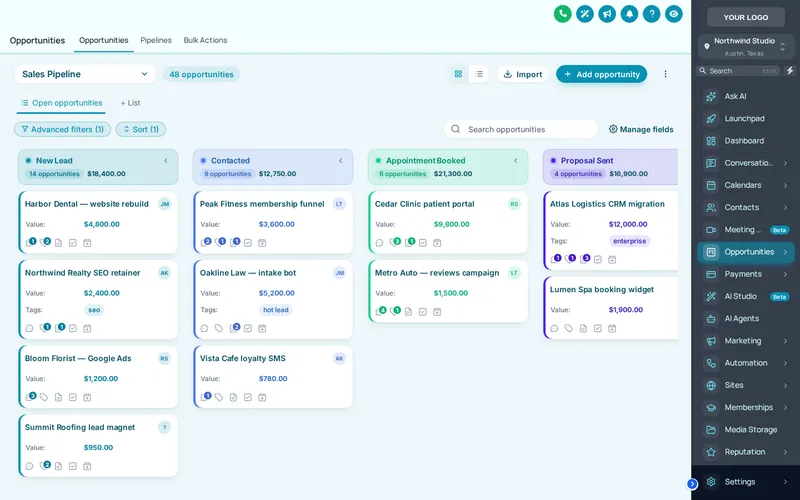
GHL pipeline design in the customizer restyles the GoHighLevel opportunities board: lanes, stage headers, cards and colours. Choose one of 12 board designs and stage colours follow column position, so every pipeline in every sub-account picks them up whatever its stages are called.
One-time payment, lifetime access. Login emailed within minutes.
- Board designs
- 12
- Stage colours
- By position
- Applies to
- Every pipeline
- Included from
- HQ Command
CZ-05.1 // LIVE PREVIEW
Restyle the opportunities board live
Design
Sidebar
A copy of the GoHighLevel opportunities board with a sample pipeline, restyled by the real engine. Stage colours follow column position, so your own pipelines pick them up whatever their stages are called.
CZ-05.2 // PROBLEM TO OUTCOME
From grey columns to clear stages
CZ-05.2 // BEFORE
On a busy opportunities board every card looks the same, stage headers blur together and a sales rep has to read each column title to know where a deal sits. Across many sub-accounts with different stage names, there is no consistent visual language.
CZ-05.2 // AFTER
Each stage carries its own colour, cards have a clear hierarchy and lanes are easy to scan. Because colours follow position, a five-stage pipeline in one client account reads the same way as a seven-stage one in another.
CZ-05.3 // AT YOUR HQ
Where a readable board pays
Sales teams on the board all day
Reps see stage at a glance from colour, which matters when a board holds hundreds of cards.
Consistent across every client
Snapshots install different pipelines in different niches. Position-based colours make all of them look like the same product.
Pipeline on a screen
Dark board designs suit a sales-floor screen showing the live pipeline.
Your own agency pipeline
Run your agency’s own new-business pipeline in a design that matches your HQ brand.
CZ-05.4 // WHAT YOU GET
What each board design changes
12 board designs
Clean light, frosted glass, neo brutal, gradient headers, colour ribbon, compact pro, brand match and more.
Stage colours by position
Stage one is always the same colour, stage two the next, so pipelines read consistently whatever their names.
Readable cards
Card spacing, value and contact details are re-weighted so the important line stands out.
Brand-linked option
The Brand Match design takes your brand colour, so a theme change carries through to the board.
CZ-05.5 // SET IT UP
Restyle the board in four moves
You do this yourself, in minutes, after your login arrives. Nothing is installed twice.
STEP 01
Open the pipeline designer
In the editor, open Pipelines and switch it on. The preview shows a sample opportunities board.
STEP 02
Pick a design
Click through the board designs; each applies to lanes, headers and cards at once.
STEP 03
Check with your theme
Combine the board with your sidebar theme in the preview so the pairing works.
STEP 04
Publish
Publish and every opportunities board, in every pipeline and sub-account, takes the design.
CZ-05.6 // PACKAGES
Compare all packagesPipelines
Included from HQ Command up
One-time payment, lifetime access. Login emailed within minutes (max 24 hours). You set it up yourself in the live editor.
CZ-T2
HQ Command
$747
CZ-T3
HQ Empire
$1,497
CZ-05.7 // QUESTIONS
Pipelines questions
Can I change how the GoHighLevel opportunities board looks?
How are stage colours chosen?
How many pipeline designs are there?
Does it work on every pipeline in every sub-account?
Will drag and drop still work?
Can I use a dark board with a light theme?
Is the pipeline designer in HQ Basic?
Does this help GHL pipeline performance?
CZ-05.8 // RELATED MODULES
Modules to pair with pipelines
The modules agencies usually set up next, each with its own live preview.
CZ-05.9 // DEPLOY THE LOOK
Make every pipeline readable
The pipeline designer is part of HQ Command, with dashboards, menus and contact actions.
One-time payment, lifetime accessLogin by email in minutesOne-line install
GHL Customizer accounts run on the GHL Customer Care customizer platform (customizer.ghlcustomercare.com); AgencySnapshotHQ sells the account packages on this page. GoHighLevel and HighLevel are trademarks of HighLevel Inc. This product is independent: not affiliated with, endorsed by, or a reseller of HighLevel Inc. Previews use sample data and a copy of the GoHighLevel interface.