CZ-06 // CONTACT ACTIONS
From HQ CommandGoHighLevel contact actions, one click from every record
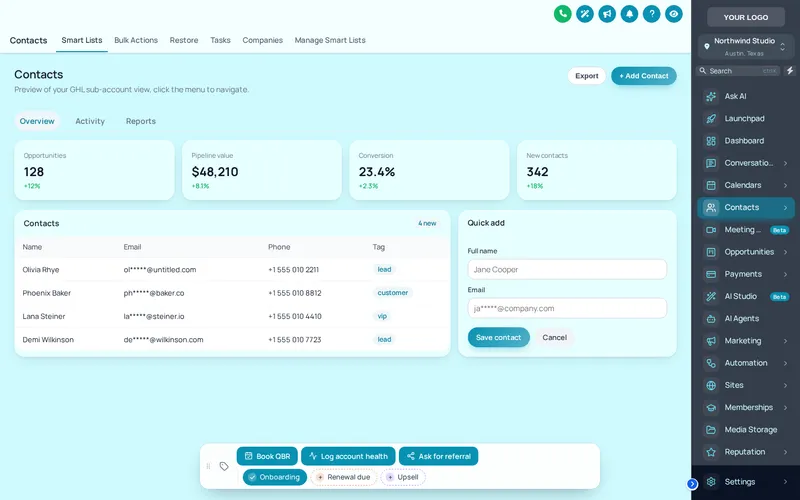
GoHighLevel contact actions in the customizer add a bar to every contact record with quick tags, buttons and small forms. A quick tag adds or removes a tag in one tap, a button can add tags that start your workflows, and a form writes straight into custom fields. The bar can sit in 6 positions and be dragged.
One-time payment, lifetime access. Login emailed within minutes.
CZ-06.1 // LIVE PREVIEW
Tap the bar live
Chips
Show
Position
Theme
The real contact actions bar. Tap a quick tag to add or remove it, press Log account health to open its form, or drag the bar by its grip. Nothing is saved in the preview.
CZ-06.2 // SET IT UP
Build the bar in four moves
You do this yourself, in minutes, after your login arrives. Nothing is installed twice.
- 01
Switch on contact actions
In the editor, open Contact actions and enable the bar. The preview shows a sample contact record.
- 02
Add quick tags
List the tags your team uses most, set labels and colours.
- 03
Add buttons and forms
Create buttons that add tags for your workflows, and forms that map to your custom fields.
- 04
Place it and publish
Choose a position, test it in the preview, then publish to every sub-account.
CZ-06.3 // AT YOUR HQ
One click instead of five
After every client call
Log the outcome with one tap: renewal due, upsell, referral ask. Each tag can start the workflow that follows it up.
Account health checks
A form button collects retainer, next review date and health status into custom fields without leaving the record.
No more tag typos
Workflows triggered by tags fail quietly when a tag is misspelled. Buttons always send the exact tag.
Faster for new staff
New hires do not need to memorise your tag naming. The actions they need are on the bar.
CZ-06.4 // PROBLEM TO OUTCOME
Typing tags versus tapping them
THE PROBLEM
Starting a workflow from a contact usually means opening the tag box, typing the exact tag and hoping nobody misspells it. Updating three custom fields means scrolling the record. Multiply that by every call your team makes.
THE OUTCOME
The common actions sit on a bar on every contact: tap Onboarding to tag, press Book QBR to start the review-call workflow, open a short form to log account health. Same tags, every time, spelled correctly.
CZ-06.5 // WHAT YOU GET
What the bar holds
Quick tags
Chips that add or remove a tag in one tap, coloured per tag, by brand colour, or green-on and grey-off.
Action buttons
Buttons that add and remove tags with a confirmation message, ideal for starting and stopping workflows.
Forms into custom fields
Short forms with number, date and dropdown fields that save straight into the contact’s custom fields.
Where you want it
6 positions, draggable by its grip, with a minimise control so it never covers what you need.
CZ-06.6 // PACKAGES
Compare all packagesContact actions
Included from HQ Command up
One-time payment, lifetime access. Login emailed within minutes (max 24 hours). You set it up yourself in the live editor.
CZ-T2
HQ Command
$747
CZ-T3
HQ Empire
$1,497
CZ-06.7 // QUESTIONS
Contact actions questions
What is the GoHighLevel contact actions bar?
Can a button start a GoHighLevel workflow?
Do the forms save to custom fields?
Does it work in every sub-account?
Can I move the bar?
Which package includes contact actions?
Is anything sent outside GoHighLevel?
Can I have different buttons for different clients?
CZ-06.8 // RELATED MODULES
Modules to pair with contact actions
The modules agencies usually set up next, each with its own live preview.
CZ-06.9 // DEPLOY THE LOOK
Put your workflows one tap away
The contact actions bar comes with HQ Command.
One-time payment, lifetime accessLogin by email in minutesOne-line install
GHL Customizer accounts run on the GHL Customer Care customizer platform (customizer.ghlcustomercare.com); AgencySnapshotHQ sells the account packages on this page. GoHighLevel and HighLevel are trademarks of HighLevel Inc. This product is independent: not affiliated with, endorsed by, or a reseller of HighLevel Inc. Previews use sample data and a copy of the GoHighLevel interface.