CZ-04 // MENUS
From HQ CommandGoHighLevel menu customization for teams that live in it
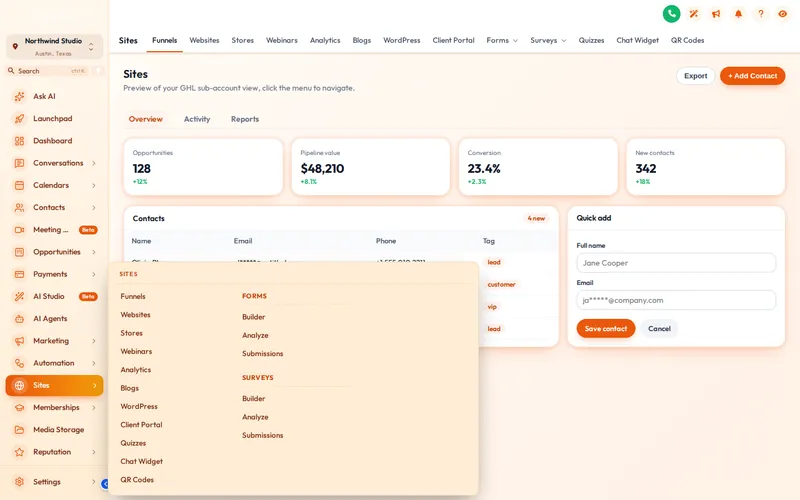
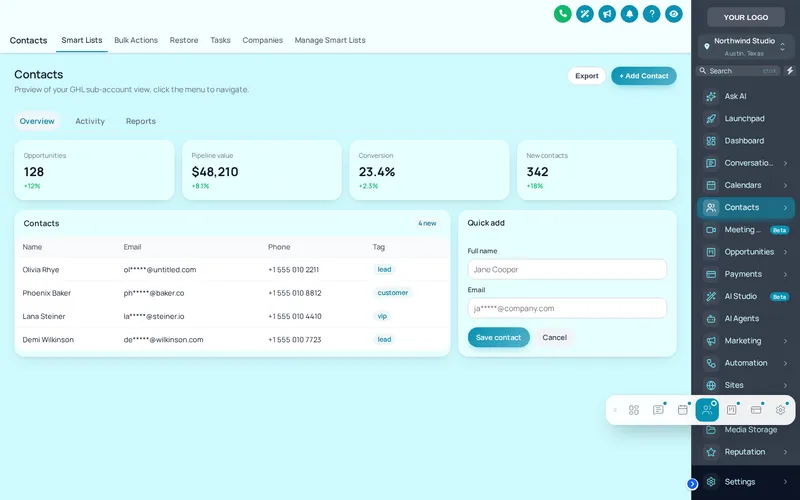
GoHighLevel menu customization in the customizer covers where the menu sits (left, right or a top bar), how sub-menus open (8 mega menu styles), how the header looks (8 styles) and a floating quick menu your team can drag anywhere. Layout is in every package; mega menus and the quick menu start at HQ Command.
One-time payment, lifetime access. Login emailed within minutes.
CZ-04.1 // PROBLEM TO OUTCOME
Hours of clicking, gone
THE PROBLEM
An account manager clicks the GoHighLevel sidebar hundreds of times a day, and sub-pages like Sites and Payments hide behind extra clicks. Across a team and a long client list, that is hours a week spent finding things.
THE OUTCOME
Sub-menus open as mega menus that show every destination at once, the menu sits where your team expects it, and a floating quick menu keeps the six pages they use most one click away on every screen.
CZ-04.2 // LIVE PREVIEW
Rearrange the menu live
- Mega menu styles
- 8
- Top-bar styles
- 8
- Header styles
- 8
- Quick-menu skins
- 8
CZ-04.3 // WHAT YOU GET
Every way the menu can move
Left, right or top
Dock the sidebar on either side or switch to a top bar, with collapsed-icon mode for small screens. In every package.
8 mega menu styles
Columns, split, cascade, tiles, tabs, icon rail, accordion and wide. Each opens a section’s sub-pages on one panel.
8 top-bar and 8 header styles
From solid and glass to brand gradient and segmented, so the top of the app matches the rest of your theme.
Floating quick menu
3 layouts and 8 skins. Your team drags it to wherever suits them and it stays on every page.
CZ-04.4 // AT YOUR HQ
Built for teams on many accounts
Account managers on many accounts
Switching between client sub-accounts all day is faster when every account has the same layout and the same quick menu in the same place.
Top bar for wide screens
Move the menu to a top bar and give dashboards and pipelines the full width of a large monitor.
A quick menu per role
Set up the floating quick menu with the pages your team uses most: Conversations, Calendars, Contacts and Opportunities, wherever they are in the app.
Easier client training
Clients learn faster when sub-pages are laid out on one panel instead of hidden in a list. Fewer "where is the funnel builder" tickets.
CZ-04.5 // SET IT UP
Rebuild the navigation in four moves
You do this yourself, in minutes, after your login arrives. Nothing is installed twice.
- 01
Pick a layout
Choose left sidebar, right dock, top bar or merged header in the editor and check it in the preview at desktop and phone width.
- 02
Choose sub-menu behaviour
Keep the normal list or pick a mega menu style; hover a section with sub-pages in the preview to see it open.
- 03
Style the header
Pick one of the header styles so the top of every page matches the theme.
- 04
Add a quick menu
Switch on the floating quick menu, choose its pages, layout and skin, then publish.
CZ-04.6 // PACKAGES
Compare all packagesMenus
Included from HQ Command up
One-time payment, lifetime access. Login emailed within minutes (max 24 hours). You set it up yourself in the live editor. Layout is in every package; mega menus and the quick menu need HQ Command or above
CZ-T2
HQ Command
$747
CZ-T3
HQ Empire
$1,497
CZ-04.7 // QUESTIONS
Menus questions
Can you customise the GoHighLevel sidebar menu?
What is a GHL mega menu?
Which package includes mega menus?
Does changing the menu remove any GoHighLevel pages?
What is the floating quick menu?
Will the top bar work on a phone?
Can I hide menu items from clients?
Do menu changes need a re-install?
CZ-04.8 // RELATED MODULES
Modules to pair with the menu
The modules agencies usually set up next, each with its own live preview.
CZ-04.9 // DEPLOY THE LOOK
Fewer clicks for every account manager
Mega menus and the floating quick menu come with HQ Command.
One-time payment, lifetime accessLogin by email in minutesOne-line install
GHL Customizer accounts run on the GHL Customer Care customizer platform (customizer.ghlcustomercare.com); AgencySnapshotHQ sells the account packages on this page. GoHighLevel and HighLevel are trademarks of HighLevel Inc. This product is independent: not affiliated with, endorsed by, or a reseller of HighLevel Inc. Previews use sample data and a copy of the GoHighLevel interface.