CZ-03 // DASHBOARDS
From HQ CommandGoHighLevel dashboard design your clients actually open
GoHighLevel dashboard design in the customizer means picking one of 18 finished dashboard templates and applying it to the sub-account dashboard: cards, charts, a live clock, quick links and hero area all restyled. 9 are light, 3 are dark and 6 are photo-led.
One-time payment, lifetime access. Login emailed within minutes.
- Dashboard designs
- 18
- Dark designs
- 3
- Photo designs
- 6
- Included from
- HQ Command
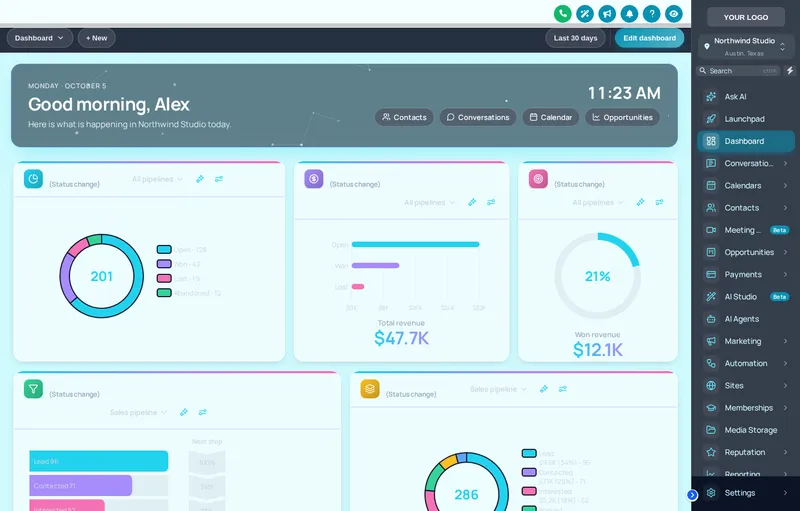
CZ-03.1 // LIVE PREVIEW
Flip through dashboard designs live
Style
Design
Sidebar
Each chip is a real dashboard template, applied by the engine to a copy of the GoHighLevel dashboard. The clock runs live; quick links and chart colours belong to the design.
CZ-03.2 // AT YOUR HQ
Who the dashboard is for
Results clients notice
When the dashboard looks deliberate, clients look at the numbers on it. That makes your monthly check-in a confirmation rather than a reveal.
A wall screen for the office
Dark designs suit a TV in the agency office running the dashboard all day, readable from across the room.
Quick links to the real work
Put Conversations, Calendars and Payments one click away on the first screen, so clients stop asking where things are.
Match the niche
A warm photo design for a wellness client, a sober slate design for a law firm. Your HQ theme stays; the dashboard fits the business.
CZ-03.3 // PROBLEM TO OUTCOME
From a glance to a habit
CZ-03.3 // BEFORE
The default sub-account dashboard is a grid of grey widgets that most clients glance at once and never return to. When they do not open it, they do not see the results you are delivering.
CZ-03.3 // AFTER
A designed dashboard turns the first screen into something clients want to land on: your colours, clear cards, chart colours that read at a glance and quick links to what they actually use.
CZ-03.4 // WHAT YOU GET
Inside each design
18 templates
9 light, 3 dark and 6 photo designs, each with its own cards, chart palette and hero treatment.
Live clock and greeting
Hero areas carry a live clock and greeting, so the dashboard feels current every time it opens.
Chart colours that belong
Each design sets a chart palette tuned for its background, so lines and bars do not disappear.
Quick links
Designs include quick links to the pages a client uses most, styled as part of the dashboard rather than bolted on.
CZ-03.5 // SET IT UP
Apply a dashboard design in four moves
You do this yourself, in minutes, after your login arrives. Nothing is installed twice.
STEP 01
Open the dashboard designer
In the editor, open Dashboard and switch it on. The preview loads a copy of a GoHighLevel dashboard.
STEP 02
Filter by style
Narrow the gallery to light, dark or photo, then click designs to try them over your current theme.
STEP 03
Tune it
Adjust the hero, quick links and card details that the design exposes.
STEP 04
Publish
Publish, and every sub-account dashboard shows the new design on its next load.
CZ-03.6 // PACKAGES
Compare all packagesDashboards
Included from HQ Command up
One-time payment, lifetime access. Login emailed within minutes (max 24 hours). You set it up yourself in the live editor.
CZ-T2
HQ Command
$747
CZ-T3
HQ Empire
$1,497
CZ-03.7 // QUESTIONS
Dashboards questions
Can you change the GoHighLevel dashboard design?
Does it change the data on the dashboard?
How many dashboard designs are there?
Which package includes the dashboard designer?
Will a dark dashboard clash with a light theme?
Does it work on phones?
Can clients switch the dashboard off?
Is this a replacement for GoHighLevel reporting?
CZ-03.8 // RELATED MODULES
Modules to pair with dashboards
The modules agencies usually set up next, each with its own live preview.
CZ-03.9 // DEPLOY THE LOOK
Give clients a dashboard worth opening
The dashboard designer comes with HQ Command, alongside pipelines, menus and contact actions.
One-time payment, lifetime accessLogin by email in minutesOne-line install
GHL Customizer accounts run on the GHL Customer Care customizer platform (customizer.ghlcustomercare.com); AgencySnapshotHQ sells the account packages on this page. GoHighLevel and HighLevel are trademarks of HighLevel Inc. This product is independent: not affiliated with, endorsed by, or a reseller of HighLevel Inc. Previews use sample data and a copy of the GoHighLevel interface.