THE SHORT VERSION
- A snapshot that sends email from GoHighLevel's default shared domain will authenticate against the wrong domain, so a perfectly good campaign fails DMARC alignment and lands in spam.
- Since 2024, Gmail and Yahoo, and since May 2025 Outlook, require SPF, DKIM and DMARC on any domain sending more than 5,000 messages a day, and filter unauthenticated mail from everyone else too.
- Set a dedicated sending subdomain per client sub-account, not one shared domain for the whole agency, so one client's complaints cannot drag every other client into spam.
- The DNS records are free and the setup is covered inside the twelve hours of installation support that ship with every snapshot, so this is time, not a line item.
The email that started this was a review request. A dental practice on one of our client accounts finished a crown fitting, the appointment moved to completed, the workflow fired, and the two-line ask for a Google review went out. It sent. The workflow history showed it sent. Three weeks of them sent, to every completed patient, and the practice’s review count did not move by one.
The owner assumed the copy was weak. It was not the copy. We pulled a test send into a Gmail account and it was sitting in spam, where it had been sitting the whole time. Then account nine in the same rollout showed the same thing, and account eleven, and it stopped being one practice’s problem and became a question about how the whole rollout was sending mail.
Every one of those accounts had installed cleanly. The workflows were right. The system that is meant to bring in five to ten reviews a month was doing everything except the one thing that matters, which is reaching a human. This is the failure that no send log will ever show you, because as far as GoHighLevel is concerned the job was done the moment it handed the message off.
Sending and arriving are two different events
Here is the distinction the send log hides. GoHighLevel sends an email. A mailbox provider, Gmail or Yahoo or Outlook, decides whether that email reaches the inbox, the spam folder, or nothing at all. Those are separate systems making separate decisions, and the second one is the one your client feels.
The receiving side makes that decision on two things: can it prove who sent this, and does it trust them. Authentication answers the first. Reputation answers the second. Get authentication wrong and the reputation question never gets a fair hearing, because an unauthenticated message starts guilty.
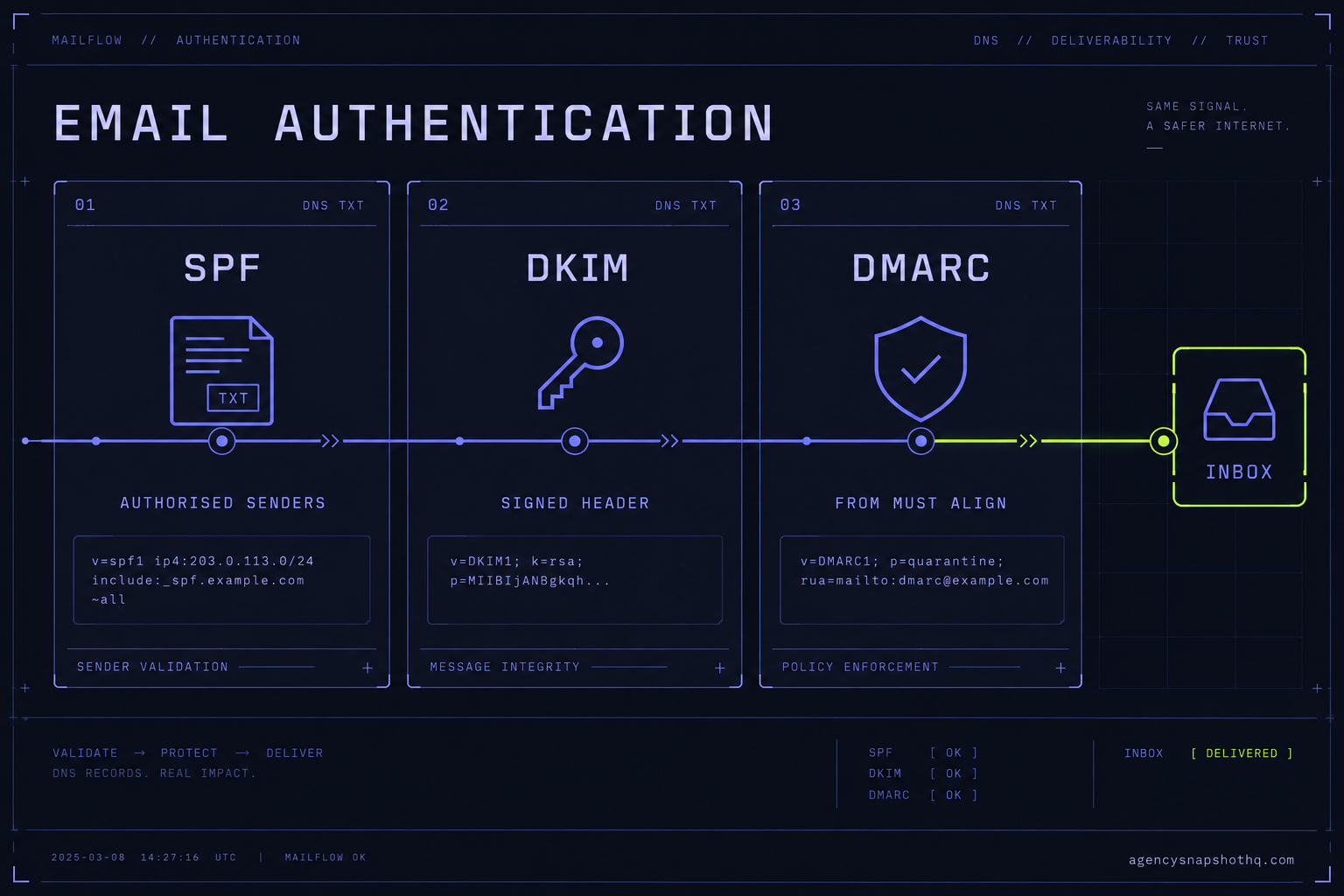
Three DNS records carry the authentication, and each one proves a different thing.
The three records and what each proves
SPF, the Sender Policy Framework, is a TXT record on the domain that lists which servers are allowed to send on its behalf. When a message arrives, the receiver checks the sending server against that list. It answers one narrow question: was this server authorised to send for this domain. The published standard is RFC 7208.
DKIM, DomainKeys Identified Mail, adds a cryptographic signature to the message header and publishes the matching public key in DNS. The receiver verifies the signature against that key. It proves two things SPF cannot: that the message genuinely came from an authorised signer, and that nobody altered it in transit. The standard is RFC 6376.
DMARC, published as a TXT record at _dmarc.yourdomain.com, ties the first two together and adds the part that trips up nearly every snapshot deployment: alignment. DMARC requires that the domain a human sees in the From line matches the domain that passed SPF or DKIM. You can pass both SPF and DKIM on some other domain and still fail DMARC, because the visible From does not line up with the authenticated domain. DMARC also tells receivers what to do on a failure, through a policy of none, quarantine or reject. GoHighLevel’s own explainer for it lives here.
Alignment is the concept to hold onto, because it is where a working GoHighLevel account quietly fails. The records can all verify green and the mail can still land in spam, because the From address the client chose does not align with the domain doing the authenticating.
What GoHighLevel does by default, and why it is wrong for a client
Out of the box, GoHighLevel sends email through its own shared LeadConnector infrastructure. That is fine for a test. It is wrong for a client, because the message authenticates against a domain that is not the client’s, so the client’s chosen From address, the one on their own domain, does not align. To a receiver, the visible sender and the authenticated sender disagree, and disagreement reads as suspicious.
The fix is a dedicated sending domain. In the sub-account you go to Settings, then Email Services, then Dedicated Domain and IP, and add a domain. GoHighLevel recommends a subdomain rather than the root, something like mail.clientdomain.com, so the client’s primary domain reputation stays separate from bulk sending. You add the DNS records it gives you, a set of CNAME entries for DKIM plus the SPF and return-path records, verify, and set the From address to match. Their step-by-step, including the general domain-and-DNS walkthrough, is here. Two things from that page are worth committing to memory before you start: DNS changes can take up to twenty-four hours to propagate, and GoHighLevel does not support more than one DKIM record for the same domain, so you cannot stack a second sender on the same subdomain and expect both to sign.
That single change, moving each account off the shared domain and onto its own authenticated subdomain, is the difference between the review request in the story landing in the inbox and landing in spam. Everything below is what breaks around it.
What the mailbox providers now require
The rules stopped being advice in 2024. Google and Yahoo set a shared bar for anyone sending more than 5,000 messages a day to their users, effective February 2024, and Microsoft matched it for Outlook, Hotmail and Live addresses on 5 May 2025. The three requirements overlap almost exactly, which is the point: there is now one bar, not three.
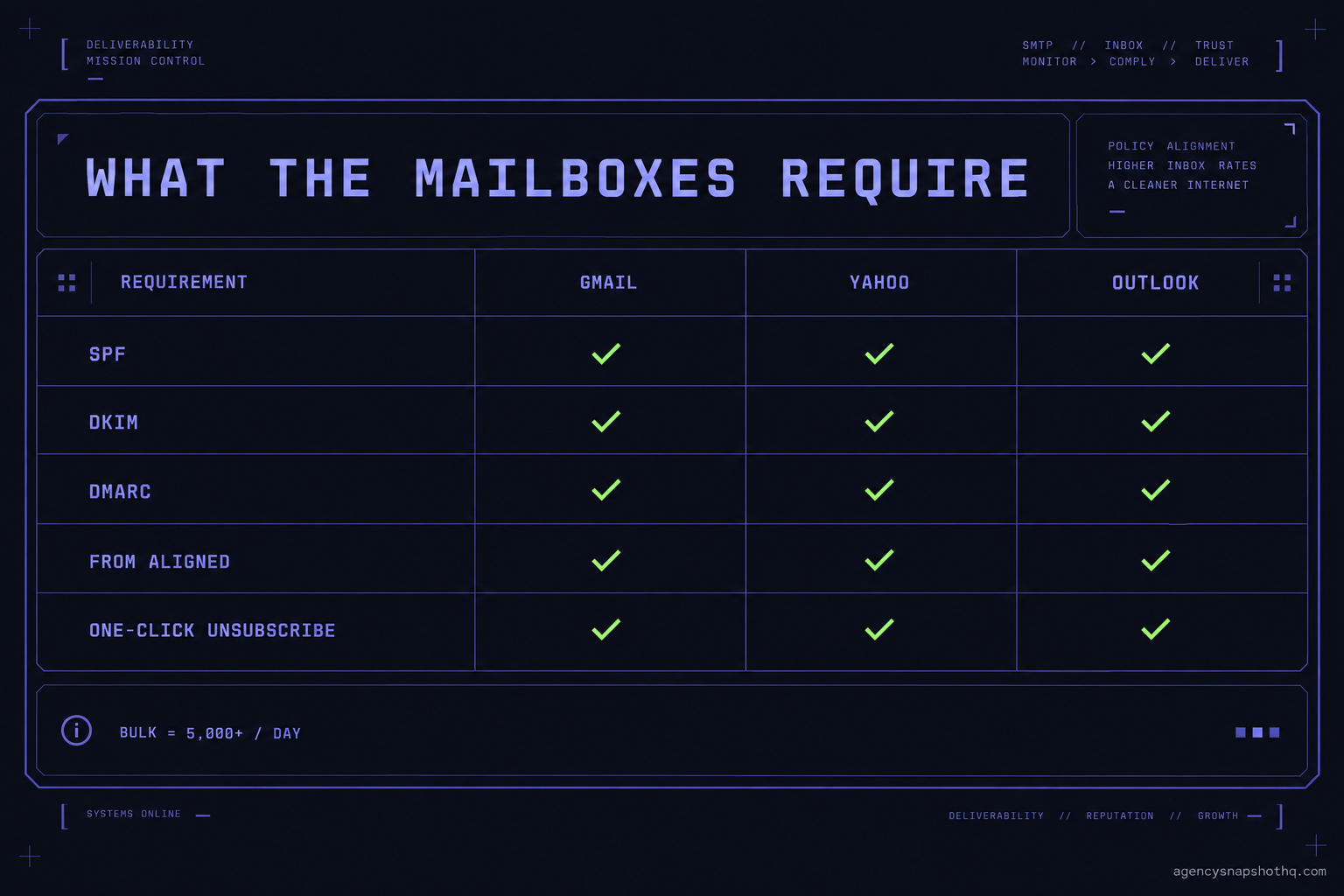
| Requirement | Gmail (bulk, 5,000+/day) | Yahoo (bulk) | Outlook (high volume, 5,000+/day) |
|---|---|---|---|
| SPF | Required | Required | Required |
| DKIM | Required | Required | Required |
| DMARC | Required, policy at least p=none |
Required, at least p=none |
Required, at least p=none |
| From alignment | Must align with SPF or DKIM | Must align | Align with SPF or DKIM |
| One-click unsubscribe | Required, honour within 2 days | Required, honour within 2 days | Functional unsubscribe expected |
| Spam complaint rate | Keep below 0.1%, never reach 0.3% | Held to a low complaint rate | Monitored |
| On failure | Filtered or rejected | Filtered or rejected | Rejected with 550 5.7.15 |
Sources, all confirmed this month: Google’s email sender guidelines, the Yahoo Sender Hub best practices, and Microsoft’s announcement for high-volume senders.
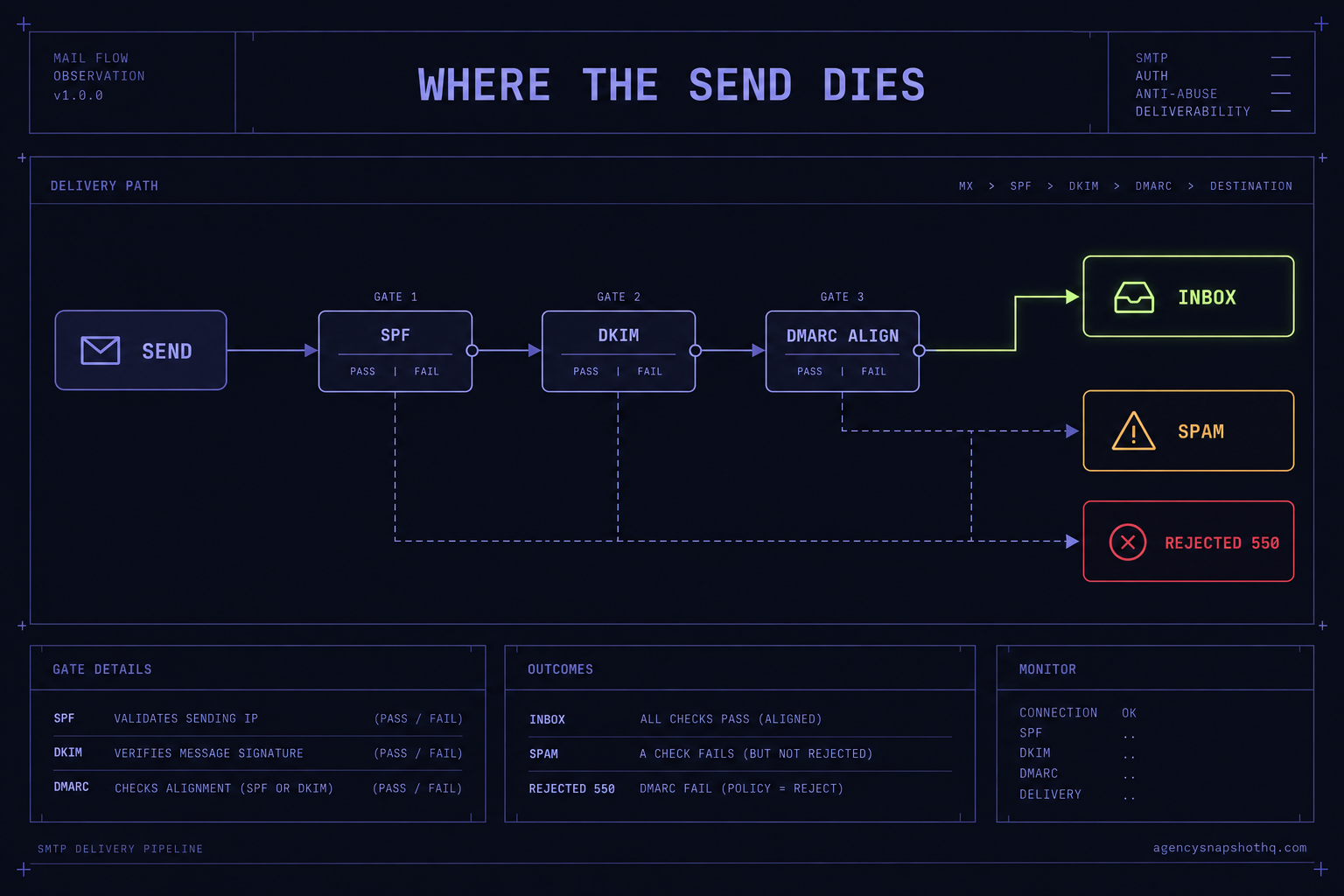
Read the failure row twice. Google filters an unauthenticated bulk message into spam. Outlook does not filter it, it rejects it with a 550 5.7.15 and returns nothing the sender would recognise as trouble inside GoHighLevel. The behaviour is close enough to the A2P situation on the SMS side that the two belong in the same runbook: the receiving network decides, and the sending tool reports success either way. If you have read why a perfectly good snapshot sends no SMS, this is the same shape wearing a different hat.
The one-click unsubscribe rule has its own standard worth naming, RFC 8058. It requires a List-Unsubscribe header with an HTTPS link and a List-Unsubscribe-Post header carrying the value List-Unsubscribe=One-Click, and the DKIM signature has to cover both headers. GoHighLevel adds the unsubscribe link for you when the message is a marketing send, but it only signs correctly when your DKIM is set up on the sending domain, which loops back to the dedicated-domain step above. Skip that step and you fail the unsubscribe requirement without touching the unsubscribe setting.
Where the send dies
Four or five things break in the field, and they break in a rough order. Learn to check them in this order and you will diagnose most spam problems in ten minutes instead of a week.
It is sending from the shared domain
This is the story at the top, and it is the single most common cause. The account never had a dedicated sending domain added, so every message authenticated against LeadConnector’s domain while carrying the client’s From address. SPF and DKIM can both pass and DMARC alignment still fails, because the visible domain and the authenticated domain are not the same. What the operator sees: mail sends, some of it even lands, and review or nurture response rates are quietly terrible. The fix is the dedicated subdomain, per account, described above. If you did a rollout and never touched Email Services in any sub-account, assume this is happening in all of them.
DKIM is added but the From line still points somewhere else
A half-done version of the same problem. Someone added the dedicated domain and the DKIM records verified, but the workflow emails or the account default still send from the old address on the root domain, or from a different subdomain entirely. The record is green, so it looks solved, but the From line does not align with what got signed, and DMARC fails on alignment. What the operator sees: authentication that reports success and mail that still filters. The fix is to make the From address match the authenticated sending domain everywhere, in the account defaults and in every workflow email step, not just in one place.
SPF has too many lookups
SPF has a hard limit of ten DNS lookups when it evaluates. A client domain that already runs Google Workspace, then added another email tool, then had GoHighLevel’s include bolted on, can blow past ten. When it does, SPF returns a permanent error and receivers treat it as a fail. What the operator sees: intermittent placement that gets worse as more services are added to the same domain. The fix is to consolidate the SPF record down to what actually sends, and to lean on DKIM alignment, which does not have the lookup problem, as the primary authentication for the GoHighLevel sending domain.
There is no DMARC record at all
Plenty of client domains have SPF and DKIM and no _dmarc entry, because the first two often come pre-set by a web host and DMARC almost never does. Under the current rules that is now a failing state for any real sending volume, and it is the specific thing that earns an Outlook 550 5.7.15 rejection. What the operator sees: Outlook and Hotmail recipients get nothing, Gmail placement is shaky, and it looks random because it depends on which provider each contact uses. The fix is to publish a DMARC record starting at p=none, which is monitor-only and safe, confirm mail is aligning, then tighten toward quarantine once you trust it.
The complaint rate is climbing
This one is not a DNS problem, it is a list problem, and it is the one that undoes all the others. If contacts mark the mail as spam, reputation falls and even perfectly authenticated mail starts to filter. It usually traces to a list that was imported cold, a reactivation blast to contacts who forgot the business, or an unsubscribe that is hard to find so people hit the spam button instead. What the operator sees: deliverability that was fine and then decays over a few sends. The fix is list hygiene, a visible one-click unsubscribe, and honouring opt-outs inside the two days the providers require. A dormant list is worth reviving carefully rather than blasting, which is a big part of why dormant-list recovery is scoped as its own piece of work rather than a button you press.
The numbers, and the arithmetic behind them
Every figure here is sourced and current as of this month, and none of it is guesswork.
The threshold is 5,000 messages a day to a single provider. That is where Gmail and Outlook switch on their bulk enforcement, per Google’s guidelines and Microsoft’s announcement. The trap for an agency is aggregation. Route every client through one domain you own and it is that one domain’s traffic to Gmail that gets counted, so a handful of busy accounts sending reminders, nurture and review requests can cross 5,000 a day to Gmail on a single domain far sooner than any one client would alone. Split the sending per client and each domain stays well under, which is one more reason the per-account subdomain is the right structure and not just the tidy one.
Keep the spam complaint rate below 0.1%, and never let it reach 0.3%. Google’s own wording is that senders should stay under 0.1% and should prevent the rate from ever hitting 0.3%, above which they become ineligible for mitigation. Put that in plain counts: 0.3% is three complaints per thousand delivered. A single review-request campaign to two thousand past patients trips the line at six people hitting the spam button. Six. That is how little room there is, and it is why you gate who gets the ask rather than mailing the whole list. The same maths applies to a real estate agent chasing reviews off a list of past closings: the ask is the same, and so is the six-complaint cliff.
Honour unsubscribes within two days. Both Google and Yahoo require it. In practice GoHighLevel processes the opt-out immediately, so the risk is not the mechanism, it is a workflow that keeps emailing a contact through a different sequence after they opted out of one. Check that your opt-out sets an account-wide suppression, not a single-workflow one.
Budget twenty-four hours for DNS. GoHighLevel notes propagation can take up to a day. That single fact is why email setup, like A2P registration, belongs at the front of a launch and not the afternoon before. On a multi-account rollout you stage every sub-account’s DNS early so the wait happens in parallel, the same discipline that keeps a twenty-account rollout from turning into a six-week one.
The cost of doing all of this is time, not money. The DNS records are free to publish. What it takes is the hour or so per account to add the sending domain, set the records, align the From address and publish DMARC, plus the twenty-four-hour wait. On a snapshot install that hour is already accounted for: email domain setup sits inside the twelve hours of installation support that ship with every snapshot, to be used within ten days of purchase, alongside the rebrand and the A2P work. It is our own configuration, not a third-party integration, so it is covered rather than quoted.
The objections worth answering
“We send well under 5,000 a day, so these rules do not apply to us.” The 5,000 figure is the line at which the providers reject unauthenticated bulk mail outright. It is not the line below which they stop caring. Gmail, Yahoo and Outlook run the same authentication checks on every message at every volume and filter unauthenticated or misaligned mail into spam regardless of how little you send. Low volume buys you slightly more forgiveness on reputation, nothing on authentication. And because volume aggregates on a shared domain, the account you were sure was small can be part of a domain that is not.
“GoHighLevel already handles our email, so this is done.” GoHighLevel handles the sending. It does not, by default, handle the arriving, because its default shared domain does not align with your client’s From address. The platform gives you every tool to fix that, the dedicated domain, the DKIM records, the DMARC guidance, but none of it is switched on for you. Treating “it sends” as “it is set up” is exactly the assumption that left a dental practice’s reviews flat for three weeks.
“Why not put every client on one sending domain I control and do this once?” Because reputation attaches to the sending domain, and a shared domain shares its reputation. The client with the cold list, or the one whose reactivation campaign drew complaints, pulls down the inbox placement of every other client on that domain. A per-client subdomain contains the damage to the account that caused it. Doing it once feels efficient right up to the first complaint spike, after which it is the reason all your clients’ mail is filtering at the same time.
“Do we actually need to pay you for this?” Honestly, no, not on its own. The records are free, the GoHighLevel documentation linked above is public, and once an operator has set up authentication on one account the next one takes under an hour. If you have the time and one or two accounts, do it yourself from those docs. Where paying makes sense is scale and speed: a rollout across many sub-accounts where you would rather the setup, the DNS staging and the alignment checks come off your plate, or an agency account setup where email authentication is one line in a larger standing-up of the account. Buy the time back if the time is the constraint. If it is not, this is a job you can own, and the pricing and FAQ spell out exactly what the installation hours cover so there is no surprise about where the line sits.
The review request that started this is a small email. It is also the whole difference between a review-automation system that quietly compounds and one that quietly does nothing, and the difference is not in the copy or the timing or the workflow. It is in three DNS records and which domain the message says it came from. Set those correctly, per account, before the first send, and the system you paid for gets to do the job it was built for.