THE SHORT VERSION
- White-labeling GoHighLevel is not one switch. It is four depths of work, and most agencies need far less of it than they buy.
- A light rebrand (your name, logo and login page) works on any plan. A white-label domain that removes HighLevel from the web app comes with the Unlimited tier's white-label features.
- A branded mobile app and full SaaS-mode reselling both require the Agency Pro plan at $497 a month, so the deepest white-label is a recurring cost, not a one-time setup.
- Branding leaks through the channels you forget: the mobile app, the help docs and the marketplace still say GoHighLevel unless you cover them deliberately.
- Turning on SaaS-mode rebilling before you understand per-message usage costs is how an agency resells the platform at a loss.
You are three minutes into an onboarding call and the client is sharing their screen. You walk them to the login page you sent, they type the address, the dashboard loads. Then they stop. “Hold on,” they say, hovering the cursor at the top of the window. “It says LeadConnector up here. And when I googled how to change my calendar hours, the help page was gohighlevel.com. I thought this was your software.”
You had told them it was. Not as a lie, exactly. You rebranded the dashboard, put your logo in the corner, set the login page to your colours. You did the part everyone does in an afternoon. What the client found was the part nobody warns you about: the channels you did not cover. The mobile app they downloaded still carried someone else’s name. The help documentation still pointed home. The seam was not in the work you did. It was in the work you did not know was part of the job.
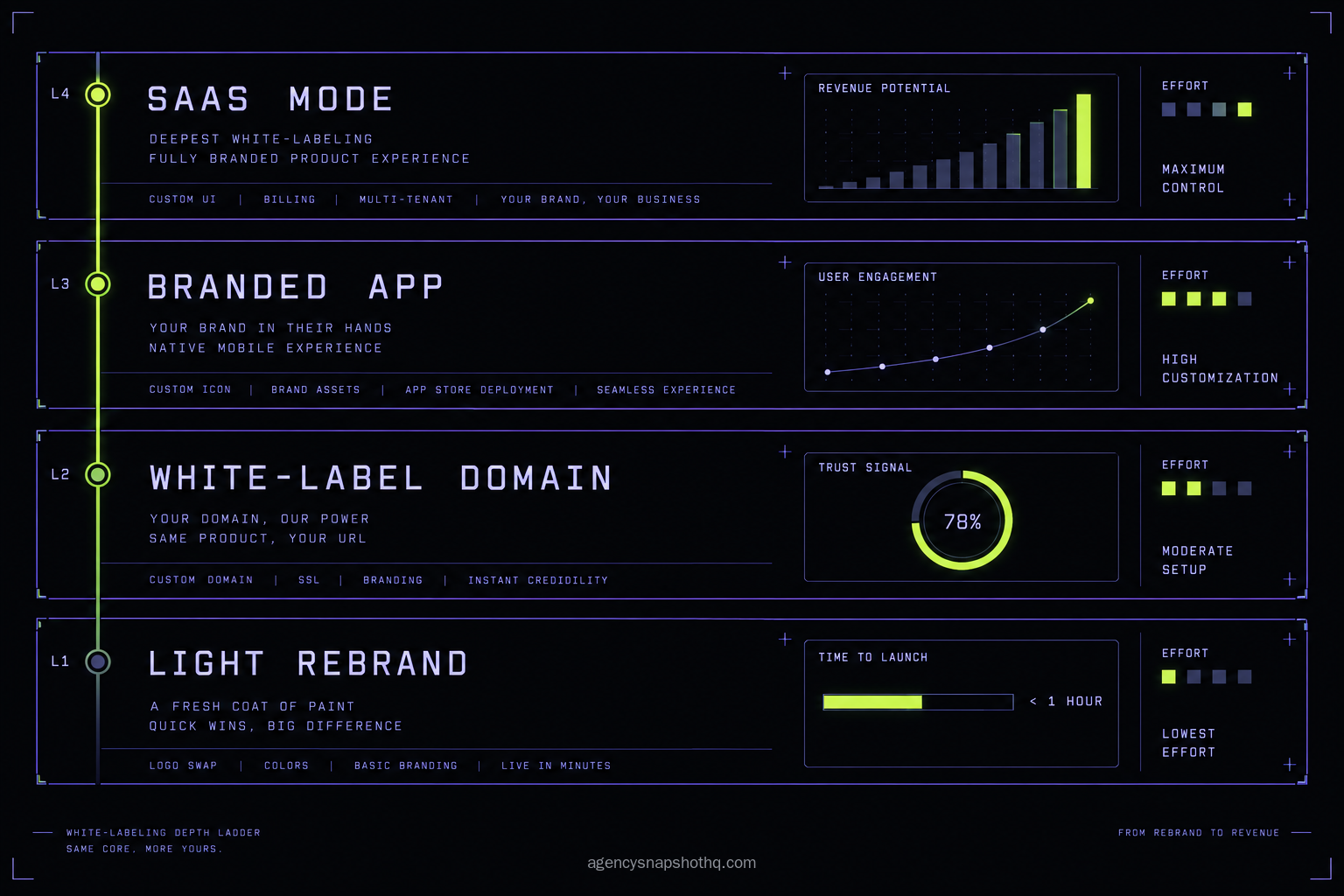
White-labeling GoHighLevel gets sold as a switch. It is not a switch. It is four separate depths of work, each one covering a different surface the client can see, and the decision that actually matters is not whether to white-label. It is how far down that ladder you need to go, and what each rung costs you to stand on.
What white-labeling actually changes in GoHighLevel
Before you choose a depth, you have to know what the platform lets you brand and what it does not, because the word “white-label” covers at least four different jobs and GoHighLevel gates them behind different plans. Get the mental model right first, and the plan decision falls out of it.
The agency layer and the client layer
GoHighLevel has two levels, and white-labeling only touches one of them cleanly. The agency layer is your own account, the view you log into to run every client. The client layer is the sub-account, one per client, where the actual work lives: the pipelines, the workflows, the funnels, the calendars. When people say they want to white-label the platform, they almost always mean the agency layer and the chrome around every sub-account: the login page, the dashboard header, the web address, the notification emails. That is the frame the client sees.
The snapshot you install sits inside the client layer and does not care about any of that frame. This is the point most guides skip, so hold onto it: white-labeling and snapshots are two independent decisions. You can run an unbranded platform full of carefully built sub-accounts, or a fully branded platform full of empty ones. The branding is the frame. The snapshot is the picture inside it. Confusing the two is how agencies spend a month on branding and still have nothing for a client to use.
The branding that ships on every plan
The first depth costs nothing extra and takes an afternoon. Inside the agency settings you set your business name, upload a logo, choose the colour scheme, and the dashboard stops saying GoHighLevel in the places those settings control. You set a support email and a chat name so the help widget speaks in your voice. This is the light rebrand, and for a lot of agencies it is genuinely enough, because their clients rarely log in and never go looking for the platform’s real name.
The limit is reach. The light rebrand only touches the surfaces the settings page exposes. The web address in the browser bar is still a GoHighLevel address until you take the next step, and anything that lives outside the dashboard, the app, the public docs, the marketplace, stays untouched. For a client who logs in twice a year, that is fine. For one who lives in the platform daily, the gaps start to show.
The domain, the app, and SaaS mode
The next three depths are where the plan tier starts to decide things. A white-label domain replaces the address in the browser with your own, something like app.youragency.com, so a client who glances at the URL sees you and not the platform. You set it in Settings, then Agency Settings, then White Label Domain, add the subdomain, and point your DNS records at the target GoHighLevel documents, following GHL Scale Up’s white-label setup walk-through. This removes HighLevel’s name from the one place the light rebrand cannot reach, the address bar, and it is part of the white-label feature set that comes with the Unlimited plan at $297 a month.
The branded mobile app is deeper still. Instead of a client downloading an app that carries HighLevel’s name, they download one that carries yours, listed under your agency in the App Store and Google Play. That is only available on the Agency Pro plan at $497 a month, and it is not a toggle. There is a store listing and a review process to clear before it goes live, which means days or weeks, not an afternoon.
The deepest depth, SaaS mode, is a different thing from branding altogether. It lets you resell the platform as your own software product, with your own Stripe billing, self-service signup, and pricing tiers you set in the SaaS configurator. The client does not just see your brand. They pay you a subscription and provision their own account under it. SaaS mode also requires Agency Pro at $497 a month. The jump from the third depth to the fourth is the jump from looking like a software company to operating as one, with the support load that comes with it.
The four approaches, side by side
Here are the four depths against the eight things that actually decide between them. Plan prices are HighLevel’s own, confirmed this run and sourced in the numbers section below. The rows that decide it for most agencies are the last two: where HighLevel still shows through, and which business model the depth fits.
| Criterion | Light rebrand | White-label domain | Branded app | SaaS mode |
|---|---|---|---|---|
| Plan required | Any plan | Unlimited | Agency Pro | Agency Pro |
| Monthly floor it sits on | Your current plan | $297 | $497 | $497 |
| Setup effort | An afternoon | DNS and SSL, half a day | Store listing and review | Billing and offer design |
| Time to live | Same day | Hours to a day | Days to weeks | Weeks |
| What the client sees | Your name and logo | Your web address too | Your app in the store | Your software, your bill |
| Where HighLevel still shows | URL, app, docs, marketplace | App, docs, marketplace | Docs, marketplace | Docs, marketplace |
| Reversibility | Instant | Repoint DNS | Unlist the app | Unwind billing, affects clients |
| Best-fit agency | Clients rarely log in | Clients log in often | A mobile-first client base | You sell software, not service |
Read it by the bottom row, then work up. If you sell a service and your clients rarely log in, the light rebrand is the whole answer and everything below it on the table is money you do not need to spend. If your clients log in often and you want a clean address, add the white-label domain and stop there. The branded app earns its place only when your client base genuinely lives on their phones. And SaaS mode is for the operator building a product, not running retainers, which is a different business wearing the same platform.
The quiet trap in the table is the “where HighLevel still shows” row. Every depth leaves something uncovered, and the deeper you go the more it costs to discover that you missed one. That is the next section.
Where white-labeling leaks
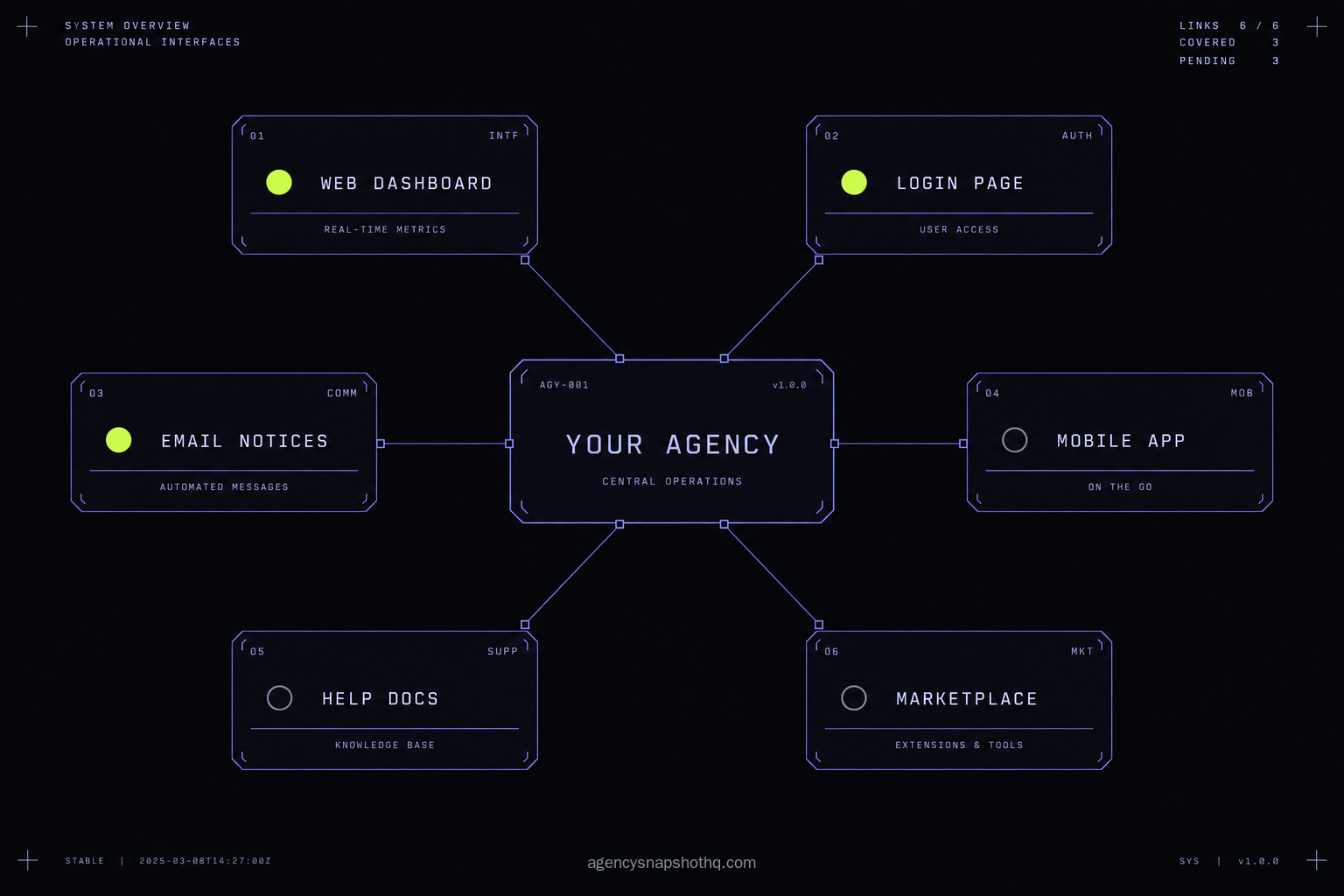
The branding switches are the easy part. The leaks are where agencies lose a client’s trust, and they leak in four predictable places.
The dashboard is branded, the mobile app is not
This is the one from the onboarding call at the top. You set the light rebrand, maybe even the white-label domain, told the client it was your platform, and then they installed the mobile app and saw LeadConnector. What you see is a client who feels misled. What is actually wrong is that the mobile app is a separate surface from the web dashboard, and it carries your brand only on Agency Pro with the branded app built and approved. The web rebrand never reaches it. The fix is to pick a lane before you promise anything: either set the expectation that clients use the web app on mobile, where your white-label domain still carries your name, or commit to Agency Pro and the branded app because your clients really do live on their phones. What you must not do is promise a client their own app while running a plan that does not include one.
The white-label domain resolves, but the login is broken or insecure
You add the subdomain, point the DNS, and the address loads, except the browser warns that it is not secure, or the login bounces to a GoHighLevel address, or the page half-renders. What you see is a worse first impression than no white-label domain at all. What is wrong is almost always one of three things: the SSL certificate has not finished provisioning yet, the CNAME is pointed at the wrong target, or you white-labeled the dashboard domain but left the funnel and client-portal domains on the default. The fix is patience and separation. Confirm the CNAME matches the documented target, give the certificate time to issue before you test, check it in a clean incognito window, and remember that the dashboard’s white-label domain is a different setting from the domains your funnels and client portals serve on. All of them have to be yours, or a client clicks through to a funnel on someone else’s address.
You turned on rebilling before you knew your usage costs
SaaS mode is live, clients are subscribing, and your HighLevel bill is climbing faster than your revenue. What you see is a product that looks like it is selling and feels like it is losing money. What is wrong is usage. SMS, email and AI are billed by volume on top of the plan, commonly $20 to $150 or more a month per account depending on how much a client sends, and in SaaS mode you either rebill that usage through the client wallet or you absorb it. If you set a flat client price and never configured a wallet markup, every text your clients send comes straight out of your margin. Before a single number sends, that account also has to clear A2P 10DLC registration, so the usage you are reselling is not optional plumbing, it is the thing the client is paying for. The fix is to model usage per client and set the rebilling markup in the configurator first, or price the subscription high enough to swallow expected usage, and only then count the plan as covered.
Everything is branded except the help docs and the marketplace
A client googles “how do I set up a calendar in [your brand]” and lands on help.gohighlevel.com. Or they open the in-app marketplace and see a wall of HighLevel apps. What you see is the illusion breaking in a place you forgot existed. What is wrong is that the public help documentation and the marketplace are HighLevel properties, and nothing in your agency settings rebrands them, by design. The fix is not to fight it. It is to route around it. Write your own short help content for the handful of things clients actually ask about, host it on your own domain, and point the help widget there instead of at the public docs. Treat the docs and the marketplace as out of scope, cover the questions clients really have in your own words, and the client never reaches the surfaces you cannot brand.
The numbers, with the assumptions showing
The recurring number that decides the white-label question is your platform plan, because the depth you choose is really a plan tier in disguise. Here it is with the assumptions on the table, so you can swap in your own.
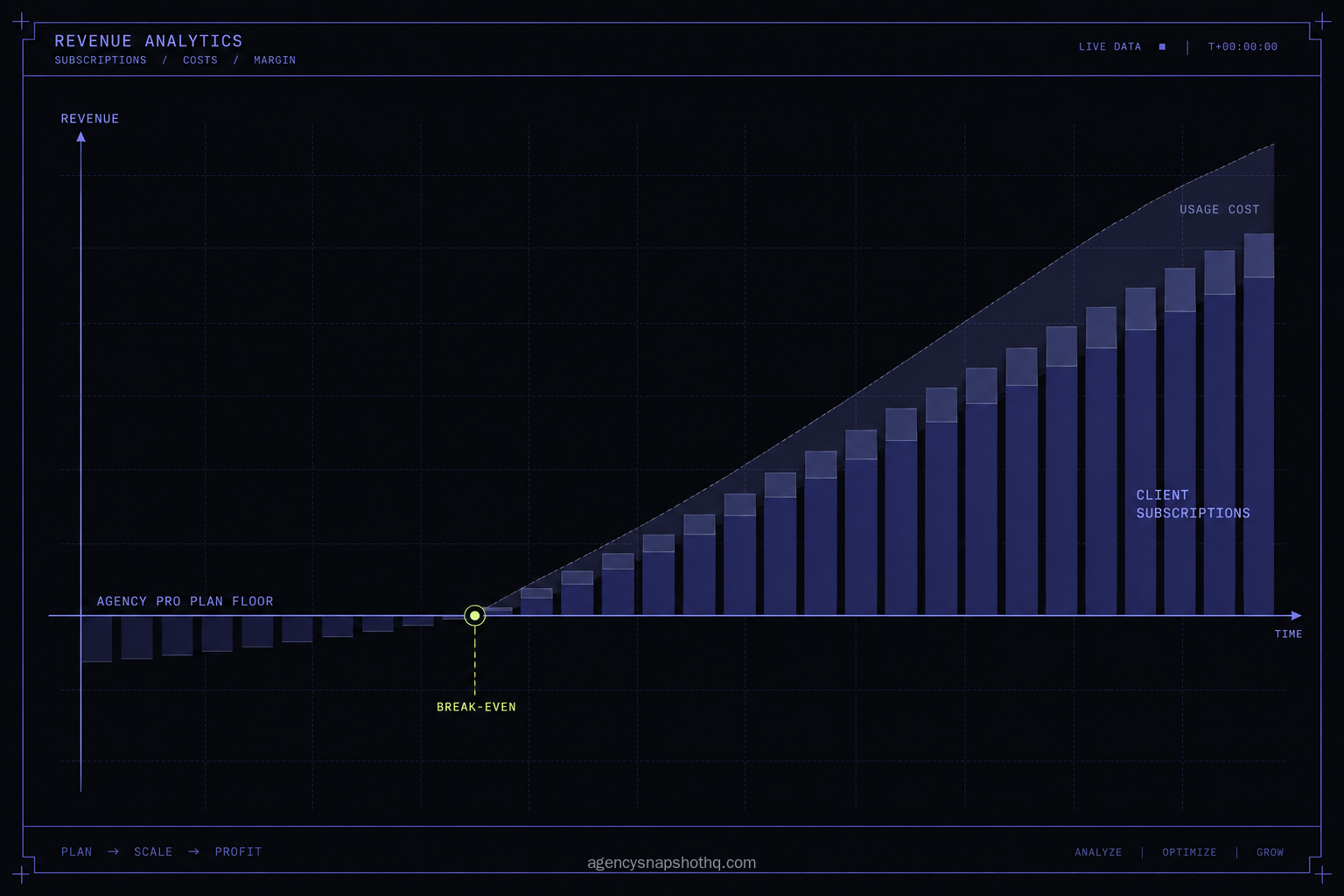
HighLevel’s plans run at $97 a month for Starter, $297 for Unlimited, and $497 for Agency Pro, per HighLevel’s pricing page. Those plan figures were confirmed via search snippet this run and not independently fetched, because the live page could not be reached from this environment. On annual billing they drop by about 17 percent, to roughly $970, $2,970 and $4,970 a year. Starter caps you at three sub-accounts; Unlimited and Agency Pro carry unlimited sub-accounts and the white-label feature set.
So the depth ladder is also a price ladder. The light rebrand is free on whatever plan you already run. The white-label domain comes with Unlimited at $297 a month, which you are very likely paying already if you run more than three clients. The branded app and SaaS mode both require Agency Pro at $497 a month, which is $200 a month, about $2,400 a year, above Unlimited. That $200 is the real price of the deepest two depths, and the only question is whether what it buys earns it back.
For a service agency, it usually does not. If you install and manage accounts for clients and bill them a retainer, the Agency Pro machinery, self-serve signup, Stripe rebilling, a branded app-store listing, is billing infrastructure for a business you are not running. You would be paying roughly $2,400 a year for a storefront you never open.
For a software operator, the arithmetic flips, but only if you respect usage. Say you resell the platform in SaaS mode at $297 a month per client. That figure is a placeholder to show the shape of the maths, not a recommendation. Two paying clients cover the $497 plan floor with about $97 left over, and that looks like profit right up until you add the part the plan price hides. SMS, email and AI are billed by volume on top, commonly $20 to $150 a month or more per account. If each of those two clients burns $40 of usage you did not rebill, your $97 is already gone. The break-even for SaaS mode is not the plan floor. It is the plan floor plus the usage you fail to pass through. Set the rebilling markup, or price the subscription to swallow the usage, and only then call the plan covered.
If you would rather have the agency layer stood up correctly once, without learning DNS, SSL and the configurator yourself, agency account setup is a scoped engagement for exactly that, with a published price rather than a sales call. The snapshots that fill the accounts behind the branding are a separate, one-time cost, and the install is free with each one.
The objections worth answering
“The white-label toggles are free, so why would I pay anyone to set this up?” The toggles are free, and if you have an afternoon and a tolerance for DNS records, you should use them yourself. The honest point is that the branding switches are not the work. The work is the half-day of DNS and SSL that makes a white-label domain resolve securely, the store review that makes a branded app real, and the usage modelling that keeps SaaS mode from losing money. Those are the hours agency account setup removes. If your time is worth less than the fee right now, do it yourself. That is a genuine answer, not a sales trap.
“I’ll go straight to SaaS mode so I only pay for the platform once, properly.” SaaS mode is the deepest depth, not the default one, and most agencies that jump to it early regret the order. It commits you to Agency Pro’s recurring premium and to running billing, support and provisioning for clients who signed up to buy a service from you, not software from themselves. If your clients want you to run their marketing, a self-serve product is a storefront they will not use. Reach SaaS mode when you have a proven offer and clients who genuinely want to self-serve, and run the light rebrand or the white-label domain until that day arrives.
“Won’t a white-labeled platform make clients think I built the software, and blow up when they find out I didn’t?” This is the objection that keeps some agencies from white-labeling at all, and it deserves a straight answer. White-labeling is standard practice. You are presenting a platform under your brand the way countless businesses present hosting, email or a CRM under theirs. The trouble only starts when you claim to have built it and a client catches the seam. Brand the platform, do not invent an origin story for it, and cover or route around the surfaces that give the game away. A client who signed up for your service and your support does not care who wrote the code. They care that the thing works and that you answer when it does not.
“My clients never log in anyway, so none of this matters.” If that is genuinely true, you are the agency the light rebrand was built for, and you should stop at it and spend nothing on depth you do not need. The only check worth doing is an honest one: clients who never log in today sometimes start, the first time they want a number, a report, or to see their own pipeline. The light rebrand covers that moment cheaply. The deeper depths are for when the platform is the product the client lives in, not the engine room they never visit.
The decision white-labeling actually asks is not “branded or not.” It is “how far.” A service agency that installs and manages can stop at a light rebrand and a clean domain and never think about it again. A software operator building a product climbs all the way to SaaS mode and pays the Agency Pro premium on purpose. The mistake is paying for a depth your business model does not use, or promising a depth your plan does not include. Match the rung to the frame your client actually sees, fill the accounts behind it with snapshots built to be reused, whether that is a digital marketing agency snapshot for your own client-facing account or a SaaS company snapshot for the product you are reselling, and the platform stops being something you apologise for on an onboarding call. Start from the snapshot library for the accounts themselves, or the pricing page if the next question is which plan the whole operation should sit on.