THE SHORT VERSION
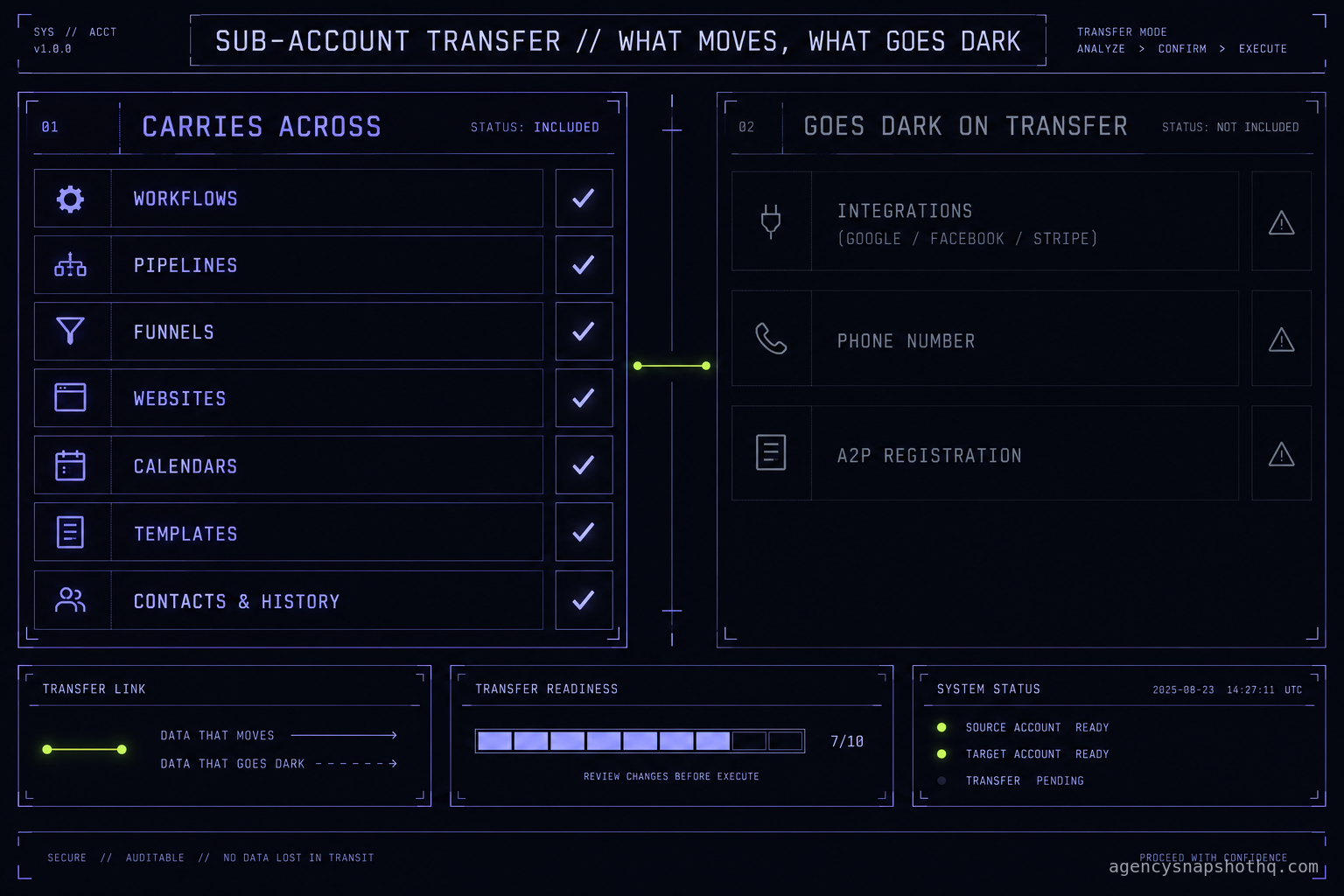
- A sub-account transfer moves the configuration but severs integrations, phone numbers and A2P registration, so the account that looked live arrives half dark.
- Audit before you change anything. The client is watching a live account, and the fastest way to own a problem you did not create is to edit a workflow before you understand it.
- A2P brand and campaign registration do not travel with the account. If they were tied to the old agency, texting stops until you re-register, which takes days.
- The decision is audit-and-patch or rebuild-and-migrate, and the account's documentation, or the absence of it, usually decides which.
- A rebuild onto a snapshot you already trust is often the cheaper takeover, because you start from a baseline you can read instead of reverse-engineering someone else's.
The client signed on Monday. They are already on GoHighLevel, built eight months ago by an agency they stopped paying in August, and they handed you the login on the kickoff call like it was a set of car keys. You log in. The dashboard loads. There is a pipeline with real deals in it, a website that resolves, a calendar with next week’s appointments sitting on it. It looks like a working account, and for about a day you let yourself believe it is one.
Then the client forwards you a text from one of their own customers asking why nobody replied to the message they sent on Saturday. You open the conversation. The inbound is there. The automated reply that should have fired is marked sent. Nothing left the account. You check another contact and find the same thing: workflows running, nothing arriving. The account you were shown on the call and the account you actually inherited are two different accounts, and the gap between them is now your problem, in front of a client who thinks they already paid someone to make it work.
This is the takeover. Not a fresh build where you control every field, and not your own snapshot rolled into a sub-account you set up. Someone else built this, left no notes, and the client is watching a live account you cannot afford to break. This briefing is the audit that keeps you out of that trap, in the order that keeps you out of it, plus the one decision that should come before you touch anything: patch what you inherited, or rebuild it onto something you can actually read.
The account you just inherited is not the account you were shown
Start by naming the thing honestly. An inherited account has three layers, and only the top one is visible on the kickoff call. The top layer is what renders: the funnels, the pipeline, the calendar, the website. The client sees this layer, the old agency demoed this layer, and it is the layer most likely to be fine, because it is the layer someone looked at.
Underneath sits the layer that actually runs the business: the workflows, the triggers, the custom values every template reads from, the integrations that connect the account to Google, Facebook, Stripe and the client’s phone number. This layer is invisible unless you go looking, and it is where inherited builds rot, because the previous agency stopped maintaining it the day the relationship soured.
The third layer is the one nobody built at all: the registration and the plumbing that the platform does not show you. A2P brand and campaign status. Which phone number is actually provisioned and who owns it. Whether the sending domain was ever authenticated. This layer does not appear on any screen the client has ever opened, and it is the one that was already broken when you got the keys.
Your job in the first week is to make all three layers visible before the client discovers a fourth problem on their own. You do that with an audit, not an edit, and the difference between those two words is the whole briefing.
What a transfer actually moves, and what it quietly drops
There are two ways an account becomes yours, and they fail differently.
The first is a sub-account transfer. GoHighLevel supports this directly. The releasing agency goes to the agency level, opens Sub-Accounts, chooses Manage Client, and under Actions picks Transfer Sub-account, entering your Relationship Number to send it to you. There is a bulk path too, under Sub-Account Transfers, that moves up to a thousand sub-accounts at a time. HighLevel documents both in its own help center, in the articles on transferring a sub-account to an existing agency and on bulk sub-account transfers. A transfer is not a merge and it cannot be partial. The whole sub-account moves, or none of it does.
The catch is what a transfer does to the connective tissue. The configuration and the data inside the account travel with it, but the external authorisations do not. The connections to Google, Facebook, Stripe and Instagram are dropped on transfer and have to be reconnected from your side, and some records stay with the original agency for billing and compliance reasons. So the transfer lands you an account that looks complete in the builder and is quietly unplugged from every outside service it depended on.
The second way is a rebuild. You do not take the old account at all. You stand up a clean sub-account, install a snapshot you trust, and migrate the client’s data and live assets into it. A snapshot carries the structure of a build, the workflows, pipelines, funnels, websites, calendars, custom fields, tags, templates and forms, but it deliberately does not carry contacts, conversation history, phone numbers, integrations or A2P registration, because those are bound to the individual account. That split is covered in most snapshot deployment guides, and confirmed by how the platform treats a snapshot: it is configuration, not data.
Here is the same split in one place, because it is the thing you will explain to the client twice:
| Layer | Sub-account transfer | Rebuild onto a snapshot |
|---|---|---|
| Workflows, pipelines, funnels, websites, calendars, templates | Moves with the account | You get the snapshot’s versions, not the old agency’s |
| Contacts and conversation history | Stays in the account, moves with it | Exported and imported separately, by you |
| Phone number | Stays provisioned, but billing and ownership need confirming | Re-provisioned or ported on the new account |
| Integrations (Google, Facebook, Stripe, Instagram) | Dropped, you reconnect each one | Connected fresh, so nothing to inherit |
| A2P brand and campaign registration | Tied to the account and the registering agency, confirm status | Registered new on the clean account |
| Documentation of why it was built this way | Rarely exists either way | You wrote the baseline, so you can read it |
Neither path is free of work. The transfer keeps the client’s data and history in place but hands you a half-unplugged account somebody else designed. The rebuild starts you from a build you understand but puts the data migration on you. Which one is cheaper is the arithmetic later in this piece, and it almost always turns on documentation.
The takeover audit, in the order that keeps you safe
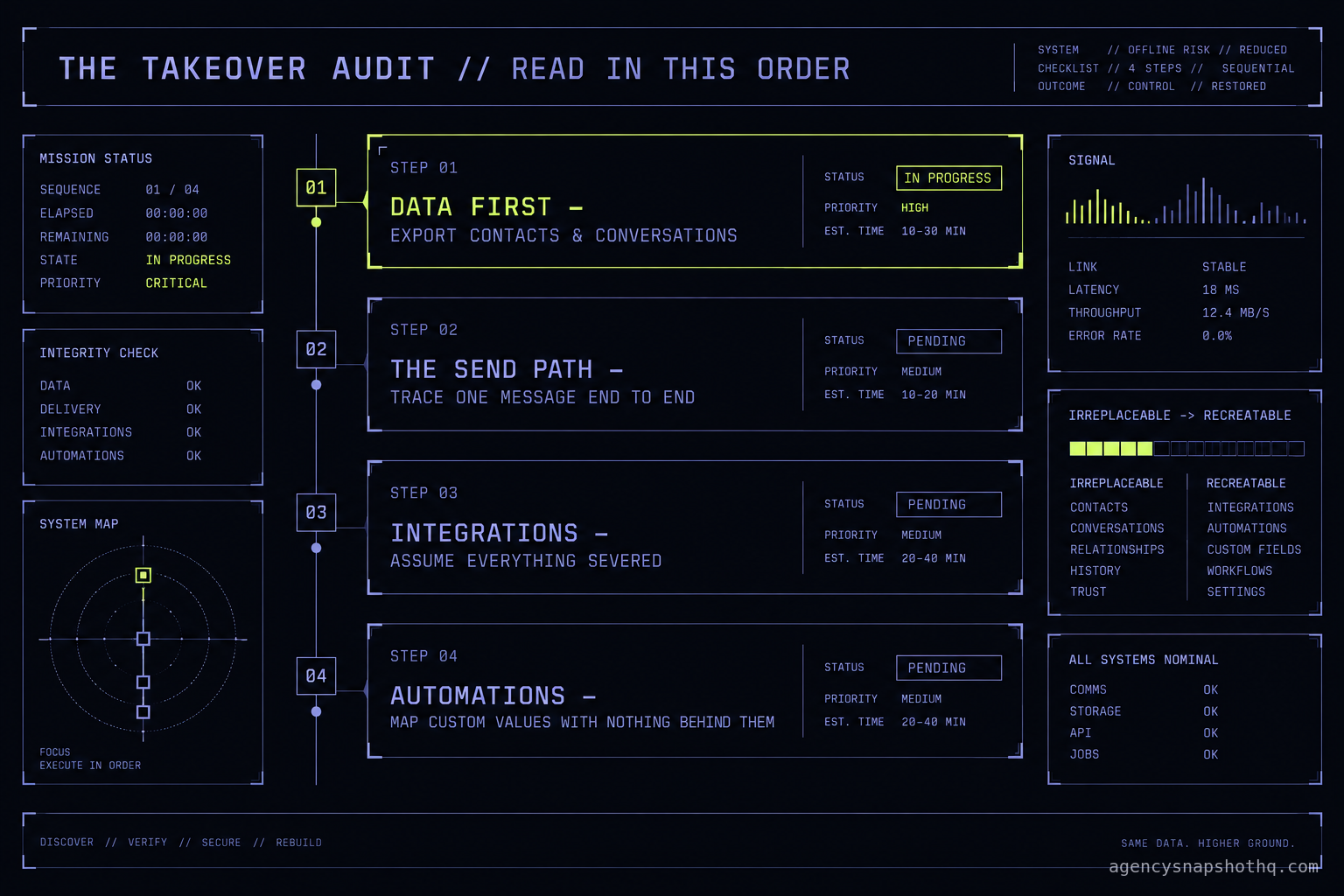
Whichever path brought the account to you, the first move is the same, and it is not a fix. It is a read. You audit in a fixed order, from the things that cannot be recreated to the things that can, so that if you have to stop halfway you have protected what matters most first.
Data before anything, because it does not come back
Open the contacts and the conversations first and get a copy out of the platform before you touch a single automation. A misfiring workflow is annoying. A workflow you edited that bulk-updates or deletes contacts is a client-ending event, and you will not know which the old builder left armed until you have read them. Export the contact list. Confirm the conversation history is intact and attributed to the right contacts. If the account came by transfer, verify the data actually arrived, because a transfer that stalls can land you the shell without the history. Only once you hold a copy of the irreplaceable layer do you have permission to poke the rest.
The send path, because it is what the client already noticed
The reason the client called you is almost always here. Trace one message end to end. Pick a real contact, find the trigger that should message them, and follow it: does the workflow fire, does it reach the send step, does the send step have a channel, is that channel a registered phone number or an authenticated sending domain, and does the message actually leave. In the opening scene, the workflow fired and the send was marked complete, and nothing arrived, which points past the automation to the registration underneath it. Walk the whole chain before you blame any one link, because an inherited account usually has more than one break and fixing the first one just reveals the second.
Integrations, because a transfer severs them by design
List every external connection the build assumes and check each one is actually live. The calendar is the classic trap: it looks connected, but it is pointed at the previous builder’s Google account, so the client’s real availability is not the availability the account is booking against. Stripe is the expensive one: if payments ran through the old agency’s connection, money is either not moving or moving to the wrong place. Facebook and Instagram lead forms go quiet the moment the token behind them is gone. If the account came by transfer, treat every one of these as disconnected until you have personally reconnected it under the client’s own credentials, because that is what the platform did to them.
Automations and the values they read, because this is where the rot lives
Now, and only now, open the workflows. You are not editing yet. You are mapping: which workflows are on, what fires them, and what they read from. The thing to hunt for is the custom value with nothing behind it, because the old builder wrote templates that pull from fields like business name, booking link and review link, and if those values were never populated on this account the automations run and send blanks or broken links. Read the templates against the custom values and mark every reference that resolves to nothing. That map is your patch list, and it is also your evidence when you tell the client why the account was sending its customers a text that said “book your appointment at “.
Where inherited builds break, in the order they surface
Four or five failures account for almost every takeover that goes sideways. You will meet them in roughly this order, because that is the order the client meets them in.
Integrations that look connected and are not
What you see: a calendar that shows availability, a payment link that renders, a lead form embedded on the site. What is actually wrong: the authorisation behind each of these belongs to an account you do not control, and on a transfer it was dropped entirely. The fix is not subtle. Reconnect every integration from scratch under the client’s own Google, Facebook and Stripe logins, confirm the calendar is reading the client’s real calendar and not an empty one, and send yourself a test booking and a test payment before you tell anyone it works. Assume nothing external survived the handover.
A2P registration that went dark with the old agency
What you see: workflows firing, sends marked complete, texts not arriving. What is actually wrong: the A2P brand and campaign registration that lets the account text US numbers is tied to the account and to whoever registered it, and if it lapsed or was bound to the old agency, the messages filter out at the carrier before they ever reach a handset. This is the single most common inherited break, and it is the slowest to fix, because re-registration is not instant. A2P carries a one-time brand registration step and ongoing per-campaign fees, documented on Twilio’s A2P support pages, and approval takes days, not minutes. Check the brand and campaign status the first hour, because if it needs redoing, the clock starts now and the client is already counting.
Phone numbers nobody can account for
What you see: a number on the account that the client recognises. What is actually wrong: on a transfer the number may still be provisioned but the billing and ownership need confirming, and on a rebuild the old number does not come across with the snapshot at all. The wrong move is to let the client keep advertising a number you cannot prove you control. Confirm who the number belongs to, whether it is still paying its way, and whether it needs porting, before it becomes a disconnected number on a billboard. If you are rebuilding, plan the port early, because porting is the one step in a migration you cannot rush.
Workflows wired against values that do not exist
What you see: automations switched on, with a green status. What is actually wrong: they read from custom values and custom fields the old builder referenced but never filled on this account, so every templated message goes out with a hole in it. This is the rot layer, and it is invisible until a customer screenshots the broken text. The fix is the custom-value map you built in the audit: populate every value the templates depend on, then test one message per workflow against a real contact, because a value that is right for one automation can still be wrong for the next.
Calendars pointed at the builder, not the business
What you see: a booking calendar with slots. What is actually wrong: it is synced to the previous agency’s own Google account, so it is honouring the builder’s availability, or an empty calendar, instead of the client’s. Appointments either refuse to book or double-book against meetings the client never sees. Disconnect it, reconnect the client’s real calendar, set the working hours and buffers to the client’s actual day, and book a test slot that you then confirm appears on the client’s phone. A calendar is the fastest inherited break to fix and the most embarrassing to miss.
The arithmetic: audit and patch, or rebuild and migrate
The audit is not the decision. The audit is what lets you make the decision with a number instead of a guess. Once you have read all three layers, you are choosing between two paths, and the honest comparison looks like this. The assumptions are printed so you can swap your own in; the hours are our own estimates from doing this work, not a measured figure from your account.
The recurring floor is the same on both paths, so it is not the deciding line. HighLevel Unlimited runs $297 a month, or $2,970 a year, and removes the sub-account cap; Agency Pro is $497 a month, or $4,970 a year, and only earns the gap if you resell the platform under your own brand; Starter at $97 a month caps you at three sub-accounts, which a growing agency outgrows fast. Those are HighLevel’s published figures, on their pricing page and in independent plan comparisons, confirmed this week. Whichever path you take, the client lives on one of those plans, so the plan is a constant, not a variable.
The variable is your labour, and it splits like this. The audit itself is a fixed cost you pay on either path, call it most of a working day to read a single inherited sub-account properly. After the audit, the patch path is: reconnect the integrations, re-register A2P, populate the missing custom values, fix the calendar, and then keep fixing whatever the first fixes reveal, because inherited breaks come in chains. The rebuild path is: install a snapshot you already trust, migrate the contacts and conversations you exported, re-provision or port the number, and set up the integrations fresh.
The rebuild has a real advantage the arithmetic usually hides: you start from a build you can read. A snapshot from the library installs free, and the share link lands within 24 business hours of purchase confirmation, business hours being 9am to 5pm Central, Monday to Friday, with nothing delivered at a weekend. That install carries twelve hours of dedicated support to be used within ten days of purchase, which covers the rebrand, the A2P setup and the email domain setup on the clean account, so the slow registration step runs in parallel with the migration instead of after it. If you would rather hand the whole thing off, snapshot installation is $650, a full agency account setup is $1,200, and a versioning and update pass to bring an account onto a current baseline is $1,650. Library snapshots themselves run from $890 to $2,490 by niche. All sales are final once the order is created and the share link is sent, so you buy the baseline once and own it across every account in that niche.
The decision rule falls out of the audit cleanly. If the inherited build is sound and you can read why it was built the way it was, patch it, because the data and history are already in place and that is the expensive part to move. If the build is undocumented, wired against itself, or held together by integrations you cannot trace, rebuild it, because the hours you would spend reverse-engineering a stranger’s logic buy you nothing you can maintain. The account that scares you is the one in the middle: looks fine, no notes. That one almost always costs less to rebuild than the second round of surprises costs to patch.
The version question you inherit too
There is one more thing hiding in an inherited account, and it is the reason the rebuild wins more often than agencies expect. You do not just inherit a build. You inherit a version of a build, frozen at whatever the old agency last touched, with no record of what it was derived from or how far it has drifted from anything current. You cannot update what you cannot identify, and an account with no known baseline is an account you will be guessing about every time the client asks for a change.
A rebuild closes that gap by starting you from a version you chose. When the next client in the same niche arrives, you are not auditing a stranger’s account from zero again; you are installing the same baseline and migrating data into it, and you can keep every account you run on a version you can name. That is the difference between operating a book of inherited mysteries and operating a library. A snapshot update and versioning pass exists precisely to pull a drifted or inherited account back onto a baseline you can read, and an agency account setup does the clean stand-up when you have decided to rebuild rather than patch.
So treat the takeover as a fork, not a rescue. Read the three layers in order, protect the data first, trace the send path the client already noticed, and then make the call with the number the audit gave you. If you are rebuilding, start from something you can read: a digital marketing agency snapshot for your own account, or the niche the client sits in, a dental practice snapshot or an HVAC contractor snapshot, so that the account you hand back is one you could audit yourself in an afternoon. The whole point of taking a client over is that the second time anyone looks at their account, it is not a mystery. The pricing is published, the baseline is yours, and the next takeover starts from a build you already trust.