THE SHORT VERSION
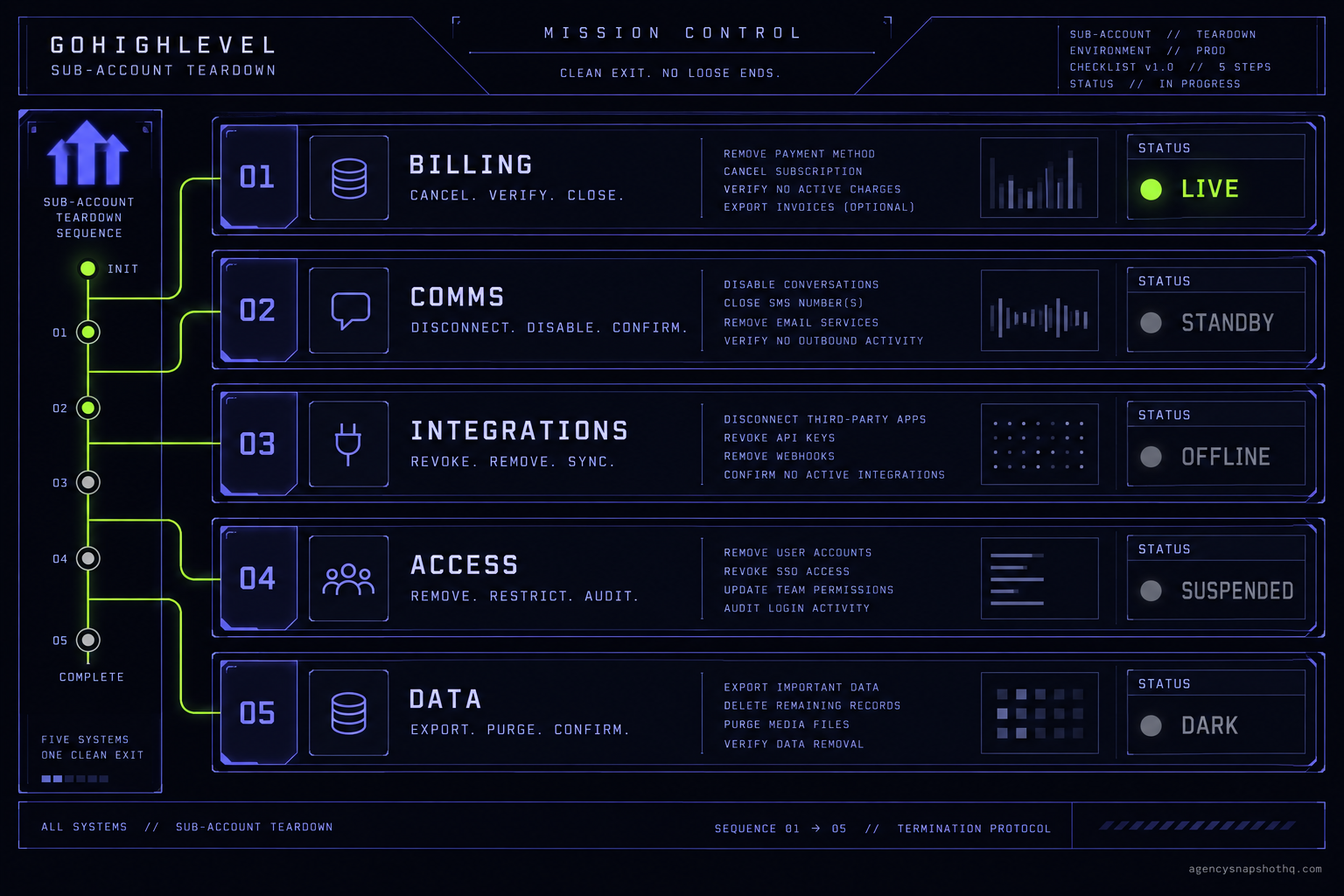
- Offboarding is five shutdowns in order, not one delete button: billing, comms, integrations, access, then data.
- Cancelling the client's Stripe does not stop your side. Rebilled Twilio and Mailgun add-ons keep billing to you until you deactivate them.
- Export before you delete. Deleting a sub-account is permanent and cannot be undone from the GoHighLevel interface.
- Pause your own automations first, or review and nurture workflows keep texting the client's old list under their A2P brand.
- A churned sub-account is an asset. Cleaned and reset, it is where your next client's snapshot lands.
The breakup email lands at 4:11 on a Friday. One of your clients, nine months in, is moving their marketing in-house. Polite, no drama, thanks for everything. Your instinct is to go into the agency dashboard, find their sub-account, and delete it. Clean slate, one less thing to look at Monday.
Do not click delete.
That sub-account is not a single thing. It is a conduit with five separate systems hanging off it, and most of them keep running after the login stops working. The phone number keeps billing. The A2P campaign keeps its monthly fee. Your review-request workflow keeps texting the client’s old customers, from the client’s number, under the client’s brand, about appointments that no longer exist. The Stripe rebill you set up keeps charging, or stops charging and leaves you paying the platform for a client who left. And the contacts, the one thing the client might come back and ask for, are gone the instant you confirm.
Offboarding is not a button. It is a shutdown sequence, and the order matters more than the speed. This is the runbook.
What is actually wired to a sub-account
Before any teardown, you have to see what you are tearing down. A GoHighLevel sub-account looks like one object in the dashboard, but it is really the junction of five independent systems, each with its own owner, its own billing and its own failure mode when you yank the conduit instead of shutting the racks down in turn.
The billing layer. This is the one that bites quietly. If you set the client up in SaaS mode, there is a Stripe subscription charging them and a rebill relationship charging you for the underlying usage. GoHighLevel’s own guidance on cancelling a SaaS sub-account is explicit that disabling SaaS is not the end of it: if the sub-account has Twilio or email through Mailgun, rebilling can stay switched on after you disable SaaS, and their Twilio and Mailgun sub-accounts stay connected in your agency settings until you close them. In plain terms, the client stops paying you and you keep paying the carrier. You can read the official steps in GoHighLevel’s cancel a SaaS sub-account article, and the short version is that the billing layer has to be shut down deliberately, by you, in the right place.
The comms layer. Every sub-account that sends has a phone number, almost always a Twilio or LC Phone number, and an A2P 10DLC registration sitting behind it: a brand and a campaign. Twilio’s billing works the way all metered telecom billing works. A provisioned number carries a monthly charge from the moment it exists, and per Twilio’s own pricing documentation the campaign carries a recurring monthly fee that continues until the campaign is deactivated or deleted. Nothing about a client cancelling on their end touches either of those. They are yours until you release the number and kill the campaign.
The integration layer. Google Business Profile, the Facebook and Instagram connections, the Stripe account used for the client’s own payments, the Google Calendar a booking widget writes into, the sending domain and its SMTP. These are external authorisations that live on the sub-account. Some of them belong to the client and some of them, if you were sloppy during setup, are pointed at your own accounts. That distinction is the whole game during teardown, and it is the one most agencies have never audited until the day they need to.
The access layer. Who can log in. The client’s user, your users, any VA you added, and the agency-level access that sits above all of them. Removing the client’s login is not the same as removing the sub-account, and the difference is deliberate: in GoHighLevel, removing the client’s user under your agency team settings keeps the data while blocking their access, which is exactly what you want in the window between “they cancelled” and “we are sure nobody needs this.”
The data layer. Contacts, conversation history, call recordings, pipelines, notes, the things that are genuinely the record of the relationship. This layer has the sharpest edge in the whole system, because deleting the sub-account destroys all of it permanently and the interface gives you no way back.
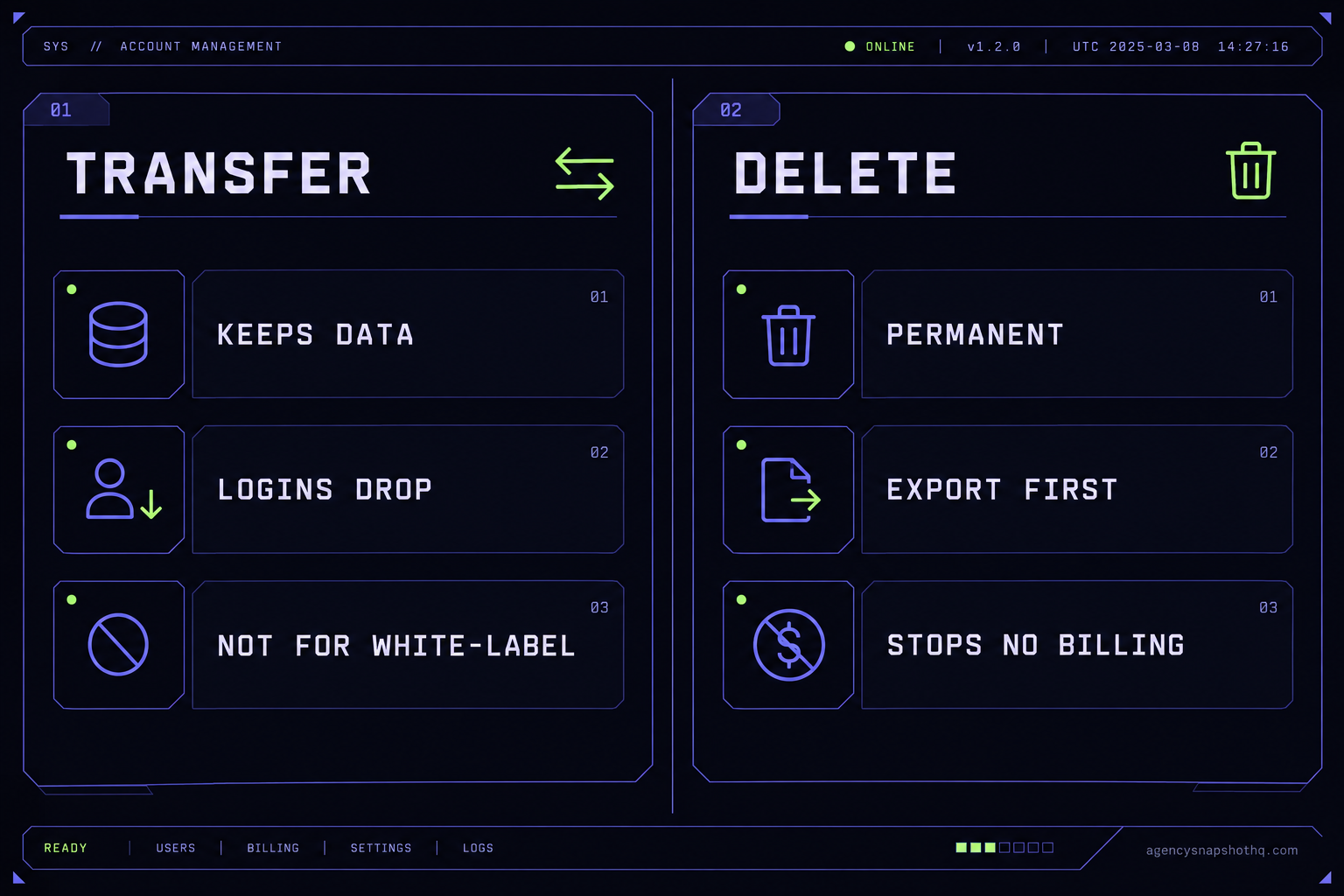
The two exits from a sub-account are transfer and delete, and they treat those five layers very differently. A transfer, reached through Agency View, then Sub-Accounts, then Manage Client, then Actions, hands the data to another agency and keeps it intact, but it drops the integration layer on the floor: the external logins have to be reconnected by whoever receives it. A delete, reached through the account’s own view details screen, is final. The runbook below works down the five layers in the one order that leaves nothing billing, nothing sending, and nothing you might owe the client sitting in a grave you cannot dig back up.
The order you shut it down in
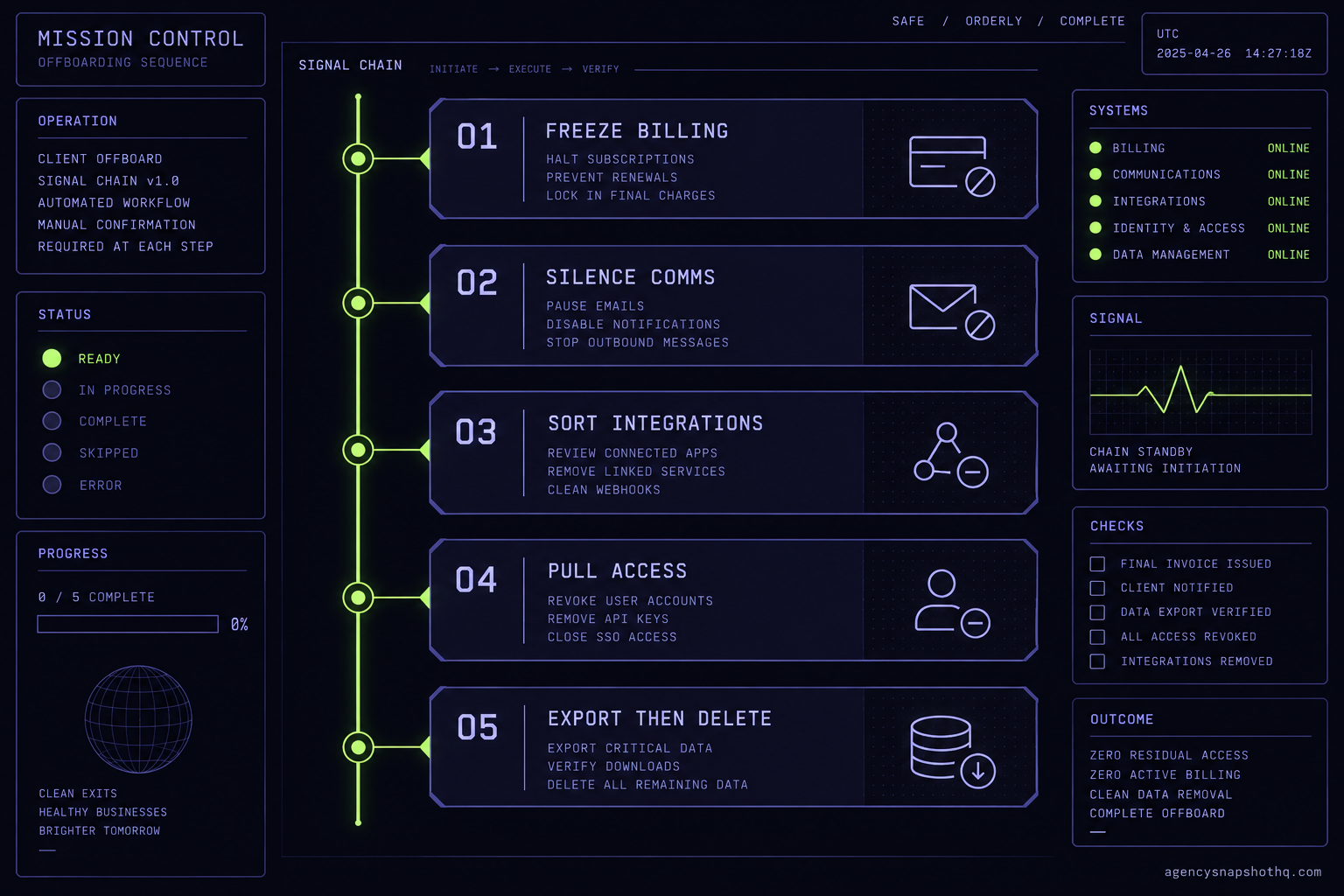
Work top to bottom. Each step assumes the one above it is done.
One, freeze the billing. Disable SaaS mode for the sub-account, then go and actually cancel the client’s Stripe subscription rather than assuming the SaaS toggle did it. Then check rebilling. If Twilio and Mailgun rebilling were on, they are still on, and the connected sub-accounts are still in your agency settings waiting to keep charging you. This is also the moment to look for add-ons, because a hosted site, an extra number or any premium feature you attached can keep billing to the agency after the main plan is gone, often with no notification at all. Freezing billing first means that however long the rest of the teardown takes, the meter has stopped.
Two, silence the comms. Turn off the workflows before you touch the number. Every review-request sequence, nurture campaign, seasonal automation and appointment reminder in that account is still armed, and until you pause them they will keep firing at the client’s old contact list. Once the automations are dark, release the phone number so it stops billing, and deactivate the A2P campaign so its monthly fee stops. If you intend to reuse that number for another client, do not. Treat a released number as released and register a fresh one for the next account, because a number carried from one brand to another is a registration mismatch waiting to be filtered.
Three, sort the integrations. Go through the external connections and ask one question of each: whose is this. The client’s Google Business Profile and their own Stripe disconnect cleanly and go with them. Anything pointed at your accounts, a shared calendar, a sending domain you own, a tracking pixel, gets reclaimed so it is not quietly serving a client you no longer have. If this account is being transferred rather than deleted, note that the transfer itself drops Google, Facebook, Stripe and Instagram and that email and Twilio setups disconnect, so none of this carries and the receiving side rebuilds it.
Four, pull the access. Remove the client’s user, remove any VA who was working only on this account, and confirm who is left. If you are keeping the data for now, this is where you stop: user removed, data retained, account dark but recoverable. If you are deleting, carry on.
Five, handle the data. Export first. Contacts, conversations and any recordings you are obligated to keep or might need, out of the platform and into storage you control. Then, and only then, either delete the sub-account or complete the transfer. Deletion is the point of no return, so it is deliberately the last thing you do.
Where offboardings go wrong
Every one of these is a real failure, and every one of them happens because someone treated a five-layer shutdown as a one-click delete.
You deleted before you exported
This is the expensive one because it is irreversible. Deleting a location in GoHighLevel is permanent and cannot be undone from the interface, and the contacts, conversation history, pipelines and recordings are destroyed with it. The failure shows up weeks later, when the client emails asking for their customer list, or their lawyer does, or you realise you needed the call recordings for a dispute. There is no undo and no support ticket that brings it back. The fix is a rule with no exceptions: nothing gets deleted until the export exists and you have opened it to confirm it is real. An export you never checked is not a backup, it is a hope.
You cancelled SaaS but left the meter running
The client’s card stops being charged, you breathe out, and six weeks later you notice your own Twilio spend has not moved. Disabling SaaS did not cancel the rebilled Twilio and Mailgun connections, so the number is still provisioned and still billing, and because rebilling was on, it is billing to you now that the client is not covering it. The A2P campaign is in the same state, charging its monthly fee into the void. What the reader sees is a flat or rising carrier bill with no client behind it. What is actually wrong is that the billing layer was never shut down, only hidden. The fix is step one of the runbook, done properly: cancel the Stripe subscription, turn off rebilling, release the number, deactivate the campaign, and audit add-ons, which are the ones most likely to be silently billing because nobody remembers attaching them.
Your automations are still texting their customers
You removed the client’s login the day they cancelled, so in your mind the account is closed. But removing a user does not stop a workflow. The review-request automation still fires after every appointment that was already booked, the seasonal campaign still goes out in November, the nurture sequence still works its way through the client’s contact list. These messages go out from the client’s number, registered to the client’s A2P brand, about a business that is no longer your client, to people who have no idea why they are still hearing from them. That is a consent and reputation problem wearing the client’s name, and it is entirely your doing. The fix is sequencing: automations off before anything else in the comms layer, every time. If you are not sure which workflows are live, the companion briefing on why your snapshot isn’t sending walks the send path end to end and will show you what is still armed.
You reused the number and killed the next client’s deliverability
A number comes free when a client leaves, and the temptation is to hand it straight to the next account rather than provisioning a new one. The problem is the A2P registration. That number was registered under the departed client’s brand and campaign, and messaging now travels under a registration that no longer matches the business sending it. Carriers filter on exactly that mismatch, in real time, and the symptom is the worst kind: the workflows run, the logs say sent, and the messages silently never arrive. The new client assumes your build is broken. The fix is to treat every number as single-use per brand. Release it when a client leaves, register a fresh one when a client arrives, and never let a number outlive the registration it was born under.
You tried to transfer something that cannot be transferred
The client is not leaving the platform, they are taking the account to another agency, so you reach for transfer instead of delete. Good instinct, except white-label sub-accounts and multi-location agency sub-accounts cannot be transferred at all, and even when the transfer does go through, it strips the external authorisations. Google, Facebook, Stripe and Instagram disconnect, email and Twilio setups come apart, and the receiving agency inherits a shell that looks broken. If nobody warned the client, they blame the agency that sent it, which is you. The fix is to know before you promise a transfer whether this account is even eligible, and to tell the receiving side exactly what they will need to reconnect so the gap is expected rather than a surprise.
What a sloppy teardown actually costs
The cost of getting this wrong is not dramatic. It is a slow leak, and the arithmetic is worth doing because it is the number that justifies having a runbook at all.
Start with the platform seat. HighLevel’s Unlimited plan is $297 a month per their pricing page, and in a rebill arrangement you were passing some version of that through to the client. When they leave and you have not actually shut their account down, you are no longer collecting that and, depending on how you structured it, you may be absorbing the underlying cost. On top of the seat sits the comms meter: a number that keeps its monthly charge until released and a campaign that keeps its monthly fee until deactivated, both of which, per Twilio’s documentation, stop only when you act.
Put rough numbers to it. Say three clients churn over a quarter, which is an ordinary rate for an agency running ten to fifteen accounts, and say each churned account sits “parked” for the full three months because nobody ran the teardown. If you were absorbing even the platform side at $297 a month, that is three accounts times $297 times three months, which is $2,673 you spent on clients who already left, before a single telecom charge is counted. The assumptions there are printed on purpose so you can swap in your own: your real churn, your real parked duration, and whether you were eating the seat or only the usage. Change any of them and the number moves, but the shape does not. A parked account is a subscription to nothing.
Now turn it around, because the recovery side is the part worth being cheerful about. A cleaned, reset sub-account is not waste, it is inventory. Strip it back to your canonical snapshot and it becomes the slot your next client drops into. That is the difference between a snapshot built once for one client and a snapshot built for reuse, like the ones across the AgencySnapshotHQ library, where the client-specific strings live in custom values and a reset is a form to refill rather than a rebuild. Whether the next account is a real estate agent or a SaaS company, the cleaned slot takes the new brand without a rebuild. Priced against our own rate card, resetting and re-skinning an account to a fresh brand is snapshot update service territory at $1,650, and for an agency doing this at fleet scale across a dozen accounts, keeping the teardown and redeploy cycle clean is exactly what an agency systems integration engagement is for. The churned account you nearly deleted in a Friday-afternoon reflex is the one you hand to the client who signs on Monday.
The objections worth answering
“I will just delete it. Clean slate, no loose ends.” Delete is the right final step, but delete-first is the one move that destroys the two things you cannot recover: the data you may owe the client, and the configured account you could reuse. It also does not reliably stop the billing, because rebilled add-ons can keep charging after the sub-account is gone. Delete last, after the meter is off and the export is in hand, and the clean slate is real instead of a hole with charges still falling into it.
“The client cancelled their Stripe, so I am done.” Their Stripe cancellation stops them paying you. It does nothing to the carrier relationships, the rebilled connections, the add-ons or the automations, all of which live on your side of the arrangement. The client pressing cancel is the event that starts your teardown, not the thing that completes it. Treat it as the trigger, then run all five layers yourself.
“Transferring is more work than deleting. Not worth it.” Sometimes true, which is why the first question is whether the client is keeping the account. If they are moving it in-house or to another agency, a transfer preserves the data and the relationship ends cleanly, and the extra work is reconnecting the integrations, which the receiving side does. If the relationship is genuinely over and the data is exported, delete is simpler and correct. The work is in choosing the right exit, not in defaulting to the lazy one.
“Why would I ever pay someone to offboard a client? It is clicking delete.” For one account, you are right, and that is the honest answer: this runbook is yours to run, and a single churned client does not need help. We are worth paying when the shape of the problem changes, when you are tearing down and standing up accounts every month across a fleet and the cost of one missed billing layer or one botched transfer compounds, or when a departing client is leaving with data integrity on the line and you want the handoff done cleanly the first time. Short of that, keep this page open on the second monitor and work down the list. The point of a runbook is that most of the time you do not need anyone else to run it, and you can see the rest of what we charge for, and what we do not, on the pricing page.
An offboarding is just an onboarding played backwards, and it rewards the same discipline. The agencies that do it well are not faster at clicking delete. They are the ones who know that a sub-account is five systems, not one, and who shut them down in the order that leaves nothing billing, nothing sending, and nothing buried that they will wish they had kept.