CZ-09 // CALCULATORS
From HQ EmpireA GoHighLevel calculator widget that does the selling
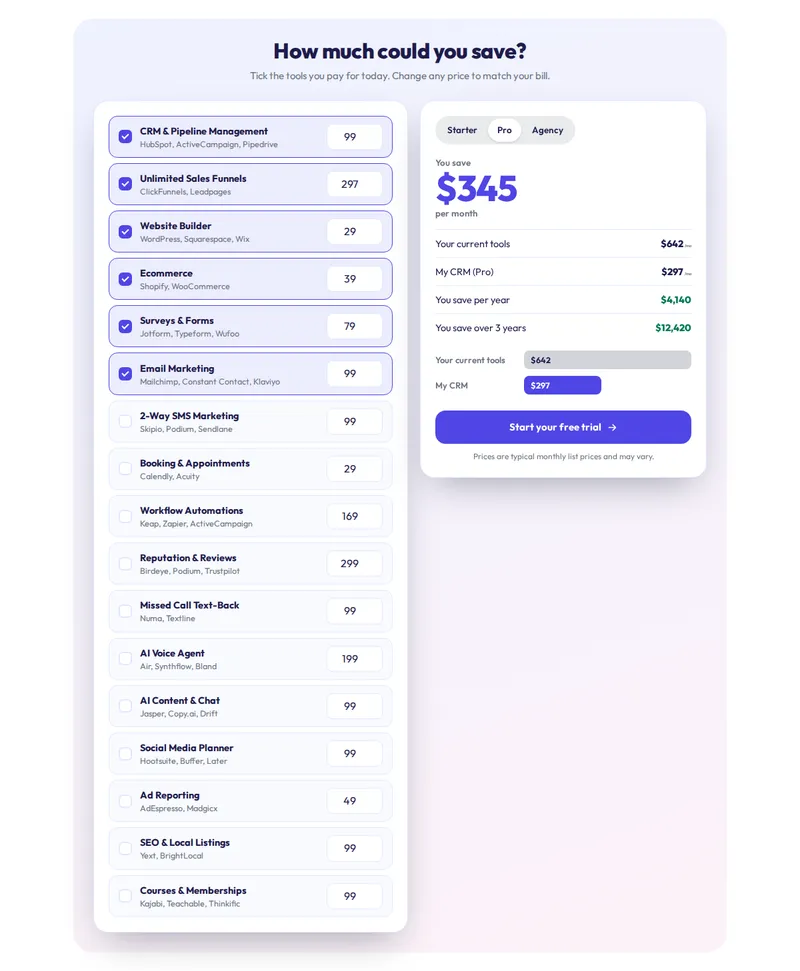
A GoHighLevel calculator widget from the customizer lets a visitor put in their own numbers and see the answer: what they would save, what they are losing to missed calls, what a reseller margin looks like. There are 134 templates across 14 calculator types and 13 style presets, up to 10 live.
One-time payment, lifetime access. Login emailed within minutes.
CZ-09.1 // PROBLEM TO OUTCOME
Claims versus their own numbers
THE PROBLEM
Prospects do not believe a claim on a sales page; they believe a number they worked out themselves. Most agency sites have no way to let them.
THE OUTCOME
A savings or ROI calculator on your site lets the visitor do the maths with their own inputs, and the result becomes the reason to book the call. Leads from the calculator go into GoHighLevel.
CZ-09.2 // LIVE PREVIEW
Run the numbers live
Type
Template
Style
Page
Pick a type, a template and a style. Move the sliders and type your own numbers: everything recalculates as you go.
CZ-09.3 // WHAT YOU GET
Calculators for every question
14 calculator types
Stack replacement, savings, us vs them, ROI, missed call, reviews, AI agent vs staff, speed to lead, no-show, time saved, reactivation, marketing ROI, reseller profit and price builder.
134 templates
Several layouts per type: tables, cards, wizards, receipts and bold hero styles.
13 style presets
Apply any preset over a template, from classic light to dark and neon.
Leads into GoHighLevel
Calculators can ask for contact details with the result and send them into GoHighLevel.
CZ-09.4 // AT YOUR HQ
Where a calculator sells
Stack savings
Show prospects what they spend on separate tools against one GoHighLevel subscription, with their own tick-boxes.
Missed-call losses
A missed-call calculator turns "you lose leads" into a dollar figure based on the visitor’s own call volume.
Reseller profit
Show partners or white-label buyers what reselling earns at the prices they set.
Price builders for clients
Give client websites a quote builder so their visitors self-qualify before the call.
CZ-09.5 // SET IT UP
Embed a calculator in four moves
You do this yourself, in minutes, after your login arrives. Nothing is installed twice.
STEP 01
Pick a calculator type
Choose the question you want visitors to answer: savings, ROI, missed calls and so on.
STEP 02
Choose a template and style
Try layouts and style presets in the preview with real inputs.
STEP 03
Set your numbers
Edit the default values, labels and pricing so the maths fits your offer.
STEP 04
Embed it
Place it on your site or a funnel page and publish; leads flow into GoHighLevel.
CZ-09.6 // PACKAGES
Compare all packagesCalculators
Included from HQ Empire up
One-time payment, lifetime access. Login emailed within minutes (max 24 hours). You set it up yourself in the live editor.
CZ-T3
HQ Empire
$1,497
CZ-09.7 // QUESTIONS
Calculators questions
Can I add a calculator to a GoHighLevel funnel or website?
What calculator types are there?
How many calculators can be live?
Can I change the numbers and wording?
Do calculators work on phones?
Are the results real?
Which package includes calculators?
Can I use a calculator for client websites?
CZ-09.8 // RELATED MODULES
Modules to pair with calculators
The modules agencies usually set up next, each with its own live preview.
CZ-09.9 // DEPLOY THE LOOK
Let prospects do the maths
Calculators come with HQ Empire, together with popups, notifications and floating widgets.
One-time payment, lifetime accessLogin by email in minutesOne-line install
GHL Customizer accounts run on the GHL Customer Care customizer platform (customizer.ghlcustomercare.com); AgencySnapshotHQ sells the account packages on this page. GoHighLevel and HighLevel are trademarks of HighLevel Inc. This product is independent: not affiliated with, endorsed by, or a reseller of HighLevel Inc. Previews use sample data and a copy of the GoHighLevel interface.